

Summary
This ransomware first came to public notice in an outbreak on 27 June 2017 which affected multiple institutions in various countries, notably Ukraine, Spain, Denmark and Russia.
Removal
F-Secure detects the known variants of this ransomware with multiple signature detections, available in the latest database updates. These include (but are not limited to):
- Trojan.Ransom.GoldenEye.B - released in the 2017-06-27_10 Aquarius database published at 1519hrs UTC on 27 June 2017
- Trojan:W32/Petya.F - released in the 2017-06-27_01 Hydra database published at 1533hrs UTC on 27 June 2017
- Trojan:W32/Petya.G - released in the 2017-06-27_01 Hydra database published at 1533hrs UTC on 27 June 2017
Instructions on how to check if your F-Secure security program is using the latest database update are available in Community: How do I know that I have the latest updates?
Once detected, the F-Secure security product will automatically remove the file.
Further action
Once the ransomware has successfully encrypted the vulnerable machine, the encryption may be sufficient to make it very difficult to decrypt the computer without the necessary decryption key.
In such circumstances, the recommended course of action is to report the crime to the relevant authorities and restore the affected data from a backup.
A False Positive is when a file is incorrectly detected as harmful, usually because its code or behavior resembles known harmful programs. A False Positive will usually be fixed in a subsequent database update without any action needed on your part. If you wish, you may also:
- Check for the latest database updates
- First, check if your F-Secure security program is using the latest updates, then try scanning the file again.
- Submit a sample
- After checking, if you still believe the file is incorrectly detected, you can submit a sample of it for re-analysis.
- Note: If the file was moved to quarantine, you need to collect the file from quarantine before you can submit it.
- Exclude a file from further scanning
- If you are certain that the file is safe and want to continue using it, you can exclude it from further scanning by the F-Secure security product.
- Note: You need administrative rights to change the settings.
Technical Details
As with previous variants of the Petya ransomware, this variant encrypts the computer's Master Boot Record, then demands payment of a ransom in return for the decryption key needed to restore the machine to normal use.
Outbreak
This variant was first seen in an outbreak that began on 27 June 2017 and affected a number of commercial organizations. For more information about the outbreak, see:
- [link removed]
Infection
The ransomware is distributed as a DLL file. At the time of writing, the initial infection vector (that is, how it first gains entry onto a machine or network) for this variant is not yet confirmed.
Once it is executed on a machine, the Petya variant creates a scheduled job to restart the affected computer in an hour. While waiting for the restart, the malware tries to propagate to any susceptible machines in the connected network. The malware uses multiple methods to spread, including:
- Exploiting vulnerabilities in the Windows Server Message Block (SMB) using the EternalBlue and EternalRomance exploit tools (see Exploit section below)
- Using legitimate Windows administrative tools, specifically PSEXEC and Windows Management Instrumentation Command-line (WMIC), to distribute and execute the malware
- Stealing administrative credentials or hijacking existing active sessions
As the malware uses multiple methods to spread, there is no exact sequence of events. The malware steals administrator credentials by first dropping and running a credential dumping tool (which shares similar code to the Mimikatz password-stealing malware). It then scans the network for machines to which it can send a copy of itself using the stolen credentials.
The malware also tries to find machines in the network that it can propagate to by using specific PSEXEC and WMIC commands. It will also try to exploit the SMB vulnerabilities to drop a copy of itself onto any vulnerable machines.
Additional precautions that administrators can take to mitigate the spread of the Petya malware in a network using these methods is given in the Removal section above.
Exploit
The Petya variant from this outbreak is notable for using the EternalBlue and EternalRomance exploit tools, which first gained prominence in the WannaCry outbreak that occurred in May 2017.
The malware uses these tools to exploit known vulnerabilities in the Windows Server Message Block and spread to other vulnerable machines in the same network. There are however notable differences in the implementation of the exploit in the latest samples.
Following the WannaCry outbreak, Microsoft released a patch that closed the vulnerabilities leveraged by the leaked tools. For more information about the vulnerabilities and the relevant patches, please see:
Encryption
While the malware is waiting for the scheduled job to execute, it will scan directories on the machine to find files matching a list of extensions. The first megabyte of these files are encrypted. This encryption occurs offline - that is, the computer does not need to be connected to the Internet for the encryption to take place, as the malware does not communicate with a command and control (C&C) server to perform the encryption.
Once the schedule job executes and restarts the machine, the malware interferes with the normal booting process by encrypting the Master File Tables (MFT) for NTFS partitions and replacing the computer's Master Boot Record (MBR) with a custom bootloader.
During this process, it displays a message that looks similar to a CHKDSK operation to mislead the user into thinking a normal process is taking place:
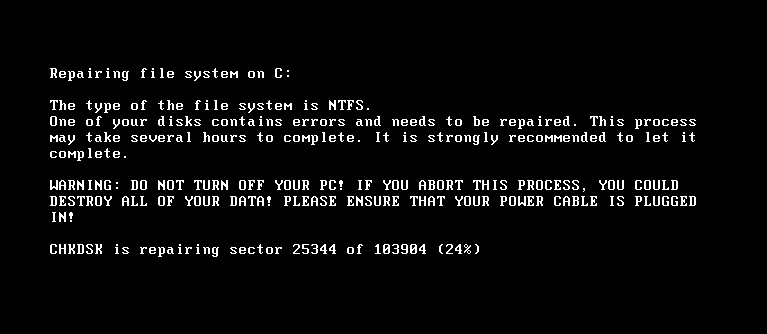
CHKDSK-like message displayed by the Petya ransomware
Once the encryption is completed, the bootloader displays the ransom demand:
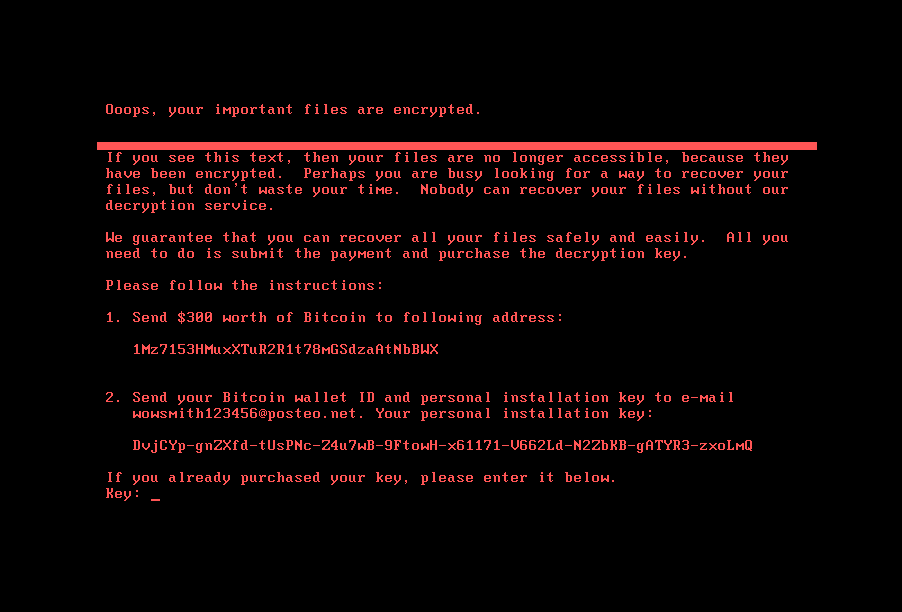
Ransom demand displayed by the Petya ransomware
Once the MBR has been encrypted, normal use of the affected computer is not possible.
Ransom
The ransom demand requires the affected users to send the payment to a specific Bitcoin address, and then send an email with their Bitcoin wallet ID to a designated email address. As of 28 June 2017, a small handful of payments have already been made to the designated Bitcoin address.
According to news reports however, the German email provider hosting the attacker's designated email address have suspended the account, meaning that the attackers are no longer able receive the emails sent by affected users and would have no way of providing the decryption keys to them.
Protect your devices from malware with F‑Secure Total
Protecting your devices from malicious software is essential for maintaining online security. F‑Secure Total makes this easy, helping you to secure your devices in a brilliantly simple way.
- Award‑winning antivirus and malware protection
- Online browsing, banking, and shopping protection
- 24/7 online identity and data breach monitoring
- Unlimited VPN service to safeguard your privacy
- Password manager with private data protection
Choose how many devices you want to protect to get started.

- Free customer support
- Cancel anytime
- The trial does not obligate you to buy the product
After 30 days your subscription will renew automatically for one year at €69.99.


More Support
Community
Ask questions in our Community.
User guides
Check the user guide for instructions.
Contact Support
Chat with our support for assistance.
Submit a Sample
Submit a file or URL for analysis.