

Summary
Nimda is a complex virus with a mass mailing worm component which spreads itself in email attachments named README.EXE. It affects Windows 95, Windows 98, Windows Me, Windows NT 4 and Windows 2000 users.
Removal
F-Secure Anti-Virus detects the worm with updates released on September 18th, 2001 19:20 EET. Disinfection was added in the updates from September 19th, 2001 17:12 EET.
F-Secure Anti-Virus with the latest updates can detect and disinfect Nimda infections. But full disinfection of the worm will require some additional manual actions.
The F-NIMDA tool was developed to automate these actions. If you wish to do them by hand, follow the instructions below. Otherwise, download F-NIMDA from:
- ftp://ftp.f-secure.com/anti-virus/tools/fsnimda3.exe
If you're running Windows ME, you need to turn off the Autorestore functionality before starting any disinfection. Do this by clicking My Computer on desktop, then Performance- > File System - > Troubleshooting- > Disable System Restore. Turn it back on when done.
To disinfect the worm and restore security of affected workstations, please follow these instructions:
About infected sites
A web site can get infected in two ways:
- Infected htmls are copied the secure site. This can happen even if you're using a patched version of IIS or something else entirely (such as Apache or Netscape). If there are infected computers in your organization, their local html files get infected. Users might then later copy or upload such infected pages to your www server. Alternatively, if your www files are accessible via file sharing the worm might infect them directly from a workstation. To clean your site, locate all html pages which refer to "README.EML"; and remove the extra Javascript code from the end of the pages.
- Direct web worm infection. If your web site is running an unsafe version of IIS, the worm can infect your site by accessing it through http. After this it will restart spreading from your server. In this case, it is not enough to just clean the virus - your web server is unsafe and has been so for a while. It's likely there have been previous illegimate accesses to your site as well and it should be considered compromised. We recommend rebuilding the web server and applying latest patches before restoring clean copies of the html pages.
Remember, F-Secure Management Server 4.x uses IIS as a web server platform. Keep them patched. F-Secure Policy Manager Server 5.0 and higher do NOT use IIS.
A False Positive is when a file is incorrectly detected as harmful, usually because its code or behavior resembles known harmful programs. A False Positive will usually be fixed in a subsequent database update without any action needed on your part. If you wish, you may also:
- Check for the latest database updates
- First, check if your F-Secure security program is using the latest updates, then try scanning the file again.
- Submit a sample
- After checking, if you still believe the file is incorrectly detected, you can submit a sample of it for re-analysis.
- Note: If the file was moved to quarantine, you need to collect the file from quarantine before you can submit it.
- Exclude a file from further scanning
- If you are certain that the file is safe and want to continue using it, you can exclude it from further scanning by the F-Secure security product.
- Note: You need administrative rights to change the settings.
Technical Details
The first variant in the Net-Worm:W32/Nimda family was found on September 18th, 2001, and quickly spread around the world.
Nimda uses the Unicode exploit to infect IIS web servers. This hole can be closed with a Microsoft patch, downloadable from: https://www.microsoft.com/technet/security/bulletin/ms00-078.asp. The MIME exploit used by the worm can be fixed with this patch: https://www.microsoft.com/technet/security/bulletin/MS01-020.asp
Nimda is the first worm to modify existing web sites to start offering infected files for download. Also it is the first worm to use normal end user machines to scan for vulnerable web sites. This technique enables Nimda to easily reach intranet web sites located behind firewalls - something worms such as Code Red couldn't directly do.
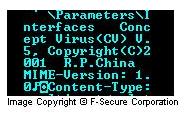
The worm has a copyright text string that is never displayed:
- Concept Virus(CV) V.5, Copyright(C)2001 R.P.China
It should be said that the worm has bugs that cause crashes or inability to spread itself in certain conditions.
The details below refer to the Net-Worm:W32/Nimda.A variant. For details of other variants in the Nimda family, please see:
History
This worm is especially relevant to F-Secure as around 15:00 GMT on 11th of October, 2001, hundreds of emails infected with Nimda.A was sent to various addresses around the world. These emails looked like they were sent by "mikko.hypponen@datafellows.com" (do note that F-Secure used to be called datafellows.com; company name and domain was changed in early 2000). Mr. Mikko Hypponen is our Manager of Anti-Virus Research. He naturally had nothing to do with this incident.
These emails were apparently sent from an infected machine located somewhere in Canada. For more information about the worm's spread, see https://www.f-secure.com/news/2001/news_2001091900.htm.
LIFECYCLE
The actual lifecycle of Nimda can be split to four parts:
- Infecting files
- Mass mailing
- Web worm
- LAN propagation
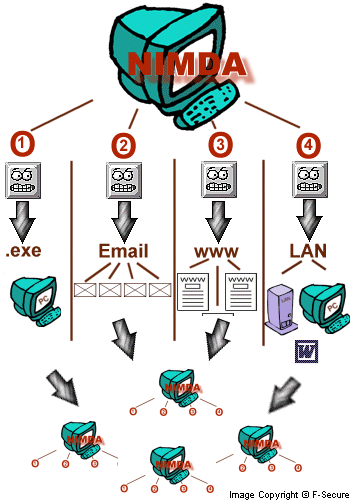
1) File infection Nimda locates EXE files from the local machine and infects them by putting the file inside its body as a resource, thus 'assimilating' that file.These files then spread the infection when people exchange programs such as games.
2) Mass mailer Nimda locates email addresses via MAPI from your email client as well as searching local HTML files for additional addresses. Then it sends one email to each address. These mails contain an attachment called README.EXE, which might be executed automatically on some systems.
3) Web worm Nimda starts to scan the internet, trying to locate www servers. Once a web server is found, the worm tries to infect it by using several known security holes. If this succeeds, the worm will modify random web pages on the site. End result of this modification is that web surfers browsing the site will get automatically infected by the worm.
4) LAN propagation The worm will search for file shares in the local network, either from file servers or from end user machines. Once found, it will drop a hidden file called RICHED20.DLL to any directory which has DOC and EML files. When other users try to open DOC or EML files from these directories, Word, Wordpad or Outlook will execute RICHED20.DLL causing an infection of the PC. The worm will also infect remote files if it was started on a server.
Execution
First, it should be noted that the worm behaves differently when started from files with different file names and with different command lines.
Starting on a server:
If the name of worm's file is ADMIN.DLL, the worm creates a mutex with 'fsdhqherwqi2001' name, copies itself as MMC.EXE into \Windows\ directory and starts this file with '-qusery9bnow' command line. Usually the worm is started as ADMIN.DLL on infected webservers. In this case the worm starts to scan and infect files on all available drives including removable and network ones. The EXE files (except WINZIP32.EXE) on these drives will get infected with the worm. The infection technique the worm uses is new - the worm puts an infected file inside its body as a resource. When the infected file is run, the worm extracts the embedded original EXE file, runs it and tries to delete it afterwards. If instant deletion is not possible, the worm creates WININIT.INI file that will delete the extracted file on next Windows startup.
The worm accesses the following key:
- SOFTWARE\Microsoft\Windows\CurrentVersion\App Paths]
It reads subkeys from there and infects all files listed in the subkeys. The worm also reads user's personal folders from the following key:
- [Software\Microsoft\Windows\CurrentVersion\Explorer\Shell Folders]
And infects files in these folders as well. The worm doesn't infect WinZip32.exe files.
Then the worm starts to search local hard drives for *.HTML, .ASP, and .HTM files and if such files are found, the worm creates README.EML file (which is the multi-partite message with MIME-encoded worm) in the same directory and adds a small JavaScript code to the end of found files. That JavaScript code would open README.EML file when the infected HTML file is loaded by a web browser. As a result the MIME-encoded worm will get activated because of a security hole and a system will get infected.
The worm's file runs from a minimized window when downloaded from an infected webserver. This technique affects users who are browsing the web with Internet Explorer 5.0 or 5.01.
The worm will also put *.EML and *.NWS files in almost all folders of computers it accesses. The RICHED20.DLL file with hidden and system attribute will be put in all folders where DOC or EML files are located. The worm will also try to replace Windows' original RICHED20.DLL file with its own copy.
Starting on a workstation:
If the worm is started from README.EXE file (or a file that has more than 5 symbols in its name and EXE extension), it copies itself to temporary folder with a random name that has 'MEP*.TMP' name and runs itself there with '-dontrunold' command line option.
When started, the worm loads itself as a DLL library, looks for a specific resource there and checks its size. If the resource size is less than 100, the worm unloads itself, otherwise it extracts its resource to a file and launches it. Checking the resource size is done to be able to detect if a worm runs from infected EXE files.
Then the worm gets current time and generates a random number. After performing a few arithmetic operations with this number the worm checks the result. If a result is bigger than worm's counter, the worm starts to search and delete README*.EXE files from temporary folder.
After that the worm prepares its MIME-encoded copy by extrating a pre-defined multi-partite MIME message from its body and appending its MIME-encoded copy to it. The file with a random name is created in a temporary folder.
The worm then looks for EXPLORER process, opens it and assigns its process as remote thread of Explorer. On some platforms the worm fails to run as Explorer's thread. The worm gets API creates a mutex with 'fsdhqherwqi2001' name, startups Winsock services, gets an infected computer (host) info and sleeps for some time. When resumed, the worm checks what platform it is running. If it is running on NT-based system, it compacts its memory blocks to occupy less space in memory and copies itself as LOAD.EXE to Windows system directory.Then it modifies SYSTEM.INI file by adding the following string after SHELL= variable in [Boot] section:
- explorer.exe load.exe -dontrunold
This will start the worm's copy every time Windows starts. The worm also copies itself as RICHED20.DLL file to system folder and sets hidden and system attributes to this file as well as to LOAD.EXE file. Then the worm enumerates shared network resources and starts to recursively scan files on remote systems.
When searching for files on remote systems the worm looks for .DOC and .EML files and then copies its binary image with RICHED20.DLL name to the folders where DOC and EML files are located. The copied DLL file has system and hidden attributes. This is done to increase the chances of worm activation on remote systems as Windows' original RICHED20.DLL component is used to open OLE files. But instead the worm's RICHED20.DLL file from current directory will be launched.
Also when the worm browsing the remote computers' directories it creates .EML and .NWS (rarely) files that have the names of document or webpage files that the worm could find on a remote system. These .EML and .NWS files are worm's multi-partite messages with a worm MIME-encoded in them. When scanning the worm can also delete the .EML and .NWS files it previously created.
The worm doesn't try to infect local or remote EXE files when started from a workstation.
Activity
The worm adjusts the properties of Windows Explorer, it accesses the following key:
- [Software\Microsoft\Windows\CurrentVersion\Explorer\Advanced]
and adjusts 'Hidden', 'ShowSuperHidden' and 'HideFileExt' keys. This affects Windows' (especially ME and 2000) ability to show hidden files - worm's files will not be seen in Explorer any more.
After that the worm adds a 'guest' account to infected system account list, activates this account, adds it to 'Administrator' and 'Guests' groups and shares C:\ drive with full access priviledges. The worm also deletes all subkeys from the following key:
- [SYSTEM\CurrentControlSet\Services\lanmanserver\Shares\Security]
to disable sharing security.
Propagation
email spreading:
The worm searches trough all the '.htm' and '.html' file in the Temporary Internet Files folder for email addresses. It reads trough user's inbox and collects the sender addresses. When the address list is ready it uses it's own SMTP engine to send the infected messages.
IIS spreading:
The worm uses backdoors on IIS servers such as the one CodeRed II installs. It scans random IP addresses for these backdoors. When a host is found to have one the worm instructs the machine to download the worm code (Admin.dll) from the host used for scanning. After this it executes the worm on the target machine this way infecting it.
Protect your devices from malware with F‑Secure Total
Protecting your devices from malicious software is essential for maintaining online security. F‑Secure Total makes this easy, helping you to secure your devices in a brilliantly simple way.
- Award‑winning antivirus and malware protection
- Online browsing, banking, and shopping protection
- 24/7 online identity and data breach monitoring
- Unlimited VPN service to safeguard your privacy
- Password manager with private data protection
Choose how many devices you want to protect to get started.

- Free customer support
- Cancel anytime
- The trial does not obligate you to buy the product
After 30 days your subscription will renew automatically for one year at €69.99.


More Support
Community
Ask questions in our Community.
User guides
Check the user guide for instructions.
Contact Support
Chat with our support for assistance.
Submit a Sample
Submit a file or URL for analysis.