

Summary
Email-Worm:VBS/LoveLetter is a worm written in Visual Basic Script. It spreads through email as a chain letter, using the Microsoft Outlook email application to spread itself. The worm can also spread using an mIRC client as well.
Removal
Manual removal of LoveLetter worm can be done by deleting the following files from the infected machine:
- All "*.VBS" files from all drives and all subdirectories.
- The file LOVE-LETTER-FOR-YOU.HTM from the Windows System directory.
- WIN-BUGSFIX.EXE and WINFAT32.EXE from the Internet Explorer download directory.
- If you are using mIRC, delete the "script.ini" file from the mIRC installation directory.
A False Positive is when a file is incorrectly detected as harmful, usually because its code or behavior resembles known harmful programs. A False Positive will usually be fixed in a subsequent database update without any action needed on your part. If you wish, you may also:
- Check for the latest database updates
- First, check if your F-Secure security program is using the latest updates, then try scanning the file again.
- Submit a sample
- After checking, if you still believe the file is incorrectly detected, you can submit a sample of it for re-analysis.
- Note: If the file was moved to quarantine, you need to collect the file from quarantine before you can submit it.
- Exclude a file from further scanning
- If you are certain that the file is safe and want to continue using it, you can exclude it from further scanning by the F-Secure security product.
- Note: You need administrative rights to change the settings.
Technical Details
LoveLetter was found globally in-the-wild on May 4th, 2000. It seems to originate from the Philippines.
The virus contains the following text at the beginning of the code:
- barok -loveletter(vbe) by: spyder / ispyder@mail.com / @GRAMMERSoft Group / Manila,Philippines
Installation
When it is executed, it first copies itself to the Windows System directory as:
- MSKernel32.vbs
- LOVE-LETTER-FOR-YOU.TXT.vbs
and to the Windows directory as:
- Win32DLL.vbs
Then it adds itself to the registry, so that it will be executed when the system is restarted. It adds the following registry keys: After that the worm replaces the Internet Explorer home page with a link that points to an executable program, "WIN-BUGSFIX.exe". If the file is downloaded, the worm adds this to the registry as well, which causes the program to be executed when the system is restarted.
Payload
The executable part the LoveLetter worm downloads from the web is a password stealing trojan. On the system startup the trojan tries to find a hidden window named 'BAROK...'. If it is present, the trojan exits immediately, in other case the main routine takes control. The trojan checks for the WinFAT32 subkey in the following Registry key:
- HKEY_LOCAL_MACHINE\Software\Microsoft\Windows\CurrentVersion\Run
If the WinFAT32 subkey key is not found, the trojan creates it, copies itself to the \Windows\System\ directory as WINFAT32.EXE and then it runs the file from that location. The above registry key modification causes the trojan to become active every time Windows starts.Then the trojan sets the Internet Explorer startup page to 'about:blank'. After that the trojan tries to find and delete the following keys:
- Software\Microsoft\Windows\CurrentVersion\Policies\Network\HideSharePwds
- Software\Microsoft\Windows\CurrentVersion\Policies\Network\DisablePwdCaching
- .DEFAULT\Software\Microsoft\Windows\CurrentVersion\Policies\Network\HideSharePwds
- .DEFAULT\Software\Microsoft\Windows\CurrentVersion\Policies\Network\DisablePwdCaching
Then the trojan registers a new window class and creates a hidden window titled 'BAROK...' and remains resident in the Windows memory as a hidden application.Immediately after startup and when timer counters reach certain values, the trojan loads the MPR.DLL library, calls the WNetEnumCashedPasswords function and sends stolen RAS passwords and all cached Windows passwords to email address 'mailme@super.net.ph' that most likely belongs to the trojan's author.The trojan uses mail server 'smtp.super.net.ph' to send emails. The email's subject is 'Barok... email.passwords.sender.trojan'.There is the author's copyright message inside the trojan's body:
- barok ...i hate go to school suck ->by:spyder @Copyright (c) 2000 GRAMMERSoft Group >Manila,Phils.
There are also some encrypted text messages in the trojan's body for its own use.
Propagation (email)
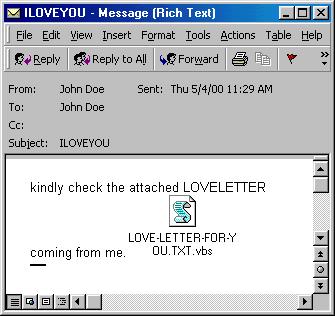
Then the worm uses Outlook to mass mail itself to everyone in each address book. The message that it sends looks like this:
- Subject: ILOVEYOU
- Body: kindly check the attached LOVELETTER coming from me.
- Attachment: LOVE-LETTER-FOR-YOU.TXT.vbs
LoveLetter sends the mail once to each recipient. After a mail has been sent, it adds a marker to the registry and does not mass mail itself anymore. Then the virus searches for certain file types from all folders in all local and remote drives and overwrites them with its own code. The files that are overwritten have either a "vbs" or a "vbe" extension. The virus creates a new file with the same name for files with the following extensions: ".js", ".jse", ".css", ".wsh", ".sct" and ".hta". The only difference is that the extension of the new file is ".vbs". The original file will be deleted. After this has been done, the the virus locates files with ".jpg" and ".jpeg" extensions, adds a new file next to it and deletes the original file. Then the virus locates ".mp3" and ".mp2" files, creates a new file and hides the original file. In both cases the new files created will have the original name with the additional extension ".vbs". For example, a picture named "pic.jpg" will cause a new file called "pic.jpg.vbs" to be created.
Propagation (IRC)
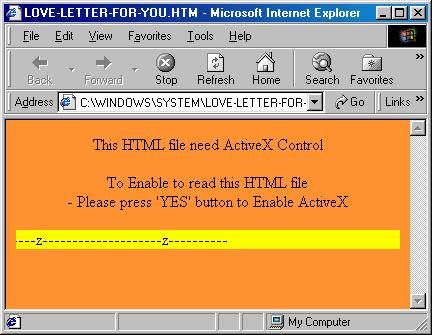
The worm creates an HTML file called "LOVE-LETTER-FOR-YOU.HTM" to the Windows System directory. This file contains the worm and it will be sent using mIRC whenever another person joins an IRC channel where the infected user currently is. To accomplish this the worm replaces the "script.ini" file from the mIRC installation directory.
Protect your devices from malware with F‑Secure Total
Protecting your devices from malicious software is essential for maintaining online security. F‑Secure Total makes this easy, helping you to secure your devices in a brilliantly simple way.
- Award‑winning antivirus and malware protection
- Online browsing, banking, and shopping protection
- 24/7 online identity and data breach monitoring
- Unlimited VPN service to safeguard your privacy
- Password manager with private data protection
Choose how many devices you want to protect to get started.

- Free customer support
- Cancel anytime
- The trial does not obligate you to buy the product
After 30 days your subscription will renew automatically for one year at €69.99.


More Support
Community
Ask questions in our Community.
User guides
Check the user guide for instructions.
Contact Support
Chat with our support for assistance.
Submit a Sample
Submit a file or URL for analysis.