

Summary
The Yaha.J worm was sent to over 50 different yahoogroups.com mailing lists on Friday the 13th of December 2002.
Removal
Based on the settings of your F-Secure security product, it will either move the file to the quarantine where it cannot spread or cause harm, or remove it.
A False Positive is when a file is incorrectly detected as harmful, usually because its code or behavior resembles known harmful programs. A False Positive will usually be fixed in a subsequent database update without any action needed on your part. If you wish, you may also:
- Check for the latest database updates
- First, check if your F-Secure security program is using the latest updates, then try scanning the file again.
- Submit a sample
- After checking, if you still believe the file is incorrectly detected, you can submit a sample of it for re-analysis.
- Note: If the file was moved to quarantine, you need to collect the file from quarantine before you can submit it.
- Exclude a file from further scanning
- If you are certain that the file is safe and want to continue using it, you can exclude it from further scanning by the F-Secure security product.
- Note: You need administrative rights to change the settings.
Technical Details
The Yaha.J worm was sent to over 50 different yahoogroups.com mailing lists on Friday the 13th of December 2002.
The initial emails looked like this:
From: HotGal4U2Fuk@Hotmail.Com To: member-of-one-of-the-yahoogroups-mailing-list Subject: joke look attach very gooooode bye Attachment: love.gif .scr This Yaha worm variant installs itself to system 3 times, creates a startup key for one of its files in the Registry and also modifies EXE file startup key so its other file could be started every time a user runs an EXE file. When run for the first time, Yaha.J displays a fake error message.
Yaha.J speads itself in email messages with different subjects. It also spams numerous email addresses by sending a message without its attachment there.
When Yaha.J is run for the first time, it displays a fake error message:
Error Application initilisation error 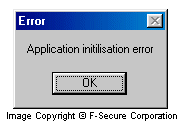
Then Yaha.J installs itself to system. It copies itself 3 times to Windows System directory with the following names:
- MSNMSG32.EXE
- NAV32.EXE
- WINREG.EXE
Yaha.J sets hidden attribute to all these files, so they are not seen in Windows Explorer with default settings.
Then Yaha.J creates 2 startup keys for the WINREG.EXE file in the System Registry:
- [HKLM\Software\Microsoft\Windows\CurrentVersion\Run] "winReg" = "%WinSysDir%\winReg.exe"
- [HKLM\Software\Microsoft\Windows\CurrentVersion\RunServices "winReg" = "%WinSysDir%\winReg.exe"
The %WinSysDir% represents Windows System directory name. Also Yaha.J modifies the default EXE file startup key:
- [HKCR\exefile\shell\open\command] @ = "%WinSysDir%\Nav32.exe "%1"%*"
This way Yaha.J's files are started not only during Windows startup, but also when a user runs any EXE file.
Yaha.J creates several threads that refresh its Registry keys and continuously restore Yaha.J's files if they are deleted from a hard drive. One of the threads kills processes with the following names:
- ANTIVIR
- APACHE.EXE
- LOCKDOWNADVANCED
- WEBSCANX
- SAFEWEB
- ICMON
- CFINET
- CFINET32
- AVP.EXE
- LOCKDOWN2000
- AVP32
- ZONEALARM
- ALERTSVC
- AMON.EXE
- AVPCC.EXE
- AVPM.EXE
- ESAFE.EXE
- PCCIOMON
- CCMAIN
- POP3TRAP
- WEBTRAP
- AVCONSOL
- AVSYNMGR
- VSHWIN32
- VSSTAT
- NAVAPW32
- NAVW32
- NMAIN
- LUALL
- LUCOMSERVER
- IAMAPP
- ATRACK
- MCAFEE
- FRW.EXE
- IAMSERV.EXE
- NSCHED32
- PCFWALLICON
- SCAN32
- TDS2-98
- TDS2-NT
- VETTRAY
- VSECOMR
- NISSERV
- RESCUE32
- SYMPROXYSVC
- NISUM
- NAVAPSVC
- NAVLU32
- NAVRUNR
- NAVWNT
- PVIEW95
- F-STOPW
- F-PROT95
- PCCWIN98
- IOMON98
- FP-WIN
- NVC95
- NORTON
Yaha.J looks for email addresses in Windows Address Book, cache folders of NET and MSN messengers and in Yahoo Messenger profile folders.
When Yaha.J locates an email address, it browses the domain name, then connects to a DNS server at address 12.127.17.71 and attempts to locate an anonymous SMTP server for that domain.
The message composition routine of this Yaha variant is quite complex. Yaha.J randomly selects fake reply-to addresses, fake names of senders, subjects and attachment names. Here's an example:
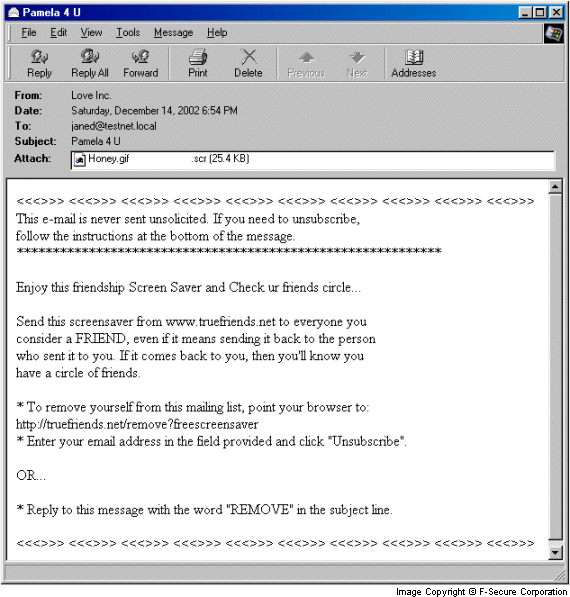
A subject of an infected email can be one of the following:
- Friendship Screensaver Inc.
- Microsoft Screensavers
- IBM Screensavers
- Lover's Scnreensaver
- Valentine Screensaver
- Sunrise Screensavers
- Marcos D'Costa
- Kevin Mitnick
- Bill Gates
- Sexy Screensavers
- Hardcore Screensavers
- Accoustic Screensavers
- Electric Screensavers
- KOF Screensavers
- Patriotic Screensavers
- Enjoy the fragrance of Love
- Pamela Anderson Screensavers
- Devon Loves Bill Gates
- Horny Britney Spears Screensavers
- Are you in Love
- You are my best friend
- Who is your best friend
- Happy Valentines Day
- So Sweet
- Dedicated to kYo-3
- Leona and Ralph
- Happy Cristmas
- Do you love your wife
- Good Luck
- Mission Impossible
- Are you In Love
- Friendship ScreenSaver
- Pamela 4 U
- Still Dreaming..
- Experience the smooooth music
- Help someone..
- Check this
- Wanna be a hacker ?
- mAtRiX
- Missing your best friend ?
A fake sender's name can be one of the following:
- Paul Smith
- Bernard Lewis
- Britney Johnson
- Susan Sarandon
- Zeus Gavinson
- Kevin Mitnick
- Friendship Screensaver Inc.
- Passionate
- Lover's Corner
- Rick Stenquin
- Amino Extolden
- Sweetheart
- Girl Friends
- The Great Indians
- Susy Aminot
- Gavin Lawson
- Viivi Josefiina Torronen
- Carmen Vidal
- Cathy Stevens
- Zeusita
- Love Inc.
- Dead Man Inc.
- Dreamz of Love Inc.
A fake sender's email address can be one of the following:
- paul@microsoft.com
- gates@microsoft.com
- britney@britneyspears.org
- sussy@sussybaby.com
- kk@alkk.com
- kevin_m@freekevin.com
- mentor@m.com
- almst@strong.com
- jennifer@lopez.com
- rick@enrique.com
- arnold@schwarzeneggar.com
- sylvester@stallone.com
- mick@foley.com
- vince@wwe.com
- vin@suckass.com
- linus@use_secure_linux.com
- g@guninski.com
- peter@p.com
- steve@wwe.com
- hulk@hogan.com
- lex@lugar.com
- christina@aguilera.com
- bryan@adams.com
A body of an infected message can look like that:
This email is never sent unsolicited. If you need to unsubscribe, follow the instructions at the bottom of the message. **************************************'********************* Enjoy this friendship Screen Saver and Check ur friends circle... Send this screensaver from www.truefriends.net to everyone you consider a FRIEND, even if it means sending it back to the person who sent it to you. If it comes back to you, then you'll know you have a circle of friends. * To remove yourself from this mailing list, point your browser to: http://truefriends.net/remove?freescreensaver * Enter your email address in the field provided and click "Unsubscribe OR... * Reply to this message with the word "REMOVE" in the subject line.An infected attachment can have one of the following names:
- LoverScreenSaver.scr
- ScreenSaver.scr
- Honey.scr
- HotShot.scr
- NeverMind.scr
- Escort.scr
- Love.scr
- EvilDaemon.scr
- mAtRiX.scr
- bestfriend.scr
Also an attachment can have double extension. An extension is selected by Yaha.J from the following list:
- .pdf .scr
- .gif .scr
- .ppt .scr
- .jpg .scr
- .doc .scr
Note that there are 23 space characters between these 2 extensions. This is done to hide the second, executable extension.
Yaha.J sends numerous email messages with the above listed body text, but without its attachment to the following addresses:
- CE@pak.gov.pk
- roxx@achayans.com
- nhsboys@vsnl.net
- admin@focusindia.com
- info@microsoft.com
- gates@micrsoft.com
- GETADMIN@cyberexploits.com
- method3411@aasp.net
- rhytha@hotmail.com
- evil_n_genious@hotmail.com
- yeshodhank@rediffmail.com
- sweta_18@hotmail.com
- Admin@firewall.cx
- c_doser@hotmail.com
- deepu_the_king@yahoo.com
- jack_king2002@hotmail.com
- dharian25@hotmail.com
- Lucky@lucky-web.net
- hackermind@sify.com
Yaha.J does not use Iframe exploit in infected messages to start itself automatically. That limits its spreading.
Yaha.J can create zEsT.txt file in Windows directory and whites the following text there:
==================================================== r^0^x~X pR3$@Nt$ @Y3rH$.@',0Ah tHi$ i$ jU$t tH3 b3gInNiNg.. w3 ar3 tH3 gR3@t 1nD1@N$.. w3 k1cK pAk1 a$$.. ==================================================== Protect your devices from malware with F‑Secure Total
Protecting your devices from malicious software is essential for maintaining online security. F‑Secure Total makes this easy, helping you to secure your devices in a brilliantly simple way.
- Award‑winning antivirus and malware protection
- Online browsing, banking, and shopping protection
- 24/7 online identity and data breach monitoring
- Unlimited VPN service to safeguard your privacy
- Password manager with private data protection
Choose how many devices you want to protect to get started.

- Free customer support
- Cancel anytime
- The trial does not obligate you to buy the product
After 30 days your subscription will renew automatically for one year at €69.99.


More Support
Community
Ask questions in our Community.
User guides
Check the user guide for instructions.
Contact Support
Chat with our support for assistance.
Submit a Sample
Submit a file or URL for analysis.