

Summary
Trojan:W32/Ransom is a ransomware threat that prevents users from accessing the infected machine's Desktop; it then demands payment, supposedly for either possession of illegal material or usage of illegal software.
Removal
Based on the settings of your F-Secure security product, it will either move the file to the quarantine where it cannot spread or cause harm, or remove it.
Some Trojan:W32/Ransom variants require users to perform manual removal to completely remove the malware from the system:
- Manual Removal for Windows XP systems Restart the system in "Safe Mode with Command Prompt"At the prompt, type in the commands below: cd %windir%dir twexx32.dllIf the file twexx32.dll is found, type in the commands below, otherwise jump to the next step: copy twexx32.dll explorer.execopy twexx32.dll %windir%\system32\dllcache\explorer.exeshutdown -rNote: When prompted, answer Yes to overwrite the file.If the file twexx32.dll is not found, type in the commands below: reg add "HKLM\SOFTWARE\Microsoft\Windows NT\CurrentVersion\Winlogon" /v Shell /d explorer.exe /fshutdown -r
- Manual Removal for Windows Vista and 7 systems Restart the system in "Safe Mode with Command Prompt"At the prompt, type the following command exactly as it appears, then press Enter: regeditBrowse for HKEY_CURRENT_USER\Software\Microsoft\Windows\CurrentVersion\RunFind registry key with value such as c:\users\[username]\appdata\roaming\[randomletters].exeDelete the registry keyClose the Registry Editor, go back to the command prompt and shutdown -r
A False Positive is when a file is incorrectly detected as harmful, usually because its code or behavior resembles known harmful programs. A False Positive will usually be fixed in a subsequent database update without any action needed on your part. If you wish, you may also:
- Check for the latest database updates
- First, check if your F-Secure security program is using the latest updates, then try scanning the file again.
- Submit a sample
- After checking, if you still believe the file is incorrectly detected, you can submit a sample of it for re-analysis.
- Note: If the file was moved to quarantine, you need to collect the file from quarantine before you can submit it.
- Exclude a file from further scanning
- If you are certain that the file is safe and want to continue using it, you can exclude it from further scanning by the F-Secure security product.
- Note: You need administrative rights to change the settings.
Technical Details
Trojan:W32/Ransom is considered ransomware as it prevents normal usage of the infected machine and demands monetary payment supposedly to restore normal use. The malware has been reported to target users in a number of European countries, most notably Germany, France, Spain and Finland.
Multiple variants of this trojan have been found thus far. The variants are also detected by a number of generic detections, based on its behavioral characteristics.
Note: for specific variants, users may need to perform manual removal in order to completely remove the trojan. See Removal above for further details.
Activity
On execution, the trojan moves the legitimate file '\explorer.exe' to a variable location, with the name '\twexx32.dll', then saves a copy of itself to the original '\explorer.exe' location.
The trojan then makes its ransom demand by displaying language-specific images appropriate to the user's locale, determining which image should be displayed by a geolocation query. Screenshots of some of the images displayed by the trojan are shown below. English translations of the German and French warning texts are also provided below.
Needless to say, though these warnings claim to be from the German 'Bundespolizei', the French 'Gendarmerie Nationale' or the non-existent Finnish Information Networks Crime Unit 'Tietoverkkorikosten tutkinnan yksikki', they are fake.
Unfortunately, even if the user does accede to these demands, no fix is performed; the computer remains inaccessible. Instead, users may use an antivirus product to remove the trojan from their machine.
Image 1: Trojan:W32/Ransom's German-targeted demand
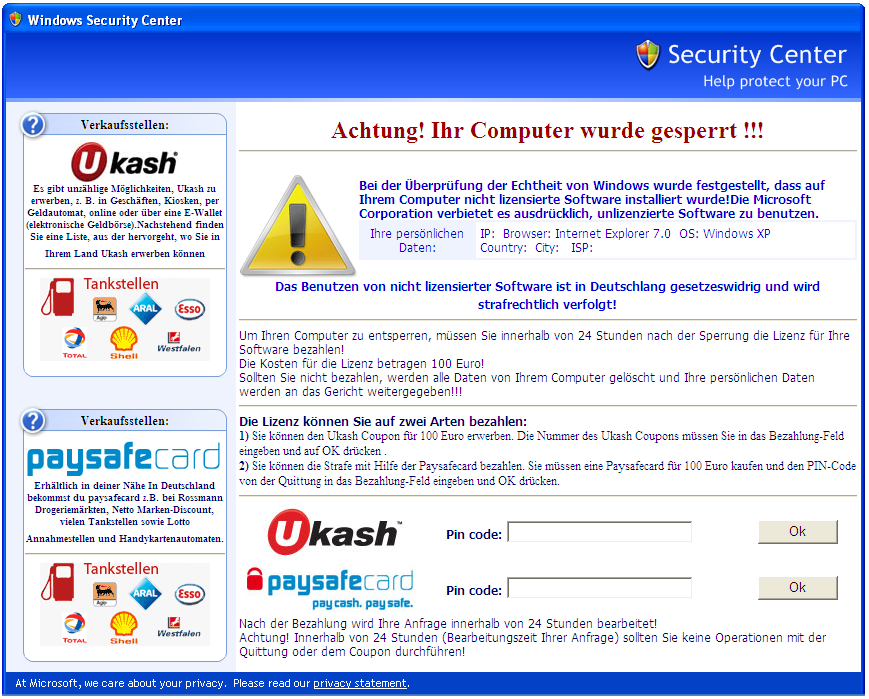
English translation of German text:
Attention! Your Computer was locked !!!
When checking the authenticity of Windows it was noticed that there is
non‑licensed software installed on your computer!
The Microsoft corperation explicitly forbids the use of unlicensed software.

your personal data: (IP, browser, OS, country, city, ISP)

The use of unlicensed software is illegal in germany and will be prosecuted!

---------------

To unlock your computer you have to pay the license fee for your software
within 24 hours!
The total amount for the license is 100 Euro!
If you do not pay all data will be deleted from your computer and your
personal data will be transferred to the court. ----------------
You have two options to pay for the license:
- Instructions for payment via Ukash
- Instructions for payment via paysafecard
Image 2: Trojan:W32/Ransom's French-targeted demand
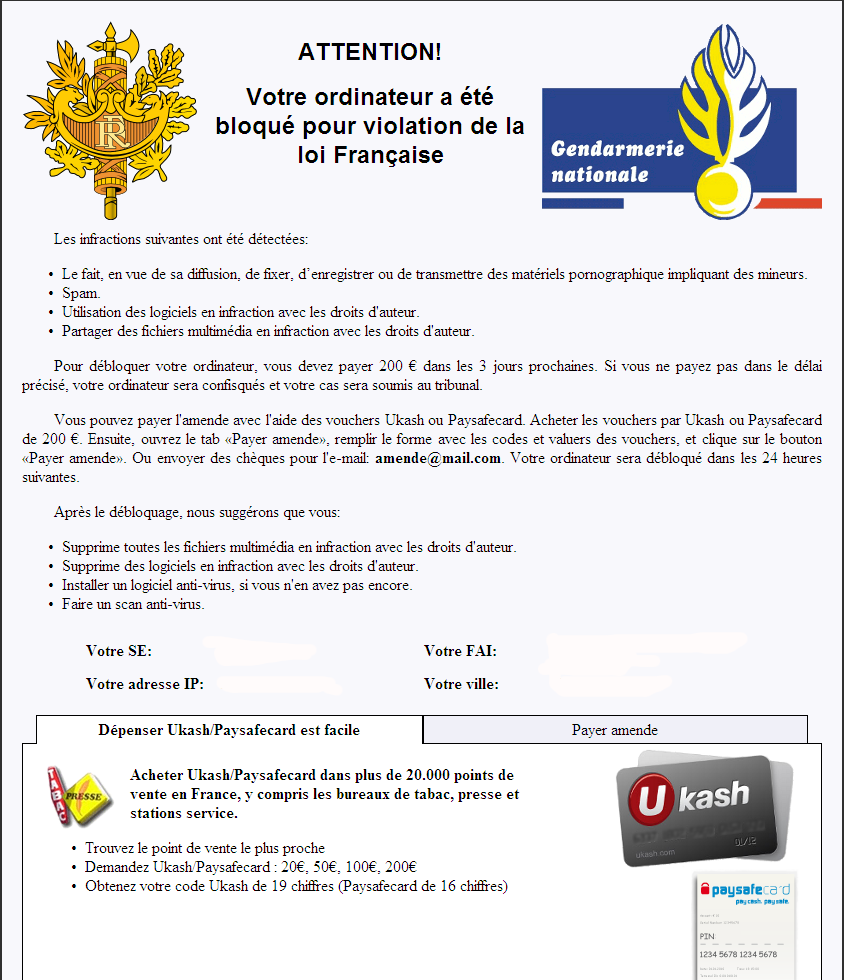
English translation of French text:
Attention, your computer has been blocked due to French law violations.
The following Illegal activities were detected:
1- Intent to create and distribute pornography containing minors.
2- Spam
3- Use of illegal software
4- Illegal file sharingTo unblock your computer you must pay 200E within the next 3 days, If you do
not pay
within the given timeframe we will confiscate your pc and you will
be faced with criminal charges.You can pay the fine with the help of Ukash or paysafecard vouchers.
Purchase a 200E voucher then open the tab "payer amende" fill in the form
then validate the vouchers and proceed to clique the "payer amende" button.
You may also send a email cheque/payment to amende@mail.com. Your computer
will be unblocked within 24 hrs.After the unlocking we recommend the following:
- Delete all the illegal files on your computer(multimedia)
- Delete all illegal software
- Install an Anti‑virus software
- Scan your computer
Protect your devices from malware with F‑Secure Total
Protecting your devices from malicious software is essential for maintaining online security. F‑Secure Total makes this easy, helping you to secure your devices in a brilliantly simple way.
- Award‑winning antivirus and malware protection
- Online browsing, banking, and shopping protection
- 24/7 online identity and data breach monitoring
- Unlimited VPN service to safeguard your privacy
- Password manager with private data protection
Choose how many devices you want to protect to get started.

- Free customer support
- Cancel anytime
- The trial does not obligate you to buy the product
After 30 days your subscription will renew automatically for one year at €69.99.


More Support
Community
Ask questions in our Community.
User guides
Check the user guide for instructions.
Contact Support
Chat with our support for assistance.
Submit a Sample
Submit a file or URL for analysis.