

Summary
Trojan-Downloader:OSX/Flashback.K is a variant of the Trojan-Downloader:OSX/Flashback malware that connects to a remote site to download its payload; on successful infection, the malware modifies targeted webpages displayed in the web browser.
Removal
11 April 2012: F-Secure now provides a free removal tool that automates the detection and removal of Flashback variants from an infected machine.
Caution: Manual disinfection is a risky process; it is recommended only for advanced users. Otherwise, please seek professional technical assistance.
F-Secure customers may also contact our Support.
A False Positive is when a file is incorrectly detected as harmful, usually because its code or behavior resembles known harmful programs. A False Positive will usually be fixed in a subsequent database update without any action needed on your part. If you wish, you may also:
- Check for the latest database updates
- First, check if your F-Secure security program is using the latest updates, then try scanning the file again.
- Submit a sample
- After checking, if you still believe the file is incorrectly detected, you can submit a sample of it for re-analysis.
- Note: If the file was moved to quarantine, you need to collect the file from quarantine before you can submit it.
- Exclude a file from further scanning
- If you are certain that the file is safe and want to continue using it, you can exclude it from further scanning by the F-Secure security product.
- Note: You need administrative rights to change the settings.
Technical Details
Trojan-Downloader:OSX/Flashback.K is dropped by malicious Java applets that exploit the known CVE-2012-0507 vulnerability.
On execution, the malware will prompt the unsuspecting user for the administrator password. Whether or not the user inputs the administrator password, the malware will attempt to infect the system, though entering the password will affect how the infection is done.
Installation
There are two files that are dropped and executed on the system when users visited a malicious webpage.
The first file is an updater component. It is dropped in the users home folder. It may have the default filename ".jupdate" or a filename supplied by the malicious webpage. The filename will always start with a ".".
A launch point is then created for the updater component in the ~/Library/LaunchAgents folder. It may have the default filename "com.java.update.plist" or a filename supplied by the malicious webpage.
On the first execution, this component reports to the following:
- http://[...]31.31.79.87/[...]/stat_svc/
On the second execution and onwards, it connects to a hard coded list of addresses to download it's update.
The second file is the downloader component just like the previous variants. It is dropped and executed in the /tmp folder. It may have the default filename "Update" or a filename supplied by the malicious webpage.
The malware then reports to the following location whether it successfully exploited the system or not:
- http://[...]31.31.79.87/[...]/stat_j/%result%
Downloading the Payload
The malware connects to the following URL to download its payload:
- http://[...]31.31.79.87/[...]/counter/%encoded_data%
Where decoded data follows this format:
- %hardware_UUID|%machine_architecture%|%kernel_version%|0|%architecture_of_malware_process%| %current_hardware_type_of_system%|%is_user_daemon%
- %is_user_daemon% is "1" if the process is running as the first OS X user account or daemon "0" otherwise
The filename and actual content of the payload depends on reply of the remote host. The reply is compressed and encrypted but the actual content follows this format:
- %encoded_filename%|%encoded_binary1_content%|%encoded_payload_config%| %encoded_binary2_content%|%encoded_png_content%
Where:
- Binary 1: We were not able to obtain the payload during our analysis. However based on previous variants, binary1 is most likely the malware's main component. It hijacks CFReadStreamRead and CFWriteStreamWrite by creating an interposition to these functions. The malware modifies contents returned or send by these APIs. It targets the contents of specific webpages, as determined by config information returned by the remote host.
- Binary 2: We were not able to obtain the payload during our analysis. However based on previous variants, binary2 is most likely a filter component that will load binary1 only into a targeted process. This is to avoid crashing incompatible applications and raising the user's suspicions. In the sample that we analyzed, it targets the Safari web browser.
Infection
Only after downloading the payload does Flashback.K proceed with infecting the machine. To do so, the malware prompts for the administrator password, as in the following screenshot:
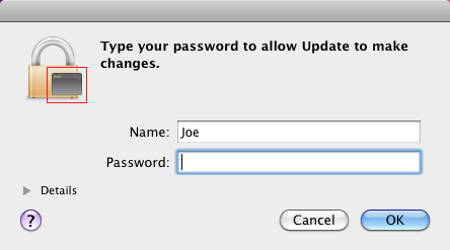
The icon indicated by the red box in the screenshot is the PNG content returned by the remote host. This is dropped to the location '/tmp/.i.png' on the system. Since this image is controlled by the remote host, it can be changed any time the author deems necessary.
Whether or not the user inputs their administrator password at the prompt determines the type of infection the malware subsequently performs:
Infection Type 1
If the user inputs their administrator password, the malware will create the following files:
- /Applications/Safari.app/Contents/Resources/.%decoded_filename%.png - contains %decoded_binary1_contents% and %decoded_payload_config%
- /Applications/Safari.app/Contents/Resources/.%decoded_filename%.xsl - contains %decoded_binary2_contents%
The malware then creates a launch point, inserting the following line into "/Applications/Safari.app/Contents/Info.plist":
- <key>LSEnvironment</key><dict><key>DYLD_INSERT_LIBRARIES</key> <string>/Applications/Safari.app/Contents/Resources/.%decoded_filename%.xsl</string></dict>
This in effect will inject binary2 into Safari when the browser is launched.
If the malware was able to infect the system this way, it reports success to the following URL:
- http://[...]31.31.79.87/[...]/stat_d/
If it failed to infect the system, the malware reports to the following URL:
- http://[...]31.31.79.87/[...]/stat_n/
Infection Type 2
In cases where the user did not input their administrator password, the malware checks if the following path exists in the system:
- /Applications/Microsoft Word.app
- /Applications/Microsoft Office 2008
- /Applications/Microsoft Office 2011
- /Applications/Skype.app
If any of these are found, the malware again skips the rest of its routine and proceeds to delete itself, presumably to avoid infecting a system that has an incompatible application installed.
If none of the incompatible applications are found, the malware will create the following files:
- ~/Library/Application Support/.%decoded_filename%.tmp - contains %decoded_binary1_contents% and %decoded_payload_config%
- /Users/Shared/.libgmalloc.dylib - contains %decoded_binary2_contents%
The malware then creates a launch point by creating "~/.MacOSX/environment.plist", containing the following lines:
- <key>DYLD_INSERT_LIBRARIES</key> <string>/Users/Shared/.libgmalloc.dylib</string>
This in effect will inject binary2 into every application launched by the infected user.
For this infection type, the malware reports the successful infection to the following URL:
- http://[...]31.31.79.87/[...]/stat_u/
Protect your devices from malware with F‑Secure Total
Protecting your devices from malicious software is essential for maintaining online security. F‑Secure Total makes this easy, helping you to secure your devices in a brilliantly simple way.
- Award‑winning antivirus and malware protection
- Online browsing, banking, and shopping protection
- 24/7 online identity and data breach monitoring
- Unlimited VPN service to safeguard your privacy
- Password manager with private data protection
Choose how many devices you want to protect to get started.

- Free customer support
- Cancel anytime
- The trial does not obligate you to buy the product
After 30 days your subscription will renew automatically for one year at €69.99.


More Support
Community
Ask questions in our Community.
User guides
Check the user guide for instructions.
Contact Support
Chat with our support for assistance.
Submit a Sample
Submit a file or URL for analysis.