

Summary
Trojan-Downloader:OSX/Flashback.C is a variant of the Trojan-Downloader:OSX/Flashback malware that poses as a Flash Player installer and connects to a remote host to obtain further installation files and configurations.
Removal
Caution: Manual disinfection is a risky process; it is recommended only for advanced users. Otherwise, please seek professional technical assistance.
F-Secure customers may also contact our Support.
A False Positive is when a file is incorrectly detected as harmful, usually because its code or behavior resembles known harmful programs. A False Positive will usually be fixed in a subsequent database update without any action needed on your part. If you wish, you may also:
- Check for the latest database updates
- First, check if your F-Secure security program is using the latest updates, then try scanning the file again.
- Submit a sample
- After checking, if you still believe the file is incorrectly detected, you can submit a sample of it for re-analysis.
- Note: If the file was moved to quarantine, you need to collect the file from quarantine before you can submit it.
- Exclude a file from further scanning
- If you are certain that the file is safe and want to continue using it, you can exclude it from further scanning by the F-Secure security product.
- Note: You need administrative rights to change the settings.
Technical Details
Trojan-Downloader:OSX/Flashback.C poses as a Flash Player installer and connects to a remote host to obtain further installation files and configurations.
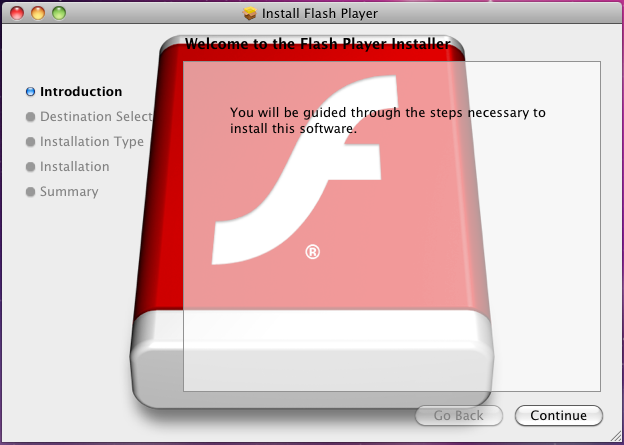
Screenshot of the Trojan-Downloader:OSX/Flashback.C installer.
To complete its installation/infection, Flashback.C requires the user to key in the administrator password.
On installation, the installer first checks if the following file is found in the system:
- /Library/Little Snitch/lsd
Little Snitch is a firewall program for Mac OS X. If the program is found, the installer will skip the rest of its routine and proceed to delete itself.
If the trojan is cleared to proceed, it connects to a remote host, identified as http://[...]93.114.43.31/counter/%encoded_strings%, with the decoded string following this format:
- %Hardware_UUID% | %machine_architecture% | %kernel_version% | %encoded_md5% The %encoded_md5% is the hash of the following:
- %hardware_UUID%Jiangxi
As of this writing, the remote host is up but it does not push anything.
Payload
Installation files and configuration returned by the host is encrypted using RC4, where the MD5 hash of the Hardware UUID of the infected system is used as the key. The decrypted content follows this format:
- %encoded_payload_filename% | %encoded_payload_content%
The installer drop copies of the payload to the following locations:
- /Applications/Safari.app/Contents/Resources/%payload_filename%
- /Applications/Firefox.app/Contents/Resources/%payload_filename%
A DYLD_INSERT_LIBRARIES environment variable is also added to the targeted browsers as launch point. This is done by inserting a LSEnvironment entry to the corresponding Info.plist of the browsers.
Example:
- The following line is inserted into "/Applications/Safari.app/Contents/Info.plist":
- <key>LSEnvironment</key><dict><key>DYLD_INSERT_LIBRARIES</key><string>/Applications/Safari.app/Contents/Resources/%payload_filename%</string></dict>
- The following line is inserted to "/Applications/Firefox.app/Contents/Info.plist":
- <key>LSEnvironment</key><dict><key>DYLD_INSERT_LIBRARIES</key><string>/Applications/Firefox.app/Contents/Resources/%payload_filename%</string></dict>
The installer then restarts running instances of Safari and Firefox in order to take the payload into effect.
The installer also disables the built-in anti-malware feature in Mac OS X. It unloads the XProtectUpdater daemon, and then wipes out the following files:
- /System/Library/LaunchDaemons/com.apple.xprotectupdater.plist
- /usr/libexec/XProtectUpdater
Protect your devices from malware with F‑Secure Total
Protecting your devices from malicious software is essential for maintaining online security. F‑Secure Total makes this easy, helping you to secure your devices in a brilliantly simple way.
- Award‑winning antivirus and malware protection
- Online browsing, banking, and shopping protection
- 24/7 online identity and data breach monitoring
- Unlimited VPN service to safeguard your privacy
- Password manager with private data protection
Choose how many devices you want to protect to get started.

- Free customer support
- Cancel anytime
- The trial does not obligate you to buy the product
After 30 days your subscription will renew automatically for one year at €69.99.


More Support
Community
Ask questions in our Community.
User guides
Check the user guide for instructions.
Contact Support
Chat with our support for assistance.
Submit a Sample
Submit a file or URL for analysis.