

Summary
Dishonest antivirus software which tricks users into buying or installing it, usually by infecting a user's computer, or by pretending the computer is infected.
Removal
The directory and file names used by XP Antivirus are generated based on a hash of the HDD serial number.
Example:rhcp1wj0e72l
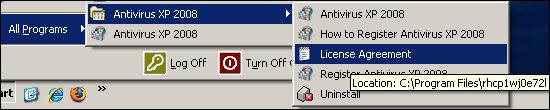
Individual installation names can be determined by examining the path of the shortcut icons as in the example image.[...] will be used to represent the directory and file names in the disinfection instructions.
Notes:
- %programfiles% represents C:\Program Files
- %windows% represents C:\WINDOWS
- %system32% represents C:\WINDOWS\system32
Terminate Malicious Processes
- Open the Windows Task Manager; press Ctrl + Alt + Del and click the Task Manager button
- Locate the malicious file from the list of running processes, example: rhcp1wj0e72l
- Select the malicious process and click the End Process button
- Close the Task Manager.
Deleting launchpoints and other malicious entries from the registry
From the Windows Start Menu, select Run, type regedit into the "Open:" field and then click OK.Delete the following keys if they are found:
- HKLM\SOFTWARE\Microsoft\Windows\CurrentVersion\Uninstall\[...]
- HKLM\software\[...]
- HKLM\SOFTWARE\Microsoft\Windows\CurrentVersion\Internet Settings\User Agent\Post Platform, "AntivirXP08"
Delete the following values to disable the program from automatically running with Windows start:
- HKLM\SOFTWARE\Microsoft\Windows\CurrentVersion, [...]
- HKLM\Software\Microsoft\Windows\CurrentVersion\Run, SM[...] = %programfiles%\[...]\[...].exe
- HKLM\Software\Microsoft\Windows\CurrentVersion\Run, [...]
- HKEY_CURRENT_USER\Software\Microsoft\Windows\CurrentVersion\Run XP Antivirus = "%programfiles%\XP Antivirus\xpa.exe"
To re-enable options for the screen saver and desktop, delete the following values:
- HKCU\Software\Microsoft\Windows\CurrentVersion\Policies \System, NoDispBackgroundPage
- HKCU\Software\Microsoft\Windows\CurrentVersion\Policies \System, NoDispScrSavPage
To reset the Desktop settings, the following can be deleted:
- HKCU\Control Panel\Desktop ConvertedWallpaper
- HKCU\Control Panel\Desktop OriginalWallpaper
- HKCU\Control Panel\Desktop SCRNSAVE.EXE
- HKCU\Control Panel\Desktop Wallpaper
Delete malicious files and directories
Delete the following directories and file if they exist:
- %programfiles%\[...]\database.dat
- %programfiles%\[...]\license.txt
- %programfiles%\[...]\MFC71.dll
- %programfiles%\[...]\MFC71ENU.DLL
- %programfiles%\[...]\msvcp71.dll
- %programfiles%\[...]\msvcr71.dll
- %programfiles%\[...]\[...].exe
- %programfiles%\[...]\[...].exe.local
- %programfiles%\[...]\Uninstall.exe
- %system32%\[...].bmp
- %system32%\[...].exe
- %system32%\[...].exe
- %system32%\[...].scr
- %windows%\Temp\.tt30.tmp.vbs
- %windows%\Temp\.tt34.tmp.exe
- C:\Documents and Settings\[Name]\Application Data\Microsoft\Internet Explorer\Quick Launch\Antivirus XP 2008.lnk
- C:\Documents and Settings\All Users\Start Menu\Programs\Antivirus XP 2008\Antivirus XP 2008.lnk
- C:\Documents and Settings\All Users\Start Menu\Programs\Antivirus XP 2008\How to Register Antivirus XP 2008.lnk
- C:\Documents and Settings\All Users\Start Menu\Programs\Antivirus XP 2008\License Agreement.lnk
- C:\Documents and Settings\All Users\Start Menu\Programs\Antivirus XP 2008\Register Antivirus XP 2008.lnk
- C:\Documents and Settings\All Users\Start Menu\Programs\Antivirus XP 2008\Uninstall.lnk
- C:\Documents and Settings\All Users\Start Menu\Programs\Antivirus XP 2008.lnk
- C:\Documents and Settings\LocalService\Application Data\[...].exe
Directories:
- %programfiles%\[...]\
- C:\Documents and Settings\All Users\Start Menu\Programs\Antivirus XP 2008
Some infections create the following set of files and directories, delete them if they exist:
- %programfiles%\XP Antivirus
- %programfiles%\XP Antivirus\xpa.exe
- C:\Documents and Settings\[Name]\Application Data\Microsoft\Internet Explorer\Quick Launch\Antivirus XP 2008.lnk
- C:\Documents and Settings\[Name]\Desktop\XP Antivirus 2008.lnk
- C:\Documents and Settings\[Name]\Start Menu\XP Antivirus 2008
- C:\Documents and Settings\[Name]\Start Menu\XP Antivirus 2008\Uninstall XP Antivirus 2008.lnk
- C:\Documents and Settings\[Name]\Start Menu\XP Antivirus 2008\XP Antivirus 2008.lnk
Note: [Name] represents the local user account name.Follow the disinfection instructions for Trojan-Downloader:W32/Exchanger if the following file exists:
- %system32%\CbEvtSvc.exe
A False Positive is when a file is incorrectly detected as harmful, usually because its code or behavior resembles known harmful programs. A False Positive will usually be fixed in a subsequent database update without any action needed on your part. If you wish, you may also:
- Check for the latest database updates
- First, check if your F-Secure security program is using the latest updates, then try scanning the file again.
- Submit a sample
- After checking, if you still believe the file is incorrectly detected, you can submit a sample of it for re-analysis.
- Note: If the file was moved to quarantine, you need to collect the file from quarantine before you can submit it.
- Exclude a file from further scanning
- If you are certain that the file is safe and want to continue using it, you can exclude it from further scanning by the F-Secure security product.
- Note: You need administrative rights to change the settings.
Technical Details
XPAntivirus is a family of rogue security programs that claim to detect and remove malicious software, but give fake and exaggerated scan results in an attempt to trick people into purchasing the program.Members of the XPAntivirus family are distributed under several different names, including:
- XP Antivirus
- Antivirus 2009
- Antivirus 2010
- Antivirus 360
As with most rogueware, an XPAntivirus variant is commonly downloaded and installed via trojans without consent and even hijacks the user's desktop to display misleading and alarming messages.
Installation
Rogue:W32/XPAntiVirus is distributed and installed with interfaces similar to the following:
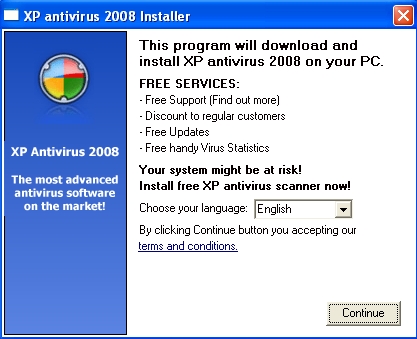
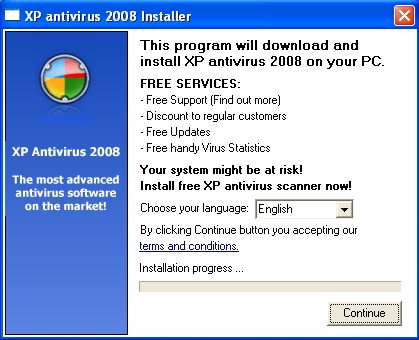
The actual installation details vary depending on the specific variant in question. Below are details of three possible installations.
XPAntivirus Sample Installation 1:
A directory is created in the Program Files folder as follows:
- C:\Program Files\[...]
- C:\Program Files\[...]\database.dat
- C:\Program Files\[...]\license.txt
- C:\Program Files\[...]\MFC71.dll
- C:\Program Files\[...]\MFC71ENU.DLL
- C:\Program Files\[...]\msvcp71.dll
- C:\Program Files\[...]\msvcr71.dll
- C:\Program Files\[...]\[...].exe
- C:\Program Files\[...]\[...].exe.local
- C:\Program Files\[...]\Uninstall.exe
Where [...] represents the generated directory and file names used by XPAntivirus.The directory and file names used by XPAntivirus are generated based on a hash of the HDD serial number (see screenshot in Disinfection section).Another folder is created in the Application Data folder using the same naming scheme:
- C:\Documents and Settings\[NAME]\Application Data\[...]
- C:\Documents and Settings\[NAME]\Application Data\[...]\Quarantine
Where [NAME] represents the account name.
XPAntivirus Sample Installation 2:
Another instance of infection may have the following set of files and directories installed:
- %programfiles%\XP Antivirus
- %programfiles%\XP Antivirus\xpa.exe
- C:\Documents and Settings\[Name]\Application Data\Microsoft\Internet Explorer\Quick Launch\XP Antivirus 2008.lnk
- C:\Documents and Settings\[Name]\Desktop\XP Antivirus 2008.lnk
- C:\Documents and Settings\[Name]\Start Menu\XP Antivirus 2008
- C:\Documents and Settings\[Name]\Start Menu\XP Antivirus 2008\Uninstall XP Antivirus 2008.lnk
- C:\Documents and Settings\[Name]\Start Menu\XP Antivirus 2008\XP Antivirus 2008.lnk
And the following registry keys are added:
- HKEY_CURRENT_USER\Software\Microsoft\Windows\CurrentVersion\Run XP Antivirus = "%programfiles%\XP Antivirus\xpa.exe"
- HKEY_CURRENT_USER\Software\XP antivirus
- HKEY_CURRENT_USER\Software\XP antivirus\Options
- HKEY_CURRENT_USER\Software\XP antivirus\Options Aff [Data]
- HKEY_CURRENT_USER\Software\XP antivirus\Options FirstRunUrl "http://xpantivirus.com/firstrun.php?product=%product%&aff=%aff%&update=%update%"
- HKEY_CURRENT_USER\Software\XP antivirus\Options AfterRegisterUrl "http://xpantivirus.com/confirm.php?product=%product%&aff=%aff%&email=%email%&update=%update%&cookie_type=%cookie_type%&cookie=%cookie%"
- HKEY_CURRENT_USER\Software\XP antivirus\Options LabelUrl [Data]
- HKEY_CURRENT_USER\Software\XP antivirus\Options TermsUrl "http://xpantivirus.com/terms.php"
- HKEY_CURRENT_USER\Software\XP antivirus\Options HelpURL "http://xpantivirus.com/help.php"
- HKEY_CURRENT_USER\Software\XP antivirus\Options BillingURL "http://xpantivirus.com/license.php?Email=%email%&AffiliateID=%aff%"
- HKEY_CURRENT_USER\Software\XP antivirus\Options BillingUrlApproved [Data]
- HKEY_CURRENT_USER\Software\XP antivirus\Options TransactionKey [Data]
- HKEY_CURRENT_USER\Software\XP antivirus\Options BillingRegURL "http://xpantivirus.com/order_xp.php?ver=%aff%"
- HKEY_CURRENT_USER\Software\XP antivirus\Options BillingURL2 [Data]
- HKEY_CURRENT_USER\Software\XP antivirus\Options BillingUrlApproved2 [Data]
- HKEY_CURRENT_USER\Software\XP antivirus\Options SecurityVector [Data]
- HKEY_CURRENT_USER\Software\XP antivirus\Options Scans [Data]
- HKEY_CURRENT_USER\Software\XP antivirus\Options LastScan [Data]
XPAntivirus Sample Installation 3:
XPAntivirus may also be installed by the malware Trojan-Downloader:W32/Exchanger.The following files are created in the computer's system directory:
- C:\WINDOWS\system32\CbEvtSvc.exe
- C:\WINDOWS\system32\[...].scr
- C:\WINDOWS\system32\[...].exe
- C:\WINDOWS\system32\[...].bmp
- C:\WINDOWS\system32\[...].exe
Note: CbEvtSvc.exe is detected as Trojan-Downloader:W32/Exchanger.The following directory and shortcut links are also created:
- C:\Documents and Settings\All Users\Desktop\Antivirus XP 2008.lnk
- C:\Documents and Settings\All Users\Start Menu\Programs\Antivirus XP 2008
- C:\Documents and Settings\All Users\Start Menu\Programs\Antivirus XP 2008\Antivirus XP 2008.lnk
- C:\Documents and Settings\All Users\Start Menu\Programs\Antivirus XP 2008\How to Register Antivirus XP 2008.lnk
- C:\Documents and Settings\All Users\Start Menu\Programs\Antivirus XP 2008\License Agreement.lnk
- C:\Documents and Settings\All Users\Start Menu\Programs\Antivirus XP 2008\Register Antivirus XP 2008.lnk
- C:\Documents and Settings\All Users\Start Menu\Programs\Antivirus XP 2008\Uninstall.lnk
- C:\Documents and Settings\All Users\Start Menu\Programs\Antivirus XP 2008.lnk
The following registry entries alter the desktop wallpaper and screensaver:
- HKEY_CURRENT_USER\Control Panel\Desktop ConvertedWallpaper = "C:\WINDOWS\system32\[...].bmp"
- HKEY_CURRENT_USER\Control Panel\Desktop SCRNSAVE.EXE = "C:\WINDOWS\system32\[...].scr"
- HKEY_CURRENT_USER\Control Panel\Desktop Wallpaper = "C:\WINDOWS\system32\[...].bmp"
- HKEY_CURRENT_USER\Control Panel\Desktop OriginalWallpaper = "C:\WINDOWS\system32\[...].bmp"
The following registry entries disable the wallpaper and screensaver options:
- HKEY_CURRENT_USER\Software\Microsoft\Windows\CurrentVersion\Policies\System NoDispBackgroundPage = dword:00000001
- HKEY_CURRENT_USER\Software\Microsoft\Windows\CurrentVersion\Policies\System NoDispScrSavPage = dword:00000001
Registry launchpoints used for autostart:
- HKEY_LOCAL_MACHINE\SOFTWARE\Microsoft\Windows\CurrentVersion\Run [...] = "C:\WINDOWS\system32\[...].exe"
- HKEY_LOCAL_MACHINE\SOFTWARE\Microsoft\Windows\CurrentVersion\Run SM[...] = "C:\Program Files\[...]\[...].exe"
Additional registry entries are also added:
- HKEY_LOCAL_MACHINE\SOFTWARE\Microsoft\Windows\CurrentVersion [...]
- HKEY_LOCAL_MACHINE\SOFTWARE\Microsoft\Windows\CurrentVersion\Uninstall\[...]
- HKEY_LOCAL_MACHINE\SOFTWARE\Microsoft\Windows\CurrentVersion\Uninstall\[...] DisplayName = "AntivirXP08"
- HKEY_LOCAL_MACHINE\SOFTWARE\Microsoft\Windows\CurrentVersion\Uninstall\[...] UninstallString = ""%programfiles%\[...]\uninstall.exe""
- HKEY_LOCAL_MACHINE\SOFTWARE\Microsoft\Windows\CurrentVersion\Internet Settings\User Agent\Post Platform AntivirXP08 "AntivirXP08"
- HKEY_LOCAL_MACHINE\SOFTWARE\[...]
- HKEY_LOCAL_MACHINE\SOFTWARE\[...] BuyUrl [Data]
- HKEY_LOCAL_MACHINE\SOFTWARE\[...] BuyDiscUrl [Data]
- HKEY_LOCAL_MACHINE\SOFTWARE\[...] domain [Data]
- HKEY_LOCAL_MACHINE\SOFTWARE\[...] ADVid [Data]
- HKEY_LOCAL_MACHINE\SOFTWARE\[...] @ "C:\Program Files\[...]"
- HKEY_LOCAL_MACHINE\SOFTWARE\[...] InstallDir "C:\Program Files\[...]"
- HKEY_LOCAL_MACHINE\SOFTWARE\[...] SoftID "AntivirXP08"
- HKEY_LOCAL_MACHINE\SOFTWARE\[...] DatabaseVersion [Data]
- HKEY_LOCAL_MACHINE\SOFTWARE\[...] ProgramVersion [Data]
- HKEY_LOCAL_MACHINE\SOFTWARE\[...] EngineVersion [Data]
- HKEY_LOCAL_MACHINE\SOFTWARE\[...] GuiVersion [Data]
- HKEY_LOCAL_MACHINE\SOFTWARE\[...] ProxyName [Data]
- HKEY_LOCAL_MACHINE\SOFTWARE\[...] ProxyPort [Data]
- HKEY_LOCAL_MACHINE\SOFTWARE\[...] ScanPriority [Data]
- HKEY_LOCAL_MACHINE\SOFTWARE\[...] DaysInterval [Data]
- HKEY_LOCAL_MACHINE\SOFTWARE\[...] ScanDepth [Data]
- HKEY_LOCAL_MACHINE\SOFTWARE\[...] ScanSystemOnStartup [Data]
- HKEY_LOCAL_MACHINE\SOFTWARE\[...] AutomaticallyUpdates [Data]
- HKEY_LOCAL_MACHINE\SOFTWARE\[...] MinimizeOnStart [Data]
- HKEY_LOCAL_MACHINE\SOFTWARE\[...] BackgroundScan [Data]
- HKEY_LOCAL_MACHINE\SOFTWARE\[...] BackgroundScanTimeout [Data]
- HKEY_LOCAL_MACHINE\SOFTWARE\[...] LastTimeStamp [Data]
Activity
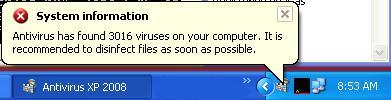
Once installed, XP Antivirus pretends to scan the computer system. The program then displays fake alert messages indicating the system has been compromised.
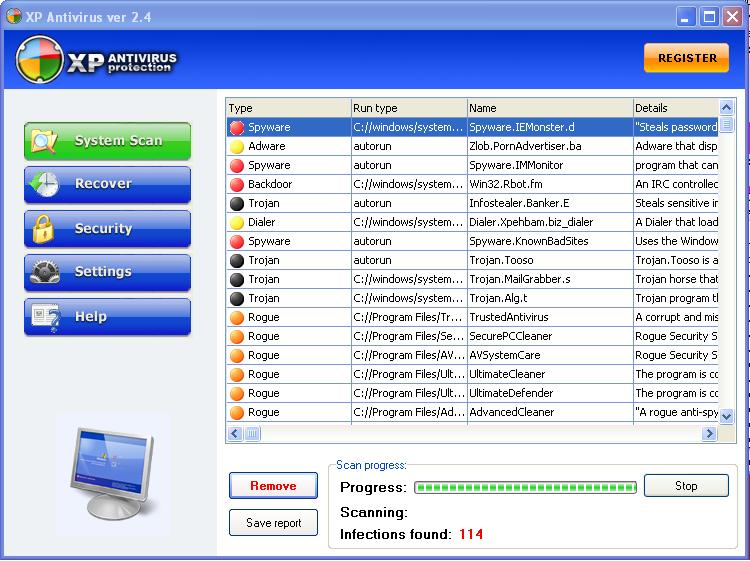
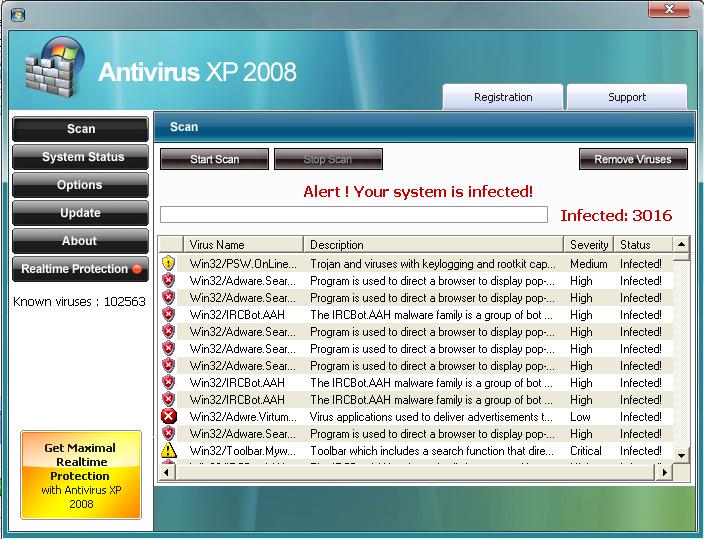
XPAntivirus variants display the following types of warnings:
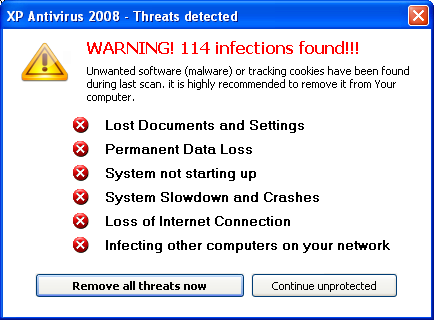
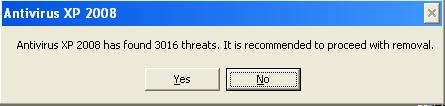
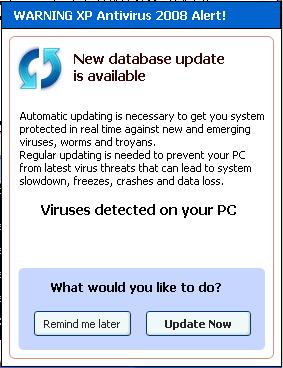
XPAntivirus variants display the following message from the System Tray:
The computer's wallpaper is changed to display the following message:
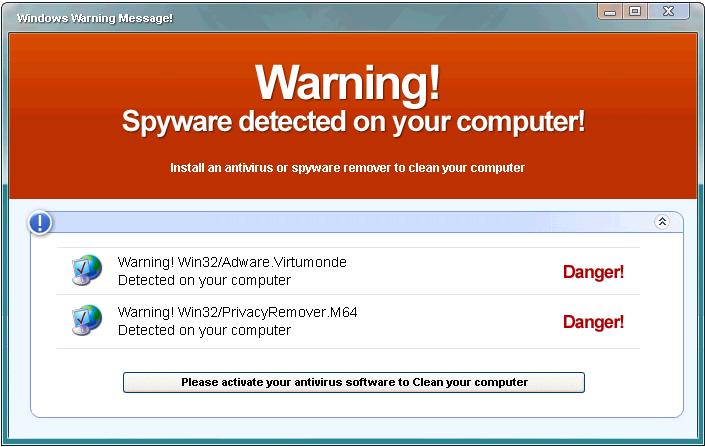
Note: All of the warning messages above were generated from a clean test machine.
Note
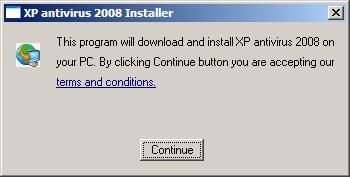
The detection Rogue:W32/XPAntivirus also detects the downloader component for the XPAntiVirus rogueware.The component downloads and executes XPAntiVirus rogueware variants on the infected computer system.The interface for the downloader component may appear as below:
Protect your devices from malware with F‑Secure Total
Protecting your devices from malicious software is essential for maintaining online security. F‑Secure Total makes this easy, helping you to secure your devices in a brilliantly simple way.
- Award‑winning antivirus and malware protection
- Online browsing, banking, and shopping protection
- 24/7 online identity and data breach monitoring
- Unlimited VPN service to safeguard your privacy
- Password manager with private data protection
Choose how many devices you want to protect to get started.

- Free customer support
- Cancel anytime
- The trial does not obligate you to buy the product
After 30 days your subscription will renew automatically for one year at €69.99.


More Support
Community
Ask questions in our Community.
User guides
Check the user guide for instructions.
Contact Support
Chat with our support for assistance.
Submit a Sample
Submit a file or URL for analysis.