

Summary
Mimail.S belongs to the Mimail mass-mailing worm family. It was first found on 29th of January, 2004. Like previous versions, the worm attempts to steal credit card information from users by asking them to fill a fake Microsoft registration form.
Removal
Based on the settings of your F-Secure security product, it will either move the file to the quarantine where it cannot spread or cause harm, or remove it.
A False Positive is when a file is incorrectly detected as harmful, usually because its code or behavior resembles known harmful programs. A False Positive will usually be fixed in a subsequent database update without any action needed on your part. If you wish, you may also:
- Check for the latest database updates
- First, check if your F-Secure security program is using the latest updates, then try scanning the file again.
- Submit a sample
- After checking, if you still believe the file is incorrectly detected, you can submit a sample of it for re-analysis.
- Note: If the file was moved to quarantine, you need to collect the file from quarantine before you can submit it.
- Exclude a file from further scanning
- If you are certain that the file is safe and want to continue using it, you can exclude it from further scanning by the F-Secure security product.
- Note: You need administrative rights to change the settings.
Technical Details
System Infection
When the worm's file is run, it registers itself as a service process and becomes invisible in Task List on Windows 9x systems.
The the worm copies itself as "rabbit.exe" file to Windows directory and creates a startup key for this file in System Registry:
[HKLM\Software\Microsoft\Windows\CurrentVersion\Run] "RabbitWannaHome" = "%windir%\rabbit.exe" where %windir% is Windows directory name.
Another copy is placed to the Windows Directory with the name 'x' which is used later when the worm sends itself in infected emails.
The worm activates the following functions only if it can resolve 'www.google.com' address i.e. when connection to Internet is available.
email Propagation
When spreading through email this variant of the worm composes email form a list of text strings within its body.
The name of the attachment is composed as follows, the first part of the filename is chosen from:
my priv private prv the best super great cool wild s*x f*ck With a separator selected from:
_ (underscore) - (dash) __ (double underscore) Followed by a second word, form the list:
pic img phot photos pctrs images imgs scene plp act action The extension of the attachment if chosen from the following list:
.pif .scr .exe .jpg.scr .jpg.pif .jpg.exe .gif.exe .gif.pif .gif.scr To collect victim's email addresses the worm scans all files on a hard drive except those with the following extensions:
bmp jpg gif exe dll avi mpg mp3 vxd ocx psd tif zip rar pdf cab wav com The collected email addresses are saved into "outlook.cfg" file located in Windows folder.
To send emails the worm tries to contact the recipient's SMTP server directly. For this purpose it tries to resolve the current user's DNS server and search for SMTP server info for recipient's domain.
Payload
After startup the worm asks the user to fill a fake Microsoft registration form. Information from that form is saved to a file and is sent to the worm's author.
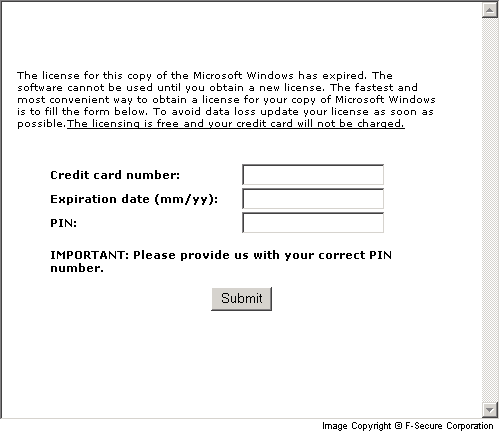
The collected data is saved to a file named "xx" that is located in the root of C: drive. After the user has entered the credit card information Mimail.S sends it to predefined email addresses.
Protect your devices from malware with F‑Secure Total
Protecting your devices from malicious software is essential for maintaining online security. F‑Secure Total makes this easy, helping you to secure your devices in a brilliantly simple way.
- Award‑winning antivirus and malware protection
- Online browsing, banking, and shopping protection
- 24/7 online identity and data breach monitoring
- Unlimited VPN service to safeguard your privacy
- Password manager with private data protection
Choose how many devices you want to protect to get started.

- Free customer support
- Cancel anytime
- The trial does not obligate you to buy the product
After 30 days your subscription will renew automatically for one year at €69.99.


More Support
Community
Ask questions in our Community.
User guides
Check the user guide for instructions.
Contact Support
Chat with our support for assistance.
Submit a Sample
Submit a file or URL for analysis.