

Summary
This type of worm is embedded in an email attachment, and spreads using the infected computer's emailing networks.
Removal
Based on the settings of your F-Secure security product, it will either move the file to the quarantine where it cannot spread or cause harm, or remove it.
A False Positive is when a file is incorrectly detected as harmful, usually because its code or behavior resembles known harmful programs. A False Positive will usually be fixed in a subsequent database update without any action needed on your part. If you wish, you may also:
- Check for the latest database updates
- First, check if your F-Secure security program is using the latest updates, then try scanning the file again.
- Submit a sample
- After checking, if you still believe the file is incorrectly detected, you can submit a sample of it for re-analysis.
- Note: If the file was moved to quarantine, you need to collect the file from quarantine before you can submit it.
- Exclude a file from further scanning
- If you are certain that the file is safe and want to continue using it, you can exclude it from further scanning by the F-Secure security product.
- Note: You need administrative rights to change the settings.
Technical Details
Email-Worm:VBS/Gedza.B is a very nasty worm which performs a variety of date-triggered actions every month. It is particularly troublesome because, in addition to spreading by email attachments like most email worms, it is also coded to be able to use numerous other vectors, including removable media and Peer-to-Peer (P2P) networks.
Whether the individual's system is infected automatically, or requires the individual to perform some action first, depends on how the worm is propagated. For example, if the worm comes in contact with the recipient's system over a network, it does not require any action from the recipient to infect the system; but if it arrives through email or a Word document, the recipient must open the email or document to infect the system.
Upon execution, the worm will install various files on the system, including an EXE file which is an antivirus program disabler and a zipped copy of the worm itself, which is the version sent out to email addresses harvested from the infected system. It also makes a variety of registry key changes designed to allow the malware to run on every startup; to lower the Excel and Word programs security levels; and to disable further registry editing.
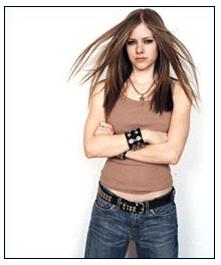
Once installed, the worm appears to launch an innocuous image of Avril Lavigne. On certain dates every month however, the worm will perform a certain action, with different actions performed on different dates.
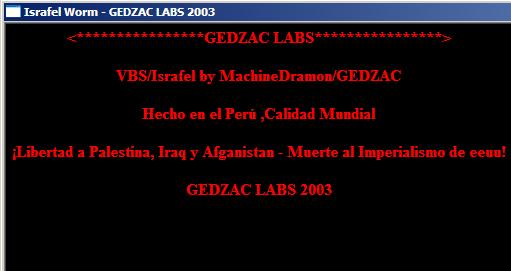
On the 3rd of every month:
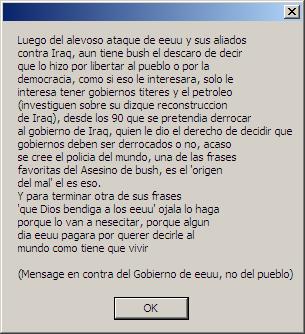
On the 11th of every month:
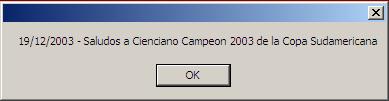
On the 19th of every month:
On the 26th of every month:
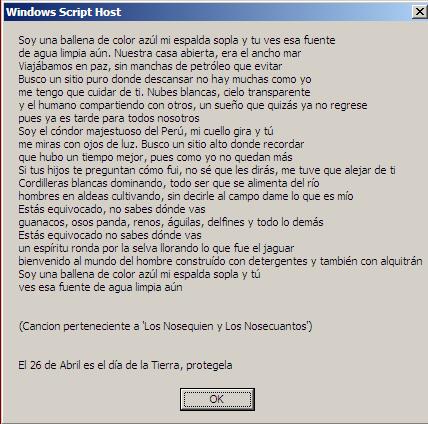
On the 29th of every month:
The worm causes the user's browser to open at the website https://www.avril-lavigne.com.
In addition to the various annoying date-triggered actions, the worm causes trouble by spreading through a exceptionally large number of ways.
1) It can spread through disks and removable drives by:
- Overwriting files with itself- Writing VBScript codes if the file extension ends with .vbs or .vbe- Writing JavaScript codes if the file extension ends with .js or .jse
- Appending itself to files- Appending itself to the end of HTA, HTM, HTML, PHP, SHTM and SHTML files, as well as other website related extensions
- Changing zip content- Inserting a copy of itself into zip archives
2) It can spread through email by:
- Creating a template in Outlook
- Sending itself out using its own mail application
3) It can spread through Peer-to-Peer (P2P) networks by:
- Copying infected zip files to P2P shared folders with interesting names eg. "HotGirls.zip" , "AVP Antivirus Pro Key Crack.zip" , "warcraft 3 crack.zip" and etc
4) It can spread through networks by:
- Going through random IPs and using a set of common usernames and passwords to try and gain access to network folders
- Once the worm has access to network folders, it infects them
5) It can spread through IIS servers by:
- Hosting an ISS server and creating asp for it
6) It can spread through Excel and Word by:
- Creating macros as normal templates for Word and Excel
- Disabling alerts and lower macro security
7) It can spread through mIRC by:
- Editing mIRC.ini and creating an IRC script to propagate itself.
File System Changes
Creates these files:
- %System%\AvrilLavigne.jpg
- %System%\iw.dat
- %System%\iwn.dat
- %System%\ix.dat
- %System%\ixn.dat
- %System%\pkzip.exe
- %System%\regsrv.exe
- %System%\sendi.exe
Modified these files:
- %System%\File.vbs
- %System%\FILEZIP.ZIP
- %System%\GEDZAC.vbs
- %System%\Israfel.vbs
- %System%\Kernel32.win
- %System%\mouse_configurator.win
- %System%\Template.htm
- %System%\winmgd.win
- [windows]run = %System%\mouse_configurator.win
- [boot]shell=Explorer.exe %System%\winmgd.win
Registry Modifications
Sets these values:
- HKEY_LOCAL_MACHINE\SOFTWARE\Microsoft\Windows\CurrentVersion\Run\Kernel21 = %System%\Kernel32.win
- HKEY_LOCAL_MACHINE\SOFTWARE\Microsoft\Windows\CurrentVersion\Run\Israfel = %System%\Israfel.vbs
- HKEY_CLASSES_ROOT\winfile\DefaultIcon = %SystemRoot%\System32\shell32.dll,-154
- HKEY_CLASSES_ROOT\winfile\Shell\Open\Command = %System%\WScript.exe %1" %*"
- HKEY_CURRENT_USER\Identities\xxx\Software\Microsoft\Outlook Express\xxx\Mail\Message Send HTML = dword:00000001
- HKEY_CURRENT_USER\Identities\xxx\Software\Microsoft\Outlook Express\xxx\Mail\Compose Use Stationery = dword:00000001
- HKEY_CURRENT_USER\Identities\xxx\Software\Microsoft\Outlook Express\xxx\Mail\Wide Stationery Name = %System%\Template.htm
- HKEY_CURRENT_USER\Identities\xxx\Software\Microsoft\Outlook Express\xxx\Mail\Stationery Name = %System%\Template.htm
- HKEY_CURRENT_USER\Software\Microsoft\WindowsNT\CurrentVersion\Policies\System\DisableRegistryTools = dword:00000001
- HKEY_CURRENT_USER\Software\Microsoft\Windows\CurrentVersion\Policies\System\DisableRegistryTools = dword:00000001
- HKEY_USERS\xxx\Software\Microsoft\Office\xxx\Excel\Security\Level = dword:00000001
- HKEY_USERS\xxx\Software\Microsoft\Office\xxx\Word\Security\Level = dword:00000001
Protect your devices from malware with F‑Secure Total
Protecting your devices from malicious software is essential for maintaining online security. F‑Secure Total makes this easy, helping you to secure your devices in a brilliantly simple way.
- Award‑winning antivirus and malware protection
- Online browsing, banking, and shopping protection
- 24/7 online identity and data breach monitoring
- Unlimited VPN service to safeguard your privacy
- Password manager with private data protection
Choose how many devices you want to protect to get started.

- Free customer support
- Cancel anytime
- The trial does not obligate you to buy the product
After 30 days your subscription will renew automatically for one year at €69.99.


More Support
Community
Ask questions in our Community.
User guides
Check the user guide for instructions.
Contact Support
Chat with our support for assistance.
Submit a Sample
Submit a file or URL for analysis.