

Summary
This program delivers advertising content to the user. It is usually annoying but harmless, unless it is combined with spyware or trackware.
Removal
Based on the settings of your F-Secure security product, it may block the file from running, move it to the quarantine where it cannot spread or cause harm, or ask you to select an action.
A False Positive is when a file is incorrectly detected as harmful, usually because its code or behavior resembles known harmful programs. A False Positive will usually be fixed in a subsequent database update without any action needed on your part. If you wish, you may also:
- Check for the latest database updates
- First, check if your F-Secure security program is using the latest updates, then try scanning the file again.
- Submit a sample
- After checking, if you still believe the file is incorrectly detected, you can submit a sample of it for re-analysis.
- Note: If the file was moved to quarantine, you need to collect the file from quarantine before you can submit it.
- Exclude a file from further scanning
- If you are certain that the file is safe and want to continue using it, you can exclude it from further scanning by the F-Secure security product.
- Note: You need administrative rights to change the settings.
Technical Details
Superjuan is an adware that is installed as a Browser Helper Object (BHO).
Installation
The dll file is usually located in the windows system folder with a random file name and implements the following autorun entries:
- HKEY_CURRENT_USER\Software\Microsoft\Windows\CurrentVersion\Run [random string] = "rundll32.exe [adware filename].dll, run"
Activity
While active, the adware can perform the& following actions:
- Display advertisement pop up depending on the search made
- Redirect user to a different website
- Trick user to install rogue application
- May track search strings on various search engines
- Lowers security level on internet zones
The adware also lowers the Security level settings on Microsoft Internet Explorer's Security Zones.
Activity
The adware tracks search queries made on a defined list of strings, then either displays adware or redirects the query. The adware tracks queries made on these websites:
- websearch.com
- usseek.com
- sensis.com.au
- searchmiracle.com
- neon.org.uk
- mirago.co.uk
- wesearchall.com
- search.about.com
- mywebsearch.com
- mysearch.myway.com
- netster.com
- lb1.netster.com
- vivisimo.com
- search.netzero.net
- search.netscape.com
- search.aol
- recherche.aol.fr
- query.nytimes.com
- mamma.com
- lycos
- kanoodle.com
- jayde.com
- hotbot.com
- search.dmoz.org
- www.excite.co.jp
- web.ask
- url.searchuk.com
- uk.searchengine.com
- excite.co.jp
- infoseek.co.jp
- search.looksmart.com
- findsearch.net
- destinationadult.com
- 7search.com
- s.teoma.com
- search.xtramsn.co.nz
- search.wanadoo.co.uk
- search.sympatico.msn.ca
- search.msn
- search.earthlink.net
- search.daum.net
- reference.com
- instafinder.com
- goguides.org
- gigablast.com
- comcast.net
- bbc.co.uk
- ask.com/web
- altavista.com
- alltheweb.com
- alexa.com
- quizrocket.com
- microsoft.com
- facebook.com
- live.com
- msn.com
- myspace
- youtube
- adultfriendfinder
- yahoo
- google
When the user searches on a defined website, the adware may contact a server to obtain an address or data containing an advertisement. The adware then launches a new web browser instance, which is in this format:
- https://[Address]/source=[string value] affid=[value created by adware] guid=[value created by adware] rid=[value created by adware]
Where [Address] is an IP address or domain returned by a contacted server, giving the location of advertisement data.
The searches made by the user may also be redirected to the following address:
- https://[Address]/go/cmp=system32 uid=[value created by adware] lid="user search string" url=[original search address result] superjuan...
Where [Address] in this case is dependent on a hard coded variant. Some possible addresses are:
- https://89.188.16.10/go/
- https://89.188.16.16/go/
- https://65.243.103.60/go/
- https://65.243.103.62/go/
- https://65.243.103.56/go/
The adware is known to be associated with several rogue applications. The adware may redirect the user to an online scanning website, which may trick the user into installing a rogue application. Some representative screenshots of rogue applications can be seen below:
.jpg)
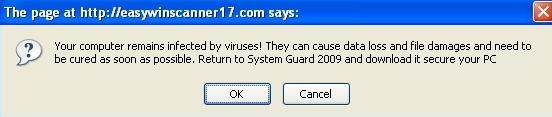
Several variants of these rogue applications may also contact a website containing a script that downloads and execute a rogue installer program.
Registry
During installation, several registry entries may be temporarily created, in order to facilitate the adware's tracking functionality.
- HKEY_LOCAL_MACHINE\Software\Microsoft\MS Juan
- HKEY_LOCAL_MACHINE\Software\Microsoft\MS Track System
- HKEY_LOCAL_MACHINE\Software\Microsoft\Juan
- HKEY_LOCAL_MACHINE\SOFTWARE\Microsoft\Con
- HKEY_LOCAL_MACHINE\SOFTWARE\Microsoft\jkwslist
- HKEY_LOCAL_MACHINE\SOFTWARE\Microsoft\jsearchcount
- HKEY_LOCAL_MACHINE\Software\Microsoft\jn_tr_<8 random character or number>
It adds the DLL file name ton the Appinit startup:
- HKEY_LOCAL_MACHINE\SOFTWARE\Microsoft\Windows NT\CurrentVersion\Windows AppInit_DLLs = "{existing entries} [adware filename].dll"
And keys to register the adware as a Browser Helper Object (BHO):
- CLSID registry key HKEY_CLASSES_ROOT\CLSID\{[selected CLSID from the list]}
- CLSID file entry HKEY_CLASSES_ROOT\CLSID\{{selected CLSID from the list}}\InprocServer32 Default =[adware filename].dll
- Browser Helper Object-added registry key entry HKEY_LOCAL_MACHINE\SOFTWARE\Microsoft\Windows\CurrentVersion\Explorer\Browser Helper\{[selected CLSID from the list]}
These are the CLSID that the adware may use:
- {B7672BAF-E9A3-49B6-86B2-C81719A18A4C}
- {849B9523-785F-4014-9CAF-079FB4A74C61}
- {1DAEFCB9-06C8-47c6-8F20-3FB54B244DAA}
- {F18F04B0-9CF1-4b93-B004-77A288BEE28B}
- {0676CC61-CDC5-447e-AAFC-9D886EC820EB}
- {7797F524-B819-42d0-B35A-0DACAF93E977}
- {013A653B-49A6-4f76-8B68-E4875EA6BA54}
- {14FD9304-A270-4d8c-B696-6B7DA0C1DF56}
- {35F7813A-AF74-4474-B1DC-7EE6FB6C43C6}
- {3FD6B99C-A275-46ea-8FD1-3D63986E51E4}
- {7DA39570-5FD2-4f18-94B4-20730CB3F727}
- {68D5CF1D-EC5C-4bdd-A9EF-F0E517565D50}
- {E03C740E-BB24-4d3c-B92A-6F84DE1DD99C}
- {337C54C9-80C1-4de2-93CD-AAA510834074}
- {D38439EC-4A7F-42b4-90C2-D810D7778FDD}
- {57E218E6-5A80-4f0c-AB25-83598F25D7E9}
- {67C55A8D-E808-4caa-9EA7-F77102DE0BB6}
- {1557B435-8242-4686-9AA3-9265BF7525A4}
- {D651AFF4-9590-424d-BD1E-8E33E090DFB3}
- {E2EE5C44-C66D-499d-BEAE-A2A79189A63A}
- {55DB983C-BDBF-426f-86F0-187B02DDA39B}
- {A24B57F8-505D-4fc5-9960-740E304D1ABA}
- {4B646AFB-9341-4330-8FD1-C32485AEE619}
- {CD3447D4-CA39-4377-8084-30E86331D74C}
- {DEBEB52F-CFA6-4647-971F-3EDB75B63AFA}
- {8F2183B9-F4DB-4913-8F82-6F9CC42E4CF8}
- {92A444D2-F945-4dd9-89A1-896A6C2D8D22}
- {E12BFF69-38A7-406e-A8EF-2738107A7831}
- {5ADF3862-9E2E-4ad3-86F7-4510E6550CD0}
- {1F6581D5-AA53-4b73-A6F9-41420C6B61F1}
- {1126271C-A8C3-438c-B951-7C94B453B16B}
- {938A8A03-A938-4019-B764-03FF8D167D79}
- {CF46BFB3-2ACC-441b-B82B-36B9562C7FF1}
- {C6039E6C-BDE9-4de5-BB40-768CAA584FDC}
- {44218730-94E0-4b24-BBF0-C3D8B2BCE2C3}
- {C24751C6-3976-419a-A776-915669E28A4D}
- {47B83D78-F986-4E96-9769-2C55EF14DA0B}
- {E64F0381-0053-4842-B3E5-08F6C4A0AEB6}
- {32A5ED57-EA40-4869-8675-28EA463E6B23}
- {89AD4D75-2429-462e-BD4E-443F233F6033}
- {F9546B58-83B5-44bb-93CF-945253E58025}
- {F864AD64-8376-447d-B5F4-EA4965E3E0EA}
- {BE3E60A0-8087-4ad2-9386-500966D663B4}
Protect your devices from malware with F‑Secure Total
Protecting your devices from malicious software is essential for maintaining online security. F‑Secure Total makes this easy, helping you to secure your devices in a brilliantly simple way.
- Award‑winning antivirus and malware protection
- Online browsing, banking, and shopping protection
- 24/7 online identity and data breach monitoring
- Unlimited VPN service to safeguard your privacy
- Password manager with private data protection
Choose how many devices you want to protect to get started.

- Free customer support
- Cancel anytime
- The trial does not obligate you to buy the product
After 30 days your subscription will renew automatically for one year at €69.99.


More Support
Community
Ask questions in our Community.
User guides
Check the user guide for instructions.
Contact Support
Chat with our support for assistance.
Submit a Sample
Submit a file or URL for analysis.