


)
What is a Trojan horse?
A Trojan horse is a type of malicious software, also known as malware, that disguises itself as a useful, safe, or entertaining software to trick you into installing it. Once it’s on your computer, this malicious software secretly allows hackers to steal sensitive data, spy on your activities, or gain unauthorized access to your system.
Stay safe against the Trojan horse virus
Get protected against virus and malware with F‑Secure.
The Trojan virus is named after an ancient Greek story in which the Greeks couldn’t capture the great city of Troy even after years of war. To achieve their goal, they came up with a plan: to disguise a wooden horse large enough for 40 men to hide in as a gift to the Trojans.
Once the Trojans dragged the horse inside the city walls, the 40 men inside let in a greater force, and the city was captured. A Trojan computer virus works just like the famous Trojan horse of Greek legend; it disguises itself as something else to get past your defenses undetected.
How does a Trojan horse virus work?
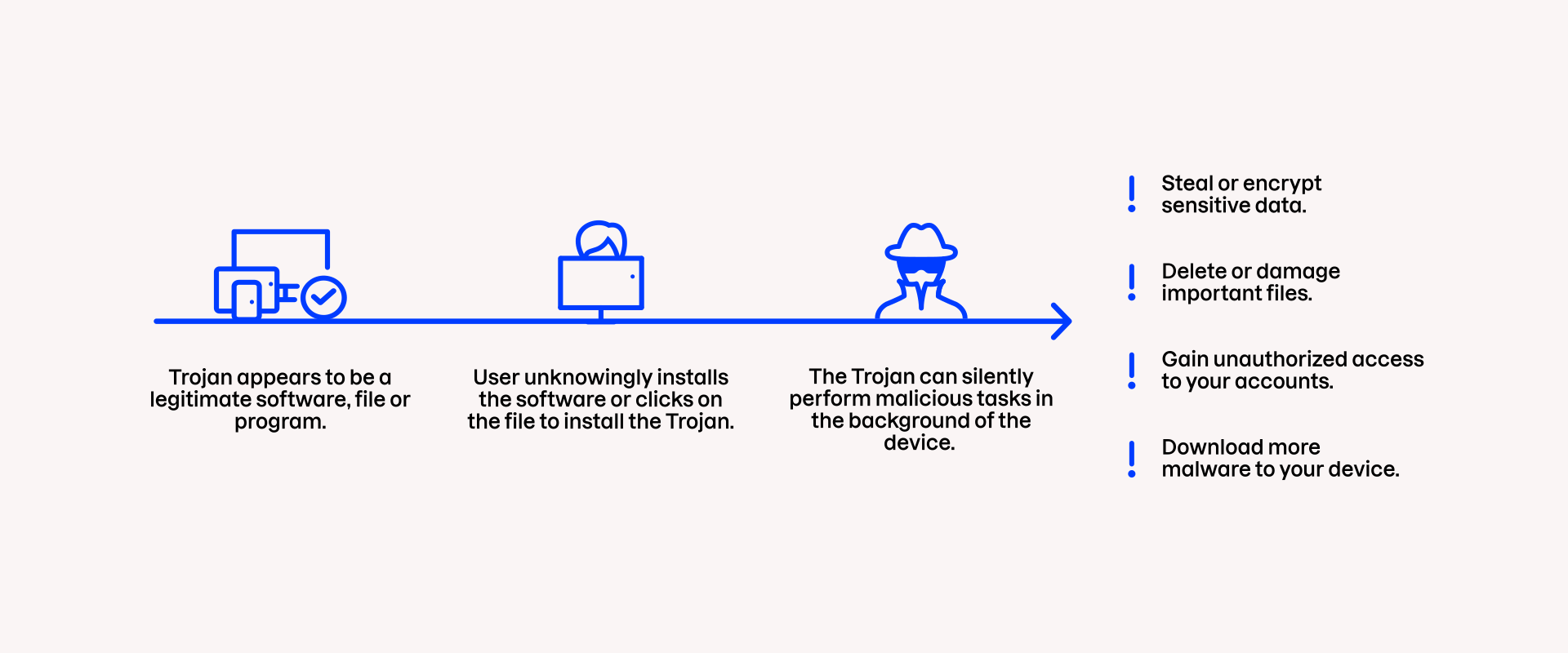
There are many ways for Trojans to infect your devices. A Trojan infection typically follows these steps:
Deception. The Trojan virus appears to be a legitimate and relevant software, app, game, or update for your device. In reality, the software contains harmful code that will damage your device.
User action. Once the user clicks on the legitimate-looking software or runs the update, the Trojan can infect the device and start running malicious tasks in the background.
Malicious action. When activated, the Trojan horse can steal data, gain unauthorized access, damage files, encrypt your files for ransom, activate keyloggers and create “backdoors” for further damage.
The Trojan virus relies on users clicking or running the malicious program on the infected device. Unlike different viruses and computer worms, a Trojan cannot spread automatically without a host activating it.
How does a device get infected by a Trojan virus?
Cyber criminals are well aware that a file named virus.exe won’t fool anyone. Therefore, the malicious file or software has to be disguised. A computer Trojan can be disguised as practically anything that gets your attention, such as an email attachment claiming to be an invoice, a viral cat video or an interesting app.
Trojans are often injected into a program or a file you want to download. Unfortunately, these tricks can be really difficult to spot. They are, after all, meant to fool you. Common ways of infecting a victim’s computer with a Trojan horse virus include phishing and so-called drive-by downloads where the Trojan is sneaked into the device.
5 common types of Trojans
There are different types of Trojan horses to look out for, and more sophisticated ones can perform multiple functions. Here are a few common types of Trojan malware:
1. Backdoor Trojan
As the name suggests, a backdoor Trojan creates a backdoor or gateway to enter your device. When a backdoor Trojan has established a path into your computer or mobile device, cyber criminals can use it to enter, steal your information, or infect the device with other malware and spyware.
2. Banking Trojan
A banking Trojan aims to steal your banking information, such as your bank account login details or credit card information. The victim of a banking Trojan may receive a malicious link in a phishing email, and after clicking it, the user is taken to a page that appears to be their bank’s login page. Instead of logging in to their online bank, they unknowingly provide their bank account details to cyber criminals.
3. Distributed Denial of Service (DDoS) Trojan
DDoS means that a server is bombarded with requests, causing its traffic to exceed its capacity. The word “distributed” here refers to multiple sources simultaneously attacking the server. A Trojan horse virus can connect a user’s infected computer or mobile device to a larger network of devices called a botnet and use the device to carry out DDoS attacks.
4. Downloader Trojan
Once active on your computer, the downloader Trojan can secretly download and install other malicious programs, such as ransomware, spyware, or banking trojans. A downloader Trojan is similar to a Trojan dropper, but droppers already contain the harmful program, whereas a downloader Trojan does not.
5. Instant messaging (IM) Trojan
Trojans can also target instant messaging services such as Messenger to steal users’ login data and passwords. Stay protected against instant messaging Trojans by using strong and unique passwords and storing them in a password manager.
Stay safe against the Trojan horse virus
Get protected against virus and malware with F‑Secure.
How to avoid Trojans and other online threats?
The Trojan horse virus cannot infect your device unless you let it in. Therefore, being safe requires your action. Follow these tips to protect yourself against Trojan malware:
Use antivirus software. A comprehensive antivirus software actively scans your computer to detect, block, and remove malicious programs, including Trojans, before they can cause harm.
Avoid opening links and attachments. Be cautious with unexpected emails, as clicking on suspicious links and attachments is the most common way to get infected by a Trojan.
Download software only from legitimate sources. Avoid downloading apps, software or files from unofficial websites or third-party app stores.
Don’t fall for phishing scams. Phishing messages create a false sense of urgency, often trying to trick you into downloading an “important” document that is actually a Trojan virus.
)