

Summary
Trojan:W32/AutoIt.D attempts to download and install other malware to the system. It also changes startup and search pages of the Internet Explorer web browser.
Removal
Based on the settings of your F-Secure security product, it will either move the file to the quarantine where it cannot spread or cause harm, or remove it.
A False Positive is when a file is incorrectly detected as harmful, usually because its code or behavior resembles known harmful programs. A False Positive will usually be fixed in a subsequent database update without any action needed on your part. If you wish, you may also:
Check for the latest database updates
First, check if your F-Secure security program is using the latest updates, then try scanning the file again.
Submit a sample
After checking, if you still believe the file is incorrectly detected, you can submit a sample of it for re-analysis.
Note: If the file was moved to quarantine, you need to collect the file from quarantine before you can submit it.
Exclude a file from further scanning
If you are certain that the file is safe and want to continue using it, you can exclude it from further scanning by the F-Secure security product.
Note: You need administrative rights to change the settings.
Technical Details
AutoIt.D is a script file converted to an executable file using AutoIt.
Distribution
AutoIt.D may be silently downloaded on the system when an unsuspecting user follows a link delivered in a malicious chat message in the Yahoo! Messenger Instant Messaging (IM) application, such as below:
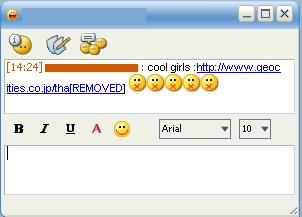
When present on an infected computer, the malware is able to hijack the IM application in order to send out the malicious chat messages. The Trojan searches for the string title "Yahoo! Messenger" in the Windows Title Bar in order to detect whe the application is open.
When the string found, AutoIt.D will secretly and randomly input any of the following messages at 80 second intervals:
- A new dangerous computer virus that can destroys all your data has just been released . Click here to know how to avoid it : http://www.geocities.co.jp/ie_[...] <<
- Cac ban co the tranh bi nhiem cac loai virus online gan day bang cach update Windows . Vao day de biet cach Update Win ma ko can ban quyen Windows xin: http://www.geocities.co.jp/ie_[...]
- cai dit con me may day . Lua tao a` ? Xem di : http://www.geocities.co.jp/tha[...] X-(
- cool girls : http://www.geocities.co.jp/tha[...] :x:x:x:x:x
- di'nh virus ru`i =)) du`ng cai nay ma diet na`y : http://www.geocities.co.jp/ie_[...]
- Download free MP3s : http://www.geocities.co.jp/tha[...] <<
- ha`i dek chiu dc =)) http://www.geocities.co.jp/tha[...] =)) =))
- have you ever seen such a silly man like this ? http://www.geocities.co.jp/tha[...] =))
- Just check out my new personal website : http://www.geocities.co.jp/tha[...] C00l !!!
- Let's vote for Miss Vietnam - Mai Phuong Thuy - for the upcoming Miss World championship : http://www.geocities.co.jp/tha[...] !!
- making money online never be easier : http://www.geocities.co.jp/tha[...] >:D<
- Now you can avoid some critical online viruses by updating Windows . Click here to know how to Update your Windows : http://www.geocities.co.jp/tha[...]
- the only way to clean some online viruses that may lead you into troubles : http://www.geocities.co.jp/ie_[...] <<
- Use this tool to remove the viruses from your PC : http://www.geocities.co.jp/ie_[...] <<
- wtf is this ? Wanna give me a shit ? http://www.geocities.co.jp/tha[...] X-( <<
The links in the messages direct the user to a webpage containing the malware:
- http://my.opera.com/termex18388/homes/files/[...].exe
- http://www.geocities.co.jp/thanatos18388/[...].jpg
The malware is then silently installed and executed on the visitor's system.
Execution
Upon execution, AutoIt.D downloads a file from the following site:
- http://www.geocities.co.jp/thanatos18388/[...].jpg
This file is detected as IM-Worm:W32/Sohanad.B. Once downloaded, it is saved with the following filename:
- %WinDir%\svchost32.exe
The saved file is then executed.
AutoIt.D also changes settings for the web browser's Home Page, Yahoo Buzz and Yahoo Launchcast links to the following site:
- http://www.geocities.co.jp/th[...]
Registry
To enable its automatic execution on startup, it creates the following registry launch point:
- [HKEY_LOCAL_MACHINE\Software\Microsoft\Windows\CurrentVersion\Run] Task Manager ="%WinDir%\svchost32.exe"
It locks the home page in Internet Explorer by modifying the following registry entry:
- [HKEY_CURRENT_USER\Software\Policies\Microsoft\Internet Explorer\Control Panel] Homepage="1"
Note: The value of Homepage varies between users. Homepage="0" will unlock the homepage settings.
It also disables Task Manager and Registry Editor by creating the following registry entries:
- [HKEY_CURRENT_USER\Software\Microsoft\Windows\CurrentVersion\Policies\System] DisableTaskMgr="1"
- [HKEY_CURRENT_USER\Software\Microsoft\Windows\CurrentVersion\Policies\System] DisableRegistryTools="1"
Protect your devices from malware with F‑Secure Total
Protecting your devices from malicious software is essential for maintaining online security. F‑Secure Total makes this easy, helping you to secure your devices in a brilliantly simple way.
Award‑winning antivirus and malware protection
Online browsing, banking, and shopping protection
24/7 online identity and data breach monitoring
Unlimited VPN service to safeguard your privacy
Password manager with private data protection
Choose how many devices you want to protect to get started.

Free customer support
Cancel anytime
The trial does not obligate you to buy the product
After 30 days your subscription will renew automatically for one year at €69.99.
)
)
More Support
Community
Ask questions in our Community.
User guides
Check the user guide for instructions.
Contact Support
Chat with with or call an agent.
Submit a Sample
Submit a file or URL for analysis.