Worm:W32/Zimuse.A
Summary
Zimuse is a family of worms that performs destructive overwrite of the Master Boot Record of disk drives on the infected system.
Removal
A False Positive is when a file is incorrectly detected as harmful, usually because its code or behavior resembles known harmful programs. A False Positive will usually be fixed in a subsequent database update without any action needed on your part. If you wish, you may also:
- Check for the latest database updates
First, check if your F-Secure security program is using the latest updates, then try scanning the file again.
- Submit a sample
After checking, if you still believe the file is incorrectly detected, you can submit a sample of it for re-analysis.
Note: If the file was moved to quarantine, you need to collect the file from quarantine before you can submit it.
- Exclude a file from further scanning
If you are certain that the file is safe and want to continue using it, you can exclude it from further scanning by the F-Secure security product.
Note: You need administrative rights to change the settings.
Technical Details
General
Arrival to the system
Zimuse.A arrives on the system either as a standalone file (possibly from a malicious download or email) or by infected removable devices (e.g., USB sticks).
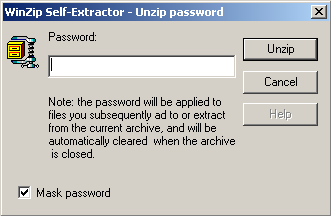
When executed, it will display a fake WinZip dialog box (see image below). This dialog box is a sham. Regardless of the user's subsequent interaction, the worm has already infected the system.
The following file operations will be performed on the system:
- Creates these files:
- Uses these temporary files:
Launchpoint/Autostart
Uses registry launchpoints to ensure its components run or are loaded as services on every startup (see below).
Registry Changes
Creates these keys:
- HKLM\System\CurrentControlSet\Services\EventLog\System\MSTART
- HKLM\System\CurrentControlSet\Services\MSTART
- HKLM\System\CurrentControlSet\Services\MSTART\Security
- HKLM\System\CurrentControlSet\Services\Mseu
- HKLM\system\currentcontrolset\services\UnzipService
Sets these values:
- HKLM\System\CurrentControlSet\Services\EventLog\System\MSTART EventMessageFile = %SystemRoot%\System32\Drivers\MSTART.SYS
- HKLM\System\CurrentControlSet\Services\EventLog\System\MSTART TypesSupported = 7
- HKLM\System\CurrentControlSet\Services\MSTART Type = 1
- HKLM\System\CurrentControlSet\Services\MSTART Start = 3
- HKLM\System\CurrentControlSet\Services\MSTART ErrorControl = 1
- HKLM\System\CurrentControlSet\Services\MSTART ImagePath = \??\C:\WINDOWS\system32\Drivers\MSTART.SYS [Launchpoint: Service]
- HKLM\System\CurrentControlSet\Services\MSTART DisplayName = MSTART
- HKLM\System\CurrentControlSet\Services\MSTART\Security Security =
- HKLM\SOFTWARE\Microsoft\Windows\CurrentVersion\Run Dump = C:\Program files\Dump\Dump.exe [Launchpoint: Run]
- HKLM\System\CurrentControlSet\Services\Mseu Type = 1
- HKLM\System\CurrentControlSet\Services\Mseu Start = 2
- HKLM\System\CurrentControlSet\Services\Mseu ErrorControl = 1
- HKLM\System\CurrentControlSet\Services\Mseu Tag = 1
- HKLM\System\CurrentControlSet\Services\Mseu Group = Extended base
- HKLM\system\currentcontrolset\services\UnzipService Type = 272
- HKLM\system\currentcontrolset\services\UnzipService Start = 2
- HKLM\system\currentcontrolset\services\UnzipService ImagePath = System32\Mseus.exe [Launchpoint: Service]
- HKLM\system\currentcontrolset\services\UnzipService ErrorControl = 0
- HKLM\system\currentcontrolset\services\UnzipService DisplayName = Self extract service
- HKLM\system\currentcontrolset\services\UnzipService ObjectName = LocalSystem
- HKLM\system\currentcontrolset\services\UnzipService Description = Self extract archive decrypt
Infection
After a certain time period from the initial infection, the worm will infect removable drives inserted into the system by dropping a copy of itself named zipsetup.exe and an autorun.inf file as show below:
[autorun] shellexecute=zipsetup.exe /H
Payload
After a further period of dormancy, the worm will trigger its payload, which overwrites the Master Boot Record of available drives on the system, and effectively crippling the file system and rendering data on the disk inaccessible except with specialist tools. The following dialog box will be displayed:

On next boot the system will be unbootable.
More Support

Community
Ask questions in our Community.

User guides
Check the user guide for instructions.

Contact Support
Chat with with or call an agent.

Submit a Sample
Submit a file or URL for analysis.