Summary
Worm:W32/Tyhos regularly checks for any removable devices connected to the system; if found, the worm copies itself to the removable drive.
Removal
Based on the settings of your F-Secure security product, it will either move the file to the quarantine where it cannot spread or cause harm, or remove it.
A False Positive is when a file is incorrectly detected as harmful, usually because its code or behavior resembles known harmful programs. A False Positive will usually be fixed in a subsequent database update without any action needed on your part. If you wish, you may also:
- Check for the latest database updates
First, check if your F-Secure security program is using the latest updates, then try scanning the file again.
- Submit a sample
After checking, if you still believe the file is incorrectly detected, you can submit a sample of it for re-analysis.
Note: If the file was moved to quarantine, you need to collect the file from quarantine before you can submit it.
- Exclude a file from further scanning
If you are certain that the file is safe and want to continue using it, you can exclude it from further scanning by the F-Secure security product.
Note: You need administrative rights to change the settings.
Technical Details
Worm:W32/Tyhos spreads via infected removable drives; once present on a machine, it checks the system for any connected removable drives every 10555 milliseconds. If found, it copies itself to the removable drive.
The worm file itself is packed using the F[ast] S[mall] G[ood] packer.
The details below are based on analysis of the following sample: SHA1: 21ae5cf02ba792d902efb7cbc9a115769c878337.
Execution
On execution, the worm creates copies of itself in the following locations:
- %System%\[random number]\avgupdate.exe
- %System%\[random number]\isass.exe
The copied files have their properties set to hidden. The worm also adds registry keys for both files, so that they run automatically whenever the system is started:
- HKEY_LOCAL_MACHINE\SOFTWARE\Microsoft\Windows\CurrentVersion\Run\avpupdt = "%System%\[Random_Numbers]\avgupdt.exe"
- HKEY_LOCAL_MACHINE\SOFTWARE\Microsoft\Windows\CurrentVersion\Run\ctfmon = "%System%\[Random_Numbers]\lsass.exe"
It also drops an HTML page to:
- %SystemRoot%\index.html
And creates the following mutexes:
- ----[ GHOSTY.NET ]----
- 6H0sty-Gh057y.net-ghozty
Once the files are dropped, the isass.exe file is launched by shellexecute and checks whether a file named ghosty.d is present in the SystemRoot folder. It also opens the dropped index.html file:
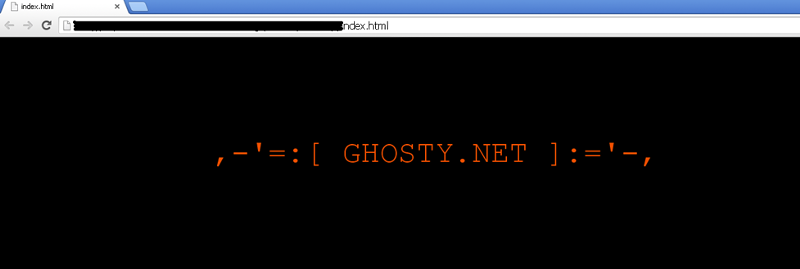
index.html file displayed by Worm:W32/Tyhos
More Support

Community
Ask questions in our Community.

User guides
Check the user guide for instructions.

Contact Support
Chat with with or call an agent.

Submit a Sample
Submit a file or URL for analysis.