Worm:W32/AutoRun.DMO
Summary
A standalone malicious program which uses computer or network resources to make complete copies of itself.
Removal
Based on the settings of your F-Secure security product, it will either move the file to the quarantine where it cannot spread or cause harm, or remove it.
A False Positive is when a file is incorrectly detected as harmful, usually because its code or behavior resembles known harmful programs. A False Positive will usually be fixed in a subsequent database update without any action needed on your part. If you wish, you may also:
- Check for the latest database updates
First, check if your F-Secure security program is using the latest updates, then try scanning the file again.
- Submit a sample
After checking, if you still believe the file is incorrectly detected, you can submit a sample of it for re-analysis.
Note: If the file was moved to quarantine, you need to collect the file from quarantine before you can submit it.
- Exclude a file from further scanning
If you are certain that the file is safe and want to continue using it, you can exclude it from further scanning by the F-Secure security product.
Note: You need administrative rights to change the settings.
Technical Details
This worm spreads through removable drives and network drives connected to an infected machine.The payload of this worm is to infect all Microsoft Excel files on the infected machine, rendering the infected files unreadable. The data itself still remains and can be recovered, but the formatting and formulas used in the worksheet(s) may not always be recoverable.
Installation
During installation, the worm will create the following files:
- %Profiles%\Default User\Templates\temp.tmp %Profiles%\[UserName]\Templates\temp.tmp
- C:\WINDOWS\System\csrsss.exe
- C:\WINDOWS\System\svchosts.exe
- C:\WINDOWS\System\winxpsp2.dll
It will then modify the following files:
- %Profiles%\Default User\Templates\excel.xls
- %Profiles%\Default User\Templates\excel4.xls
- %Profiles%\[UserName]\excel.xls
- %Profiles%\[UserName]\excel4.xls
Next, the worm will search through all Excel files stored on the system and modify them. To do so, the worm drops a small temporary file (2KB in size) on every folder containing Excel files. The temporary file contains a bad string, " @ ", which is appended to every Excel file.
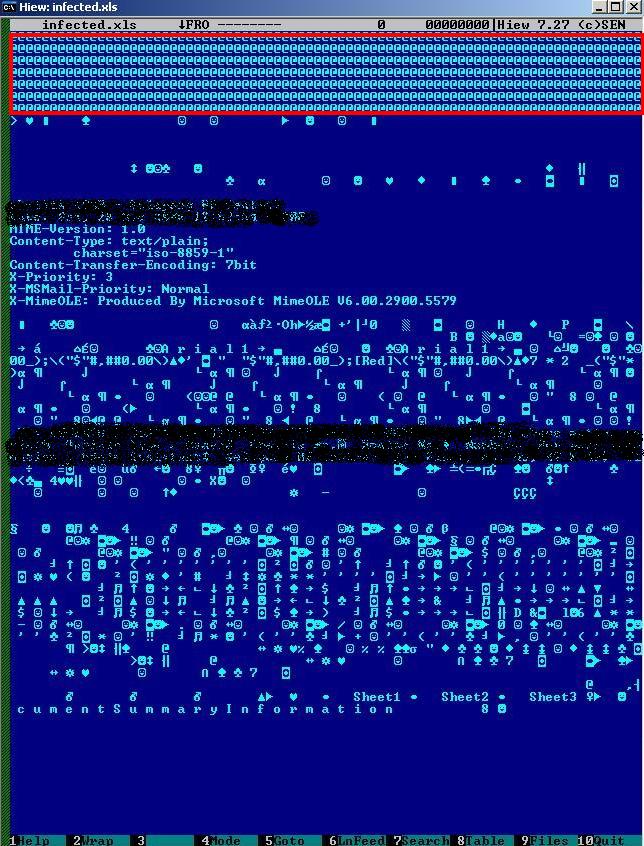
The actual search for Excel files is performed by two processes, svchosts.exe and csrsss.exe., which actively look for the targetted file types on the system. The constant searching results in the machine running a high CPU usage (usually 100%) for these processes. This high CPU usage is detectable by the user and is a sign of infection.
Propagation
The worm itself, and its autorun file, propagates through any accessible removable drive and every root folder. The autorun for this worm appears as:
- [autorun] Shellexecute=data.exe shell\open=&Open... shell\open\Command=data.exe shell\explore=&Explorer shell\explore\Command="data.exe -e"
Registry
During installation, the worm registers itself so that it will run automatically on every system startup.
- [HKEY_LOCAL_MACHINE\SOFTWARE\Microsoft\Windows\CurrentVersion\Run] Microsoft OfficeTool = "svchosts.exe"
Recovery
The infected files can be partially recovered by using Microsoft Excel's built-in repair function. Manual recovery is needed to fully recover all elements of an infected file, and involves stripping off the bad string and replacing the Excel header. Please note that this works on some, but not all, infected files.
More Support

Community
Ask questions in our Community.

User guides
Check the user guide for instructions.

Contact Support
Chat with with or call an agent.

Submit a Sample
Submit a file or URL for analysis.