Trojan:W32/Recslurp
Summary
Trojan:W32/Recslurp silently contacts remote servers and attempts to download additional files onto the infected machine.
Removal
Based on the settings of your F-Secure security product, it will either move the file to the quarantine where it cannot spread or cause harm, or remove it.
A False Positive is when a file is incorrectly detected as harmful, usually because its code or behavior resembles known harmful programs. A False Positive will usually be fixed in a subsequent database update without any action needed on your part. If you wish, you may also:
- Check for the latest database updates
First, check if your F-Secure security program is using the latest updates, then try scanning the file again.
- Submit a sample
After checking, if you still believe the file is incorrectly detected, you can submit a sample of it for re-analysis.
Note: If the file was moved to quarantine, you need to collect the file from quarantine before you can submit it.
- Exclude a file from further scanning
If you are certain that the file is safe and want to continue using it, you can exclude it from further scanning by the F-Secure security product.
Note: You need administrative rights to change the settings.
Technical Details
Trojan:W32/Recslurp is distributed via spam email messages. The messages may contain either a link that leads to a downloadable executable file, or a zipped file attachment containing the malware, such as below:
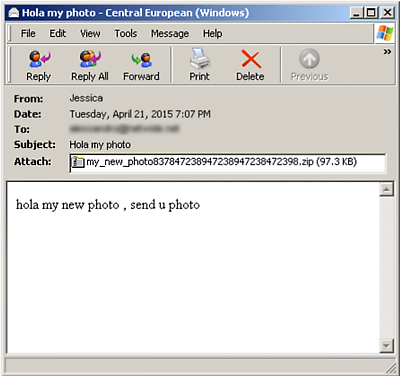
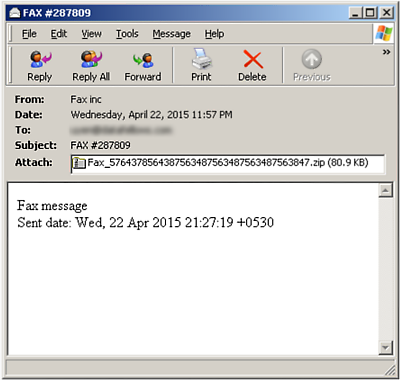
Spam email messages distributing Trojan:W32/Recslurp
If the downloaded file or file attachment is opened on the machine, the malware runs and attempts to either overwrite the following system files with a copy of itself:
- %systemroot%\csrss.exe
- %systemroot%\svchost.exe
- %systemroot%\rundll32.exe
Or drop a copy of itself at the following locations, with hidden and system file attributes:
- %userprofile%\%appdata%\csrss.exe
- %userprofile%\%appdata%\svchost.exe
- %userprofile%\%appdata%\rundll32.exe
Next, Recslurp creates the following registry keys so that the copy automatically runs at each system startup:
- HKEY_CURRENT_USER\Software\Microsoft\Windows\CurrentVersion\Run Client Server Runtime Process <%userprofile%\%appdata% or %systemroot%>\csrss.exe
- HKEY_CURRENT_USER\Software\Microsoft\Windows\CurrentVersion\Run Service Host Process for Windows <%userprofile%\%appdata% or %systemroot%>\svchost.exe
- HKEY_CURRENT_USER\Software\Microsoft\Windows\CurrentVersion\Run Host-process Windows (Rundll32.exe) <%userprofile%\%appdata% or %systemroot%>\rundll32.exe
Once installed and running, Recslurp attempts to connect to the following hosts:
- smtp.gmail.com
- plust.smtp.mail.yahoo.com
It also contacts remote servers at the following IP addresses in order to download and execute additional files:
- 61.250.[removed].132:9997 - Korea
- 41.[removed].138.246:9631 - Uganda
- 185.[removed].56.84:9997 - Netherlands
- 5.27.[removed].82:9997 - Turkey
- 186.[removed].131.131:9631 - Colombia
- 197.[removed].152.225:9631 - Algeria
More Support

Community
Ask questions in our Community.

User guides
Check the user guide for instructions.

Contact Support
Chat with with or call an agent.

Submit a Sample
Submit a file or URL for analysis.