Trojan:W32/Emotet
Summary
Emotet steals sensitive information and has the capability to download and install other malware and modules onto the system.
Removal
Based on the settings of your F-Secure security product, it will either move the file to the quarantine where it cannot spread or cause harm, or remove it.
A False Positive is when a file is incorrectly detected as harmful, usually because its code or behavior resembles known harmful programs. A False Positive will usually be fixed in a subsequent database update without any action needed on your part. If you wish, you may also:
- Check for the latest database updates
First, check if your F-Secure security program is using the latest updates, then try scanning the file again.
- Submit a sample
After checking, if you still believe the file is incorrectly detected, you can submit a sample of it for re-analysis.
Note: If the file was moved to quarantine, you need to collect the file from quarantine before you can submit it.
- Exclude a file from further scanning
If you are certain that the file is safe and want to continue using it, you can exclude it from further scanning by the F-Secure security product.
Note: You need administrative rights to change the settings.
Technical Details
Behavior
Upon execution, Emotet will attempt to create a copy of itself and then delete the main executable.
Afterwards, it creates a child process of itself, which then creates a service and uses the Windows API CreateTimerQueueTimer to invoke a recurring thread which connects to a malicious command and control (C&C;) server.
Infection Vector
Emotet is typically encountered when the user inadvertently opens a malicious file attachment that arrives via a spam email message.
Files Added
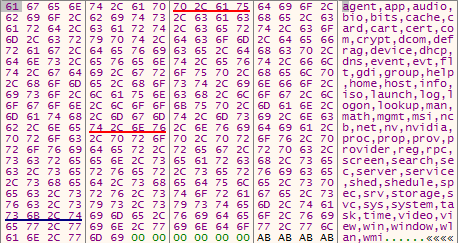
- Creates a copy of itself at [Dropped_Filename]where Dropped_Filename is a combination of any of the following 2 strings (for example msicrypt.exe, ncbprovider.exe):
Registry Changes
Adds the following registry key to create service:
- HKLM\SYSTEM\ControlSet001\services\[Dropped_Filename]\Type: 0x00000010
- HKLM\SYSTEM\ControlSet001\services\[Dropped_Filename]\Start: 0x00000002
- HKLM\SYSTEM\ControlSet001\services\[Dropped_Filename]\ErrorControl: 0x00000000
- HKLM\SYSTEM\ControlSet001\services\[Dropped_Filename]\ImagePath: %windir%\System32|SysWOW64\[Dropped_Filename].exe
- HKLM\SYSTEM\ControlSet001\services\[Dropped_Filename]\DisplayName: [Dropped_Filename]
- HKLM\SYSTEM\ControlSet001\services\[Dropped_Filename]\ObjectName: LocalSystem
- HKLM\SYSTEM\ControlSet001\services\[Dropped_Filename]\Description: Copies and root certificates from smart cards into the current users certificate store, detects when a smart card is inserted into a smart card reader, and, if needed, installs the smart card Plug and Play minidriver.
Network Activity
It encrypts the following data using an RSA public key, which is present inside the file, then sends the encrypted data to the C&C; server:
- Admin privilege + Computer Name and length of Computer Name + Hash of File-path of execution + Length and List of current process running
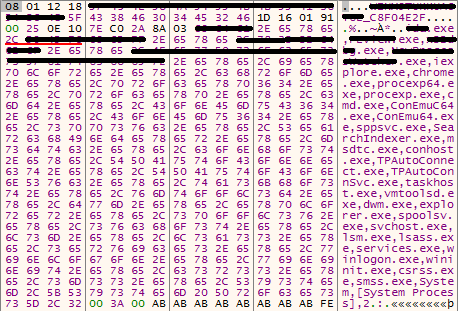
It connects to the following servers:
- 71.244.60[.]231:4143
- 84.200.208[.]98:80
- 91.217.66[.]130:443
- 193.169.54[.]12:8080
- 80.82.115[.]164:4143
- 186.103.199[.]252:4143
- 213.108.33[.]44:80
- 27.254.150[.]53:4143
- 189.51.144[.]3:80
- 159.203.94[.]198:4143
- 178.62.39[.]238:443
- 178.62.253[.]139:4143
- 52.4.64[.]240:4143
The following functionality may also be carried out if the C&C; server responds:
- Download an upgraded version of Emotet
- Download and execute other malware
- Download module to spread itself in network
Analysis on file: 7e5e1f837189e5127aa86e0a834fe8f1e55c57c7
More Support

Community
Ask questions in our Community.

User guides
Check the user guide for instructions.

Contact Support
Chat with with or call an agent.

Submit a Sample
Submit a file or URL for analysis.