Trojan:VBS/StartPage.BO
Summary
VBS/StartPage.BO.@troj is an appending VBS Virus with Trojan characteristics. It will attempt to infect all HTML files on visible drives.
Removal
Based on the settings of your F-Secure security product, it will either move the file to the quarantine where it cannot spread or cause harm, or remove it.
A False Positive is when a file is incorrectly detected as harmful, usually because its code or behavior resembles known harmful programs. A False Positive will usually be fixed in a subsequent database update without any action needed on your part. If you wish, you may also:
- Check for the latest database updates
First, check if your F-Secure security program is using the latest updates, then try scanning the file again.
- Submit a sample
After checking, if you still believe the file is incorrectly detected, you can submit a sample of it for re-analysis.
Note: If the file was moved to quarantine, you need to collect the file from quarantine before you can submit it.
- Exclude a file from further scanning
If you are certain that the file is safe and want to continue using it, you can exclude it from further scanning by the F-Secure security product.
Note: You need administrative rights to change the settings.
Technical Details
VBS/StartPage.BO.@troj is an appending VBS Virus with Trojan characteristics. It will attempt to infect all HTML files on visible drives.StartPage.BO has multiple features and performs a number of tasks including what could be described as "pranks". Things such as changing icons, mouse button settings, background images, et cetera.VBS/StartPage.BO.@troj creates these files:
- %internetcache%\www.MacDonald.com-index.htm%userprofile%\Favorites\www.MacDonald.com-index.htm
- %userprofile%\Local Settings\Application Data\Microsoft\CD Burning\www.MacDonald.com-index.htm
- %userprofile%\Local Settings\History\www.MacDonald.com-index.htm
- %userprofile%\My Documents\My Music\www.MacDonald.com-index.htm
- %userprofile%\My Documents\My Pictures\www.MacDonald.com-index.htm
- %userprofile%\My Documents\My Video\www.MacDonald.com-index.htm
- %userprofile%\My Documents\www.MacDonald.com-index.htm
- %userprofile%\Start Menu\Programs\www.MacDonald.com-index.htm
- %userprofile%\Start Menu\www.MacDonald.com-index.htm
- %windir%\system32\snd44.gif%windir%\system32\user44.ico
- %windir%\system32\VbScr.xml%windir%\system32\winini.vbs
- %windir%\system32\www.MacDonald.com-index.htm
- C:\www.MacDonald.com-index.htm
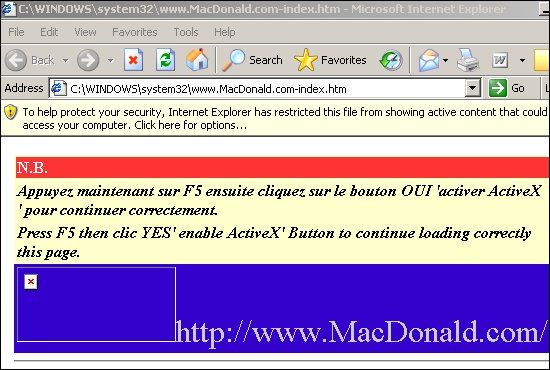
Screenshot of MacDonald.com-index.htm:
It creates multiple launch points:
HKLM\SOFTWARE\Microsoft\Windows\CurrentVersion\RunWinini.dll = C:\WINDOWS\system32\winini.vbs\REGISTRY\USER\.DEFAULT\Software\Microsoft\Windows\CurrentVersion\RunWinini.dll = C:\WINDOWS\system32\winini.vbs
It sets these values:
HKCU\Software\Microsoft\Internet Explorer\MainStart Page = C:\WINDOWS\system32\www.MacDonald.com-index.htmHKCU\Software\Microsoft\Windows\CurrentVersion\Explorer\Shell FoldersLocal AppData = C:\Documents and Settings\user\Local Settings\Application Data
More Support

Community
Ask questions in our Community.

User guides
Check the user guide for instructions.

Contact Support
Chat with with or call an agent.

Submit a Sample
Submit a file or URL for analysis.