Backdoor:W32/Small.H
Summary
A remote administration tool (RAT) that bypasses the security features of a program, computer or network to give unauthorized access or control to its user.
Removal
Small.H duplicates file names and processes of legitimate Windows applications.Windows Task Manager does not show distinctive details:
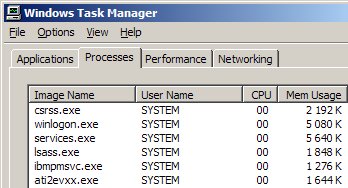
In order to determine the Small.H processes from the Windows processes, an enhanced Task Manager is needed. Process Explorer, freeware from Sysinternals, is one such application.
Note: : This is a Third Party application, the link below will direct you away from F-Secure's website.
A False Positive is when a file is incorrectly detected as harmful, usually because its code or behavior resembles known harmful programs. A False Positive will usually be fixed in a subsequent database update without any action needed on your part. If you wish, you may also:
- Check for the latest database updates
First, check if your F-Secure security program is using the latest updates, then try scanning the file again.
- Submit a sample
After checking, if you still believe the file is incorrectly detected, you can submit a sample of it for re-analysis.
Note: If the file was moved to quarantine, you need to collect the file from quarantine before you can submit it.
- Exclude a file from further scanning
If you are certain that the file is safe and want to continue using it, you can exclude it from further scanning by the F-Secure security product.
Note: You need administrative rights to change the settings.
Technical Details
Small.H is a virus with an internal spamming engine and backdoor functionality. Please see the sections below for more details.Small.H, originally named lsass.exe, spreads itself using an internal spaming-engine that is controlled through a previously set-up backdoor.It fools the user into executing its exe file by using a Windows folder icon and file names such as:
- Data.exe
- Documents.exe
- HotPictures.exe
- HotXXX.exe
- ImageGirls.exe
- SexyBoy.exe
- SexyGirls.exe
- Songs.exe
Small.H creates several copies of itself:
- C:\[Documents and Settings]\[Current User]\csrss.exe
- C:\[Documents and Settings]\[Current User]\Local Settings\Temp\FolderData.exe
- C:\[Documents and Settings]\[Current User]\winlogon.exe
- C:\RECYCLER\lsass.exe
- C:\RECYCLER\msinfo\msinfo.exe
It creates a number of autostart keys in the registry such as:
- [HKLM\SOFTWARE\Microsoft\Windows NT\CurrentVersion\Winlogon] Added value to "System" Added value to "Userinit"
- [HKCU\Software\Microsoft\Windows NT\CurrentVersion\Windows] Added value to "load"
- [HKCU\Software\Microsoft\Windows\CurrentVersion\Policies\Explorer\Run] Added value to (Default)
- Service key tree: o [HKEY_LOCAL_MACHINE\SYSTEM\CurrentControlSet\Services\MsInfo]
More Support

Community
Ask questions in our Community.

User guides
Check the user guide for instructions.

Contact Support
Chat with with or call an agent.

Submit a Sample
Submit a file or URL for analysis.