Rogue:OSX/FakeMacDef.A
Summary
Dishonest antivirus software which tricks users into buying or installing it, usually by infecting a user's computer, or by pretending the computer is infected.
Removal
A False Positive is when a file is incorrectly detected as harmful, usually because its code or behavior resembles known harmful programs. A False Positive will usually be fixed in a subsequent database update without any action needed on your part. If you wish, you may also:
- Check for the latest database updates
First, check if your F-Secure security program is using the latest updates, then try scanning the file again.
- Submit a sample
After checking, if you still believe the file is incorrectly detected, you can submit a sample of it for re-analysis.
Note: If the file was moved to quarantine, you need to collect the file from quarantine before you can submit it.
- Exclude a file from further scanning
If you are certain that the file is safe and want to continue using it, you can exclude it from further scanning by the F-Secure security product.
Note: You need administrative rights to change the settings.
Technical Details
MacDefender may also be called MacSecurity, MacProtector, MacGuard or MacShield.
Distribution
This rogue is being distributed via SEO-poisoned websites.
The user is then asked to download the installation package for a program (i.e., the rogue program) that will 'fix' the detected infection.
Installation
The rogue is installed in the Applications directory, as per normal Mac applications. It also adds its own menulet to the desktop menu bar.

Image 1: application icon used by the Mac Defender rogue
The rogue is also added to the Login Items for the user, so that it will automatically launch every time the user logs in.
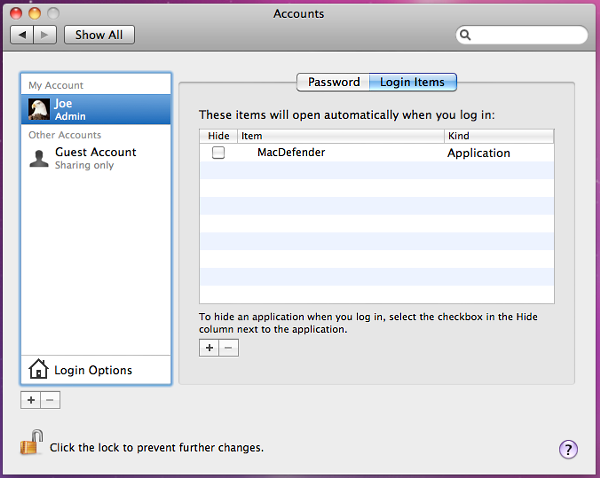
Image 2: MacDefender added to Login Items during instsallation
Payload
The rogueware poses as a legitimate virus scanner, reporting bogus infections and occassionally opening pornographic websites to trick users into believing an infection is present on the computer.
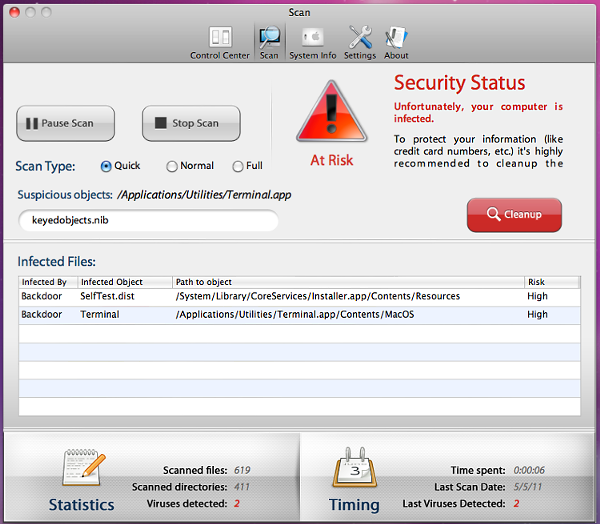
Image 3: Dialog displayed when MacDefender is run on a (clean) test machine
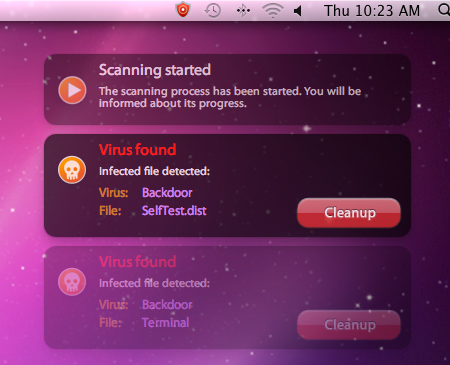
Image 4: Notifications displayed during a 'scan'. Note the menulet in the menu bar
This maybe be a further tactic to push the user into paying money for the bogus application, or to steal the user's credit card information.
More Support

Community
Ask questions in our Community.

User guides
Check the user guide for instructions.

Contact Support
Chat with with or call an agent.

Submit a Sample
Submit a file or URL for analysis.