Rogue:W32/XPAntivirus.gen!I
Summary
Deceptive antivirus software that pressures users into buying or installing it (e.g., infecting a computer; displaying false or alarming warnings or scanning results). Once installed, it may not function as claimed.
Removal
Based on the settings of your F-Secure security product, it will either move the file to the quarantine where it cannot spread or cause harm, or remove it.
A False Positive is when a file is incorrectly detected as harmful, usually because its code or behavior resembles known harmful programs. A False Positive will usually be fixed in a subsequent database update without any action needed on your part. If you wish, you may also:
- Check for the latest database updates
First, check if your F-Secure security program is using the latest updates, then try scanning the file again.
- Submit a sample
After checking, if you still believe the file is incorrectly detected, you can submit a sample of it for re-analysis.
Note: If the file was moved to quarantine, you need to collect the file from quarantine before you can submit it.
- Exclude a file from further scanning
If you are certain that the file is safe and want to continue using it, you can exclude it from further scanning by the F-Secure security product.
Note: You need administrative rights to change the settings.
Technical Details
Rogue:W32/Antiviruspro.gen!I is a Generic Detection for a family of rogue antivirus programs.
Execution
On execution, this rogueware will display a false antivirus scanner window and run a "scan" that will find non-existent malware on the system:
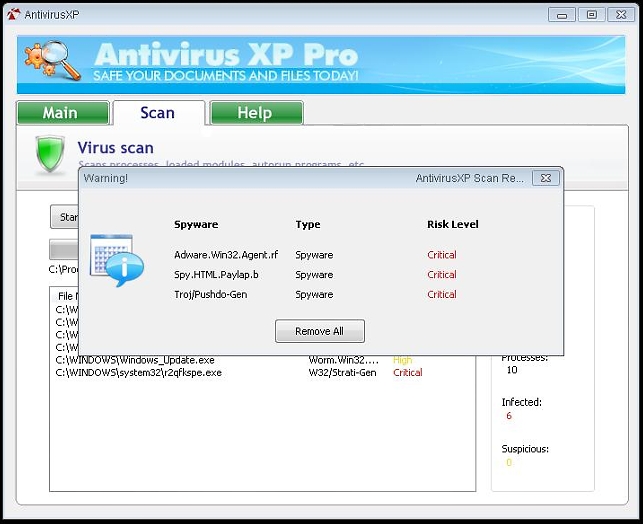
It will then direct user to pay for a "registered version" to clean the malware.
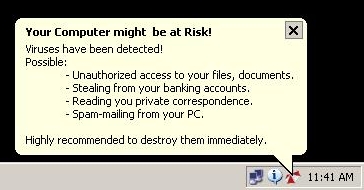
It will also periodically display a warning message on the system tray:
File System Changes
Creates these files:
- %programfiles%\AntivirusXP\AntivirusXP.exe
- %desktop%\AntivirusXP.lnk
- %startmenuprograms%\AntivirusXP\AntivirusXP.lnk
- %appdata%\Microsoft\Internet Explorer\Quick Launch\AntivirusXP.lnk
- %temp%\stylrit0.tmp
Create these directories:
- %programfiles%\AntivirusXP
- %programfiles%\AntivirusXP\Suspicious
- %programfiles%\AntivirusXP\Infected
- %startmenuprograms%\AntivirusXP
Registry Modifications
Sets these values:
- HKCU\Software\Microsoft\Windows\CurrentVersion\Explorer\Shell Folders Programs = C:\Documents and Settings\user\Start Menu\Programs
- HKCU\Software\Microsoft\Windows\CurrentVersion\Explorer\Shell Folders Start Menu = C:\Documents and Settings\user\Start Menu
- HKLM\Software\Microsoft\Windows\CurrentVersion\Explorer\Shell Folders Common Start Menu = C:\Documents and Settings\All Users\Start Menu
- HKCU\Software\Microsoft\Windows\CurrentVersion\Explorer\Shell Folders My Pictures = C:\Documents and Settings\user\My Documents\My Pictures
- HKLM\Software\Microsoft\Windows\CurrentVersion\Explorer\Shell Folders CommonPictures = C:\Documents and Settings\All Users\Documents\My Pictures
- HKLM\Software\Microsoft\Windows\CurrentVersion\Explorer\Shell Folders CommonMusic = C:\Documents and Settings\All Users\Documents\My Music
- HKLM\Software\Microsoft\Windows\CurrentVersion\Explorer\Shell Folders CommonVideo = C:\Documents and Settings\All Users\Documents\My Videos
- HKCU\Software\Microsoft\Windows\CurrentVersion\Run AntivirusXP.exe = C:\Program Files\AntivirusXP\AntivirusXP.exe [Launchpoint: Run]
Creates these keys:
- HKCU\Software\AntivirusXP
- HKLM\Software\AntivirusXP
More Support

Community
Ask questions in our Community.

User guides
Check the user guide for instructions.

Contact Support
Chat with with or call an agent.

Submit a Sample
Submit a file or URL for analysis.