Rogue:W32/SystemTool
Summary
This detection identifies a malicious rogueware program, typically used to deceive users into purchasing a fake application.
Removal
- Reboot and run "Full System Scan" with F-Secure Antivirus to make sure the system is clean.
A False Positive is when a file is incorrectly detected as harmful, usually because its code or behavior resembles known harmful programs. A False Positive will usually be fixed in a subsequent database update without any action needed on your part. If you wish, you may also:
- Check for the latest database updates
First, check if your F-Secure security program is using the latest updates, then try scanning the file again.
- Submit a sample
After checking, if you still believe the file is incorrectly detected, you can submit a sample of it for re-analysis.
Note: If the file was moved to quarantine, you need to collect the file from quarantine before you can submit it.
- Exclude a file from further scanning
If you are certain that the file is safe and want to continue using it, you can exclude it from further scanning by the F-Secure security product.
Note: You need administrative rights to change the settings.
Technical Details
This malware may also be detected by generic detections using the following naming format:
- gen.variant.kazy.[####]
Where [####] can be any number.
Activity
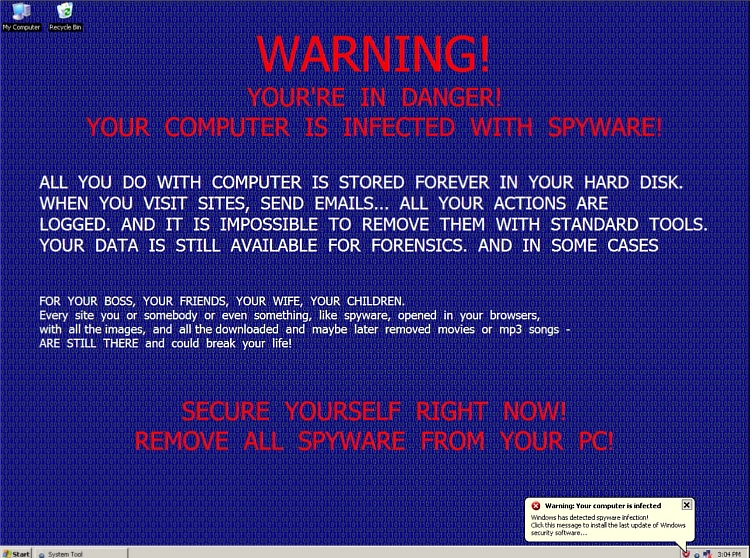
On execution, the malware hijacks the desktop and displays the wallpaper below:
It then displays a fake scanner program (System Tool) that displays bogus virus/trojan/spyware detections.
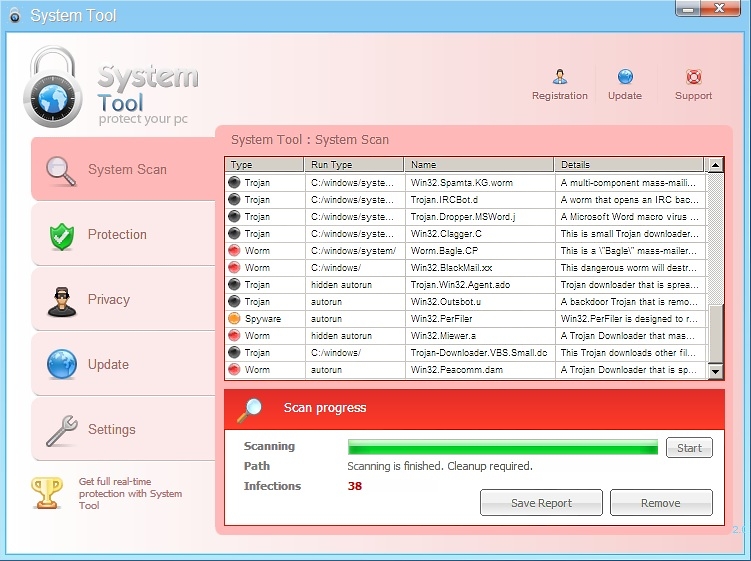
These actions are done to frighten the user into buying the fake application.
The malware also prevents execution of any other application. This disables applications like command prompt, regedit, Task Manager (including the keyboard shortcut Ctrl+Alt+Del), etc.
Installation
During installation, the malware adds the following files:
- %appdata%\[random]\[random].exe - (malware executable)
- %appdata%\[random]\[random] - (Data file)
Registry Changes
Launchpoint registry :
- HKCU\Software\Microsoft\Windows\CurrentVersion\RunOnce [random] = %appdata%\[random]\[random].exe
More Support

Community
Ask questions in our Community.

User guides
Check the user guide for instructions.

Contact Support
Chat with with or call an agent.

Submit a Sample
Submit a file or URL for analysis.