Rogue:W32/SysGuard.D
Summary
Dishonest antivirus software which tricks users into buying or installing it, usually by infecting a user's computer, or by pretending the computer is infected.
Removal
Based on the settings of your F-Secure security product, it will either move the file to the quarantine where it cannot spread or cause harm, or remove it.
A False Positive is when a file is incorrectly detected as harmful, usually because its code or behavior resembles known harmful programs. A False Positive will usually be fixed in a subsequent database update without any action needed on your part. If you wish, you may also:
- Check for the latest database updates
First, check if your F-Secure security program is using the latest updates, then try scanning the file again.
- Submit a sample
After checking, if you still believe the file is incorrectly detected, you can submit a sample of it for re-analysis.
Note: If the file was moved to quarantine, you need to collect the file from quarantine before you can submit it.
- Exclude a file from further scanning
If you are certain that the file is safe and want to continue using it, you can exclude it from further scanning by the F-Secure security product.
Note: You need administrative rights to change the settings.
Technical Details
Rogue:W32/Sysguard is distributed by Trojan-Downloader:W32/FraudLoad.HK. While active, the rogue also occasionally displays popup advertisements and attempts to connect to a few remote sites.
Execution
During execution, the following files are added:
- %temp%\571.exe
- %localappdata%\[random folder name]\[4 random characters]sysguard.exe
- %windir%\system32\iehelper.dll
While the following hosts files are modified, with the following contents:
- 91.212.127.227 aviraplatinum2009.microsoft.com
- 91.212.127.227 aviraplatinum2009.com
- 91.212.127.227 www.aviraplatinum2009.com
OR
- 91.212.127.227 antiviraprof2009.microsoft.com
- 91.212.127.227 antiviraprof2009.com
- 91.212.127.227 www.antiviraprof2009.com
Activity
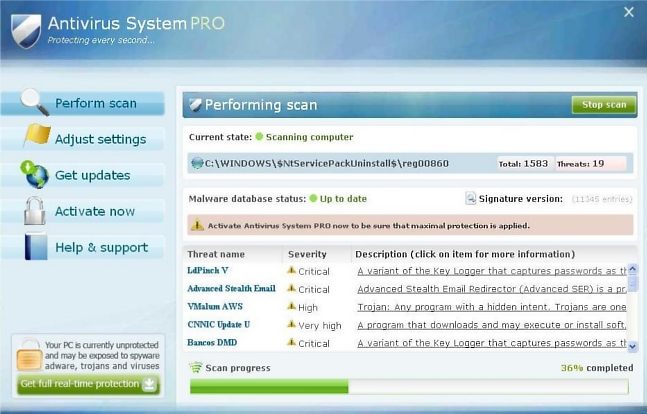
Upon execution, SysGuard will start the scanning process, which looks like the following screenshot:
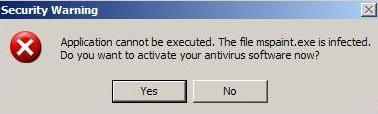
To pressure the user further, SysGuard prevents some programs from launching, then displays the following message alleging that the program is infected and asking the user to 'start your antivirus software':
While active, the rogue attempts to connect the following URLs:
- https://91.212.[...].227/check
- https://193.[...].12.51/check
- https://aviraplatinum2009.com/[...].php?[...].1
From time to time, it will display popup ads to the following websites:
- www.porno. com
- www.adult. com
- www.viagra. com
Registry Changes
The rogue makes the following changes to the Registry
- [HKCR\CLSID\{B6D223F6-C185-49a2-BA7E-A03E84744702}] @="BHO"
- [HKCR\CLSID\{B6D223F6-C185-49a2-BA7E-A03E84744702}\InProcServer32] @= C:\WINDOWS\system32\iehelper.dll" ThreadingModel="Apartment"
- [HKLM\Software\Classes\CLSID\{B6D223F6-C185-49a2-BA7E-A03E84744702}] @="BHO"
- [HKLM\Software\Classes\CLSID\{B6D223F6-C185-49a2-BA7E-A03E84744702}\InProcServer32] @="C:\WINDOWS\system32\iehelper.dll" ThreadingModel="Apartment"
- [HKLM\Software\Software\Microsoft\Windows\CurrentVersion\run] {random_value}="%localappdata%\[random folder name]\[4 random characters]sysguard.exe"
- [HKCU\Software\AvScan]
- [HKCU\Software\Microsoft\Windows\CurrentVersion\run] {random_value}="%localappdata%\[random folder name]\[4 random characters]sysguard.exe"
More Support

Community
Ask questions in our Community.

User guides
Check the user guide for instructions.

Contact Support
Chat with with or call an agent.

Submit a Sample
Submit a file or URL for analysis.