Summary
Bancos.VE is a password stealing trojan specifically designed for stealing Bank Information from users of Brazilian Banks.
Removal
Based on the settings of your F-Secure security product, it will either move the file to the quarantine where it cannot spread or cause harm, or remove it.
A False Positive is when a file is incorrectly detected as harmful, usually because its code or behavior resembles known harmful programs. A False Positive will usually be fixed in a subsequent database update without any action needed on your part. If you wish, you may also:
- Check for the latest database updates
First, check if your F-Secure security program is using the latest updates, then try scanning the file again.
- Submit a sample
After checking, if you still believe the file is incorrectly detected, you can submit a sample of it for re-analysis.
Note: If the file was moved to quarantine, you need to collect the file from quarantine before you can submit it.
- Exclude a file from further scanning
If you are certain that the file is safe and want to continue using it, you can exclude it from further scanning by the F-Secure security product.
Note: You need administrative rights to change the settings.
Technical Details
Upon execution, Bancos.VE displays the following fake error message:
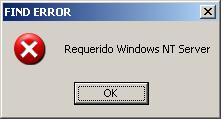
It will then drop a copy of itself into the System Directory as Tasklist32.exe:
- %systemdir%\tasklist32.exe
Note: %systemdir% by default is C:\Windows\System32.
It also creates the following registry value for its auto-start mechanism:
- HKLM\SOFTWARE\Microsoft\Windows\CurrentVersion\Run
TaskList = "%systemdir%\tasklist32.exe"
This malware monitors users' visited URLs. When specific URLs are viewed by a user, it will log all keyboard strokes.
Below are the URLs monitored by this trojan:
- bankline.itau.com.br
- https://www2.bancobrasil.com.br/aapf/saldos/006.jsp?codT=0
- https://www2.bancosbrasil.com.br/aapff/aaii/principal
- www2.bancobrasil.com.br
Bancos.VE sends the gathered information to a Brazilian email address.
More Support

Community
Ask questions in our Community.

User guides
Check the user guide for instructions.

Contact Support
Chat with with or call an agent.

Submit a Sample
Submit a file or URL for analysis.