Backdoor:W32/Maha.E
Summary
Backdoor:W32/Maha.E allows the attacker to acquire system information and allows for the uploading, downloading, and running of files on the infected computer.
Removal
Based on the settings of your F-Secure security product, it will either move the file to the quarantine where it cannot spread or cause harm, or remove it.
A False Positive is when a file is incorrectly detected as harmful, usually because its code or behavior resembles known harmful programs. A False Positive will usually be fixed in a subsequent database update without any action needed on your part. If you wish, you may also:
- Check for the latest database updates
First, check if your F-Secure security program is using the latest updates, then try scanning the file again.
- Submit a sample
After checking, if you still believe the file is incorrectly detected, you can submit a sample of it for re-analysis.
Note: If the file was moved to quarantine, you need to collect the file from quarantine before you can submit it.
- Exclude a file from further scanning
If you are certain that the file is safe and want to continue using it, you can exclude it from further scanning by the F-Secure security product.
Note: You need administrative rights to change the settings.
Technical Details
Backdoor:W32/Maha.E can record keyboard activities, keep a list of applications that a user has run, as well as archive URLs that a user opened. It steals logon IDs, passwords, PINs, check words, and other info related to online banking. Backdoor:W32/Maha.E arrives on the system as an embedded executable file inside an attached RTF file from spammed email messages.
The spammed emails appear to come from the U.S. Internal Revenue Service (IRS). The attachment contains a file named "COMPLAINT.rtf".When this RTF file is opened, it will display a fraudulent message that the original document was not loaded and will prompt the user to double click on the embedded object to reload msword.exe. Below is the sample message:
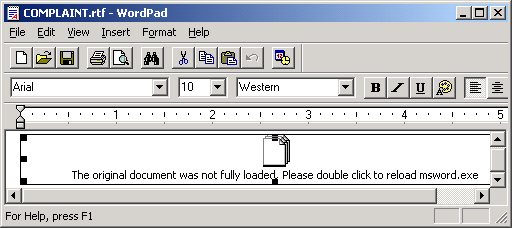
The embedded object is actually an executable file and when the user double-clicks, it will automatically execute the backdoor file. The RTF file is now detected as Trojan:W97M/Streedom.E.Once Backdoor:W32/Maha.E is executed, it will create the following files:
- %WinDir%\svchost32.dll - Dll component also detected as Backdoor:W32/Maha.E
- %WinDir%\svchost32.exe - Main Executable file
It also creates the following temporary files that will deleted by the malware after use:
- C:\alit.html
- C:\me.mp3
This backdoor installs itself as a service using the name "svchost32" by creating the following registry entry:
- [HKEY_LOCAL_MACHINE\SYSTEM\CurrentControlSet\Services\svchost32]
It also modifies the following registry entries in order to disable the firewall and its notifications:
- [HKEY_LOCAL_MACHINE\SYSTEM\CurrentControlSet\Services\SharedAccess \Parameters\FirewallPolicy\StandardProfile] DisableNotifications = dword:00000001
- [HKEY_LOCAL_MACHINE\SYSTEM\CurrentControlSet\Services\SharedAccess \Parameters\FirewallPolicy\StandardProfile] EnableFirewall = dword:00000000
Backdoor:W32/Maha.E connects to the following site and awaits for commands from a remote user:
- IP address: 203.121.79.49
- TCP Port: 54321
Upon successful connection, the following commands maybe executed:
- Retrieve stolen information
- Upload/download files
- Execute/Delete files
- Get System information
This backdoor also has key logging functions. It saves stolen information in the following file:
- %SysDir%\drivers\ssl\01\[DD_MM_YYYY].html
It uses the following format:
- [ [Process] - [Filename] - ? - ]{[Date]-[Time]} [key pressed]
In order to maximize the amount of typed information from the victim's machine, this backdoor disables password save features. It sets the following registry entries so that the user will be forced to type user information and passwords: Disable Save Password and Autologon for Yahoo:
- [HKEY_CURRENT_USER\Software\Yahoo\Pager] Save Password = dword:00000000
- [HKEY_CURRENT_USER\Software\Yahoo\Pager] Auto Login = dword:00000000
Disable Auto Complete in Internet Explorer:
- [HKEY_CURRENT_USER\Software\Microsoft\Internet Explorer\Main] Use FormSuggest = "no"
Disable Storage of Credentials and .NET passwords:
- [HKEY_LOCAL_MACHINE\SYSTEM\CurrentControlSet\Control\Lsa] disabledomaincreds = dword:00000001
This malware may also steal online information upon visiting sites mostly related to Banking and Online Payments:
- Anonygold.com
- ANZ Internet Banking
- AOL.com
- Bank of America
- BankCard
- BankWest Online banking
- Barclays IBank
- bendigobank.com.au - bendigo e-banking
- Capital One Online
- Chase.com
- Chevy Chase Bank
- Citibank
- e-gold
- Gawab.com
- Gmail
- HSBC Bank
- HYIP Lister
- iKobo Money Transfer
- ING Direct
- Key Bank
- Login to Paltalk
- moneybookers.com
- MoneyMakerGroup
- NatWest
- NetBank
- Online Service
- PayPal
- Pecunix
- PNC Bank
- Reality Cycler
- Rietumu banka
- Safemail.net
- SFIpay
- St.George Internet Banking
- V-Money
- Wachovia
- Walla!
- Wells Fargo
- WorldPay
It then sends log files containing stolen information to the following sites:
- http://in-2-web2.com/img/[REMOVED].php
- http://www.huquqalinsan.com/locales/[REMOVED].php
- http://www2.scasd.org/developers/kla13/6threview/[REMOVED].php
More Support

Community
Ask questions in our Community.

User guides
Check the user guide for instructions.

Contact Support
Chat with with or call an agent.

Submit a Sample
Submit a file or URL for analysis.