Summary
A program that monitors and records all actions on a computer, including keystrokes entered.
Removal
Based on the settings of your F-Secure security product, it may block the file from running, move it to the quarantine where it cannot spread or cause harm, or ask you to select an action.
A False Positive is when a file is incorrectly detected as harmful, usually because its code or behavior resembles known harmful programs. A False Positive will usually be fixed in a subsequent database update without any action needed on your part. If you wish, you may also:
- Check for the latest database updates
First, check if your F-Secure security program is using the latest updates, then try scanning the file again.
- Submit a sample
After checking, if you still believe the file is incorrectly detected, you can submit a sample of it for re-analysis.
Note: If the file was moved to quarantine, you need to collect the file from quarantine before you can submit it.
- Exclude a file from further scanning
If you are certain that the file is safe and want to continue using it, you can exclude it from further scanning by the F-Secure security product.
Note: You need administrative rights to change the settings.
Technical Details
Ardamax is a commercial keylogger program that can be installed onto the system from the product's website.& When run, the program can capture a range of user activities, such as keystrokes typed, instant messenger chat logs, web browser activity and even screenshots of the active desktop.
This program can be configured to a complete stealth mode, with password protection, to avoid user detection.
The information gathered is stored in an encrypted log file, which is only viewable using the built-in Log Viewer. The log file can be sent to an external party through e-mail, via a local area network (LAN) or by upload to an FTP server (in either HTML or encrypted format).
Installation
During installation, the user is presented with a typical end user license agreement (EULA) as shown below:
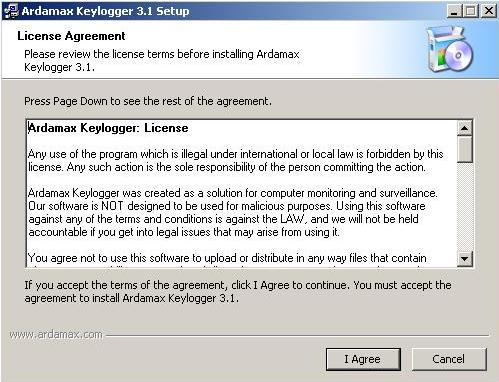
If the user clicks the "I Agree" button, the program is installed. Ardamax is by default installed at:
- C:\Program Files\CLE
Activity
Upon successful installation, the program will be launched and placed on the System Tray area:

More screenshots are available from the product website.
More Support

Community
Ask questions in our Community.

User guides
Check the user guide for instructions.

Contact Support
Chat with with or call an agent.

Submit a Sample
Submit a file or URL for analysis.