Summary
This program delivers advertising content to the user. It is usually annoying but harmless, unless it is combined with spyware or trackware.
Removal
Based on the settings of your F-Secure security product, it may block the file from running, move it to the quarantine where it cannot spread or cause harm, or ask you to select an action.
A False Positive is when a file is incorrectly detected as harmful, usually because its code or behavior resembles known harmful programs. A False Positive will usually be fixed in a subsequent database update without any action needed on your part. If you wish, you may also:
- Check for the latest database updates
First, check if your F-Secure security program is using the latest updates, then try scanning the file again.
- Submit a sample
After checking, if you still believe the file is incorrectly detected, you can submit a sample of it for re-analysis.
Note: If the file was moved to quarantine, you need to collect the file from quarantine before you can submit it.
- Exclude a file from further scanning
If you are certain that the file is safe and want to continue using it, you can exclude it from further scanning by the F-Secure security product.
Note: You need administrative rights to change the settings.
Technical Details
This adware program from ClickSpring LLC can monitor the user's browsing habits and send back the collected data to its servers. It will also download content from its servers to display as pop-up advertisements.
Installation
PurityScan is another variant of ClickSpring. There have also been a few reports that the program may also be bundled with other spyware and/or adware programs and sometime it maybe installed together with freeware applications or games.
When the program is executed manually, an End User License Agreement (EULA) and Privacy Policy is displayed:
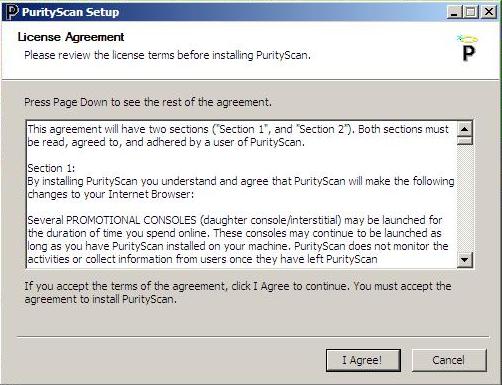
The user must accept the EULA in order to proceed with installation. After accepting the EULA, PurityScan is silently installed to the system.
During installation, the main executable and uninstaller is dropped at the following path:
- C:\Program Files\PurityScan\PuritySCAN.exe
- C:\Program Files\PurityScan\PuritySCANUninstall.exe
PurityScan will also drop files at:
- %UserProfile%\[user]\Local Settings\temp\wups.exe
- %UserProfile%\[user]\Application Data\[random file name].exe, for example
- %UserProfile%\[user]\Application Data\rcoa.exe
- %UserProfile%\[user]Application Data\neni
It then creates a shortcut item in start menu program:
- %UserProfile%\Start Menu\Programs\Purity Scan
Activity
Once installed, PurityScan registers itself by sending details of the system it has been installed on back to the server at fp.clickspring.net. It then retrieves advertising contents and updates of itself from www.clickspring.netand pisces.clickspring.net.
Registry
PurityScan creates the following registry subkey, so that it will execute automatically each time Windows starts:
- [HKEY_CURRENT_USER\Software\Microsoft\Windows\CurrentVersion\Run][Random name]=%UserProfile%\[user]\Application Data\[Random file name]
The following registry subkey is also created, so that it appears in the Add/Remove program list:
- [HKEY_LOCAL_MACHINE\Software\Microsoft\Windows\CurrentVersion\Uninstall\PuritySCAN]
More Support

Community
Ask questions in our Community.

User guides
Check the user guide for instructions.

Contact Support
Chat with with or call an agent.

Submit a Sample
Submit a file or URL for analysis.