Summary
This program delivers advertising content to the user. It is usually annoying but harmless, unless it is combined with spyware or trackware.
Removal
Based on the settings of your F-Secure security product, it may block the file from running, move it to the quarantine where it cannot spread or cause harm, or ask you to select an action.
A False Positive is when a file is incorrectly detected as harmful, usually because its code or behavior resembles known harmful programs. A False Positive will usually be fixed in a subsequent database update without any action needed on your part. If you wish, you may also:
- Check for the latest database updates
First, check if your F-Secure security program is using the latest updates, then try scanning the file again.
- Submit a sample
After checking, if you still believe the file is incorrectly detected, you can submit a sample of it for re-analysis.
Note: If the file was moved to quarantine, you need to collect the file from quarantine before you can submit it.
- Exclude a file from further scanning
If you are certain that the file is safe and want to continue using it, you can exclude it from further scanning by the F-Secure security product.
Note: You need administrative rights to change the settings.
Technical Details
PluginDl is an adware-supported application program. By itself, PluginDI is a downloader plugin, providing additional functionality to the Mozilla, Opera and Netscape web browsers. As its development/distribution is being supported by advertising however, Its installation directory contains other files meant for displaying advertisements.
Installation
The adware usually uses the folder "DlPlugin-Moz" in the Program files directory.
It may display this window on Installation:
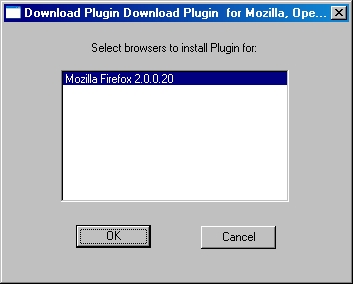
The "DlPlugin-Moz" folder contains the following files:
- buddy.dat - data file
- buddy.exe - an adware program that is related to LOP adwares
- buddy.uri - ascii text file
- npdlplug.dll - the web browser plugin; this will also be copied or moved to the web browser plugin directory
- setup2.exe - the setup file
- vendor.txt - acsii text file
Installation registry entries may be created to be able function properly as plugin; the actual registry changes vary according to the web browser selected on installation.
Activity
On successfully installing the downloader plugin, pop-up advertisements may constantly display when the user is browsing the Internet.
More Support

Community
Ask questions in our Community.

User guides
Check the user guide for instructions.

Contact Support
Chat with with or call an agent.

Submit a Sample
Submit a file or URL for analysis.