Summary
This program delivers advertising content to the user. It is usually annoying but harmless, unless it is combined with spyware or trackware.
Removal
Based on the settings of your F-Secure security product, it may block the file from running, move it to the quarantine where it cannot spread or cause harm, or ask you to select an action.
A False Positive is when a file is incorrectly detected as harmful, usually because its code or behavior resembles known harmful programs. A False Positive will usually be fixed in a subsequent database update without any action needed on your part. If you wish, you may also:
- Check for the latest database updates
First, check if your F-Secure security program is using the latest updates, then try scanning the file again.
- Submit a sample
After checking, if you still believe the file is incorrectly detected, you can submit a sample of it for re-analysis.
Note: If the file was moved to quarantine, you need to collect the file from quarantine before you can submit it.
- Exclude a file from further scanning
If you are certain that the file is safe and want to continue using it, you can exclude it from further scanning by the F-Secure security product.
Note: You need administrative rights to change the settings.
Technical Details
Superjuan is an adware that is installed as a Browser Helper Object (BHO).
Installation
The dll file is usually located in the windows system folder with a random file name and implements the following autorun entries:
- HKEY_CURRENT_USER\Software\Microsoft\Windows\CurrentVersion\Run [random string] = "rundll32.exe [adware filename].dll, run"
Activity
While active, the adware can perform the& following actions:
- Display advertisement pop up depending on the search made
- Redirect user to a different website
- Trick user to install rogue application
- May track search strings on various search engines
- Lowers security level on internet zones
The adware also lowers the Security level settings on Microsoft Internet Explorer's Security Zones.
Activity
The adware tracks search queries made on a defined list of strings, then either displays adware or redirects the query. The adware tracks queries made on these websites:
- websearch.com
- usseek.com
- sensis.com.au
- searchmiracle.com
- neon.org.uk
- mirago.co.uk
- wesearchall.com
- search.about.com
- mywebsearch.com
- mysearch.myway.com
- netster.com
- lb1.netster.com
- vivisimo.com
- search.netzero.net
- search.netscape.com
- search.aol
- recherche.aol.fr
- query.nytimes.com
- mamma.com
- lycos
- kanoodle.com
- jayde.com
- hotbot.com
- search.dmoz.org
- www.excite.co.jp
- web.ask
- url.searchuk.com
- uk.searchengine.com
- excite.co.jp
- infoseek.co.jp
- search.looksmart.com
- findsearch.net
- destinationadult.com
- 7search.com
- s.teoma.com
- search.xtramsn.co.nz
- search.wanadoo.co.uk
- search.sympatico.msn.ca
- search.msn
- search.earthlink.net
- search.daum.net
- reference.com
- instafinder.com
- goguides.org
- gigablast.com
- comcast.net
- bbc.co.uk
- ask.com/web
- altavista.com
- alltheweb.com
- alexa.com
- quizrocket.com
- microsoft.com
- facebook.com
- live.com
- msn.com
- myspace
- youtube
- adultfriendfinder
- yahoo
When the user searches on a defined website, the adware may contact a server to obtain an address or data containing an advertisement. The adware then launches a new web browser instance, which is in this format:
- https://[Address]/source=[string value] affid=[value created by adware] guid=[value created by adware] rid=[value created by adware]
Where [Address] is an IP address or domain returned by a contacted server, giving the location of advertisement data.
The searches made by the user may also be redirected to the following address:
- https://[Address]/go/cmp=system32 uid=[value created by adware] lid="user search string" url=[original search address result] superjuan...
Where [Address] in this case is dependent on a hard coded variant. Some possible addresses are:
- https://89.188.16.10/go/
- https://89.188.16.16/go/
- https://65.243.103.60/go/
- https://65.243.103.62/go/
- https://65.243.103.56/go/
The adware is known to be associated with several rogue applications. The adware may redirect the user to an online scanning website, which may trick the user into installing a rogue application. Some representative screenshots of rogue applications can be seen below:
.jpg)
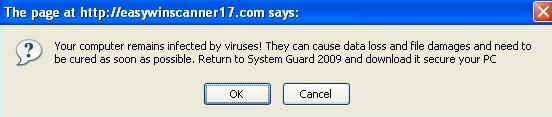
Several variants of these rogue applications may also contact a website containing a script that downloads and execute a rogue installer program.
Registry
During installation, several registry entries may be temporarily created, in order to facilitate the adware's tracking functionality.
- HKEY_LOCAL_MACHINE\Software\Microsoft\MS Juan
- HKEY_LOCAL_MACHINE\Software\Microsoft\MS Track System
- HKEY_LOCAL_MACHINE\Software\Microsoft\Juan
- HKEY_LOCAL_MACHINE\SOFTWARE\Microsoft\Con
- HKEY_LOCAL_MACHINE\SOFTWARE\Microsoft\jkwslist
- HKEY_LOCAL_MACHINE\SOFTWARE\Microsoft\jsearchcount
- HKEY_LOCAL_MACHINE\Software\Microsoft\jn_tr_<8 random character or number>
It adds the DLL file name ton the Appinit startup:
- HKEY_LOCAL_MACHINE\SOFTWARE\Microsoft\Windows NT\CurrentVersion\Windows AppInit_DLLs = "{existing entries} [adware filename].dll"
And keys to register the adware as a Browser Helper Object (BHO):
- CLSID registry key HKEY_CLASSES_ROOT\CLSID\{[selected CLSID from the list]}
- CLSID file entry HKEY_CLASSES_ROOT\CLSID\{{selected CLSID from the list}}\InprocServer32 Default =[adware filename].dll
- Browser Helper Object-added registry key entry HKEY_LOCAL_MACHINE\SOFTWARE\Microsoft\Windows\CurrentVersion\Explorer\Browser Helper\{[selected CLSID from the list]}
These are the CLSID that the adware may use:
- {B7672BAF-E9A3-49B6-86B2-C81719A18A4C}
- {849B9523-785F-4014-9CAF-079FB4A74C61}
- {1DAEFCB9-06C8-47c6-8F20-3FB54B244DAA}
- {F18F04B0-9CF1-4b93-B004-77A288BEE28B}
- {0676CC61-CDC5-447e-AAFC-9D886EC820EB}
- {7797F524-B819-42d0-B35A-0DACAF93E977}
- {013A653B-49A6-4f76-8B68-E4875EA6BA54}
- {14FD9304-A270-4d8c-B696-6B7DA0C1DF56}
- {35F7813A-AF74-4474-B1DC-7EE6FB6C43C6}
- {3FD6B99C-A275-46ea-8FD1-3D63986E51E4}
- {7DA39570-5FD2-4f18-94B4-20730CB3F727}
- {68D5CF1D-EC5C-4bdd-A9EF-F0E517565D50}
- {E03C740E-BB24-4d3c-B92A-6F84DE1DD99C}
- {337C54C9-80C1-4de2-93CD-AAA510834074}
- {D38439EC-4A7F-42b4-90C2-D810D7778FDD}
- {57E218E6-5A80-4f0c-AB25-83598F25D7E9}
- {67C55A8D-E808-4caa-9EA7-F77102DE0BB6}
- {1557B435-8242-4686-9AA3-9265BF7525A4}
- {D651AFF4-9590-424d-BD1E-8E33E090DFB3}
- {E2EE5C44-C66D-499d-BEAE-A2A79189A63A}
- {55DB983C-BDBF-426f-86F0-187B02DDA39B}
- {A24B57F8-505D-4fc5-9960-740E304D1ABA}
- {4B646AFB-9341-4330-8FD1-C32485AEE619}
- {CD3447D4-CA39-4377-8084-30E86331D74C}
- {DEBEB52F-CFA6-4647-971F-3EDB75B63AFA}
- {8F2183B9-F4DB-4913-8F82-6F9CC42E4CF8}
- {92A444D2-F945-4dd9-89A1-896A6C2D8D22}
- {E12BFF69-38A7-406e-A8EF-2738107A7831}
- {5ADF3862-9E2E-4ad3-86F7-4510E6550CD0}
- {1F6581D5-AA53-4b73-A6F9-41420C6B61F1}
- {1126271C-A8C3-438c-B951-7C94B453B16B}
- {938A8A03-A938-4019-B764-03FF8D167D79}
- {CF46BFB3-2ACC-441b-B82B-36B9562C7FF1}
- {C6039E6C-BDE9-4de5-BB40-768CAA584FDC}
- {44218730-94E0-4b24-BBF0-C3D8B2BCE2C3}
- {C24751C6-3976-419a-A776-915669E28A4D}
- {47B83D78-F986-4E96-9769-2C55EF14DA0B}
- {E64F0381-0053-4842-B3E5-08F6C4A0AEB6}
- {32A5ED57-EA40-4869-8675-28EA463E6B23}
- {89AD4D75-2429-462e-BD4E-443F233F6033}
- {F9546B58-83B5-44bb-93CF-945253E58025}
- {F864AD64-8376-447d-B5F4-EA4965E3E0EA}
- {BE3E60A0-8087-4ad2-9386-500966D663B4}
More Support

Community
Ask questions in our Community.

User guides
Check the user guide for instructions.

Contact Support
Chat with with or call an agent.

Submit a Sample
Submit a file or URL for analysis.