Summary
This program delivers advertising content to the user. It is usually annoying but harmless, unless it is combined with spyware or trackware.
Removal
The software can be successfully removed from Control Panel -> Add/Remove Programs -> Gamevance.
A False Positive is when a file is incorrectly detected as harmful, usually because its code or behavior resembles known harmful programs. A False Positive will usually be fixed in a subsequent database update without any action needed on your part. If you wish, you may also:
- Check for the latest database updates
First, check if your F-Secure security program is using the latest updates, then try scanning the file again.
- Submit a sample
After checking, if you still believe the file is incorrectly detected, you can submit a sample of it for re-analysis.
Note: If the file was moved to quarantine, you need to collect the file from quarantine before you can submit it.
- Exclude a file from further scanning
If you are certain that the file is safe and want to continue using it, you can exclude it from further scanning by the F-Secure security product.
Note: You need administrative rights to change the settings.
Technical Details
Adware:W32/GameVance is a program that collects anonymous usage information from a user's computer that are used to select and display popup, popunder and other kinds of advertisements.
The software is installed in exchange for free online games from Gamevance.
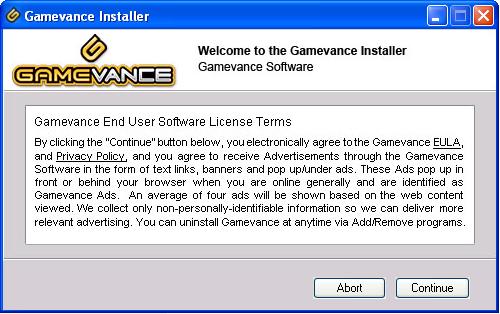
The screeenshot below shows Gamevance's software license terms:
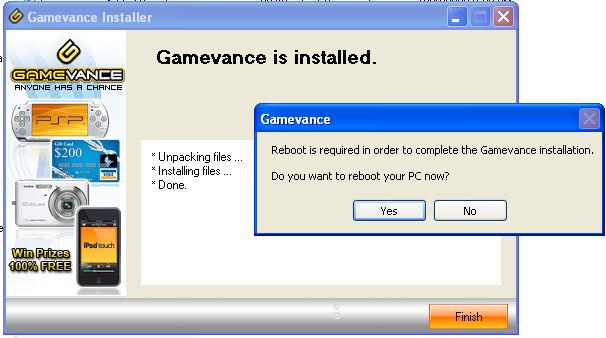
The image below shows the end of the installation process:
Installation
During installation, the program modifies the Windows Registry to install a Browser Helper Object (BHO). The changes also ensure the program starts at every system startup. Unlike some adware programs, Gamevance also adds a registry key to ensure it has an entry in the Add/Remove Programs menu.
File System Changes
Creates these files:
- C:\Program Files\Gamevance
- C:\Program Files\Gamevance\ars.cfg
- C:\Program Files\Gamevance\gamevance32.exe
- C:\Program Files\Gamevance\gamevancelib32.dll
- C:\Program Files\Gamevance\gvtl.dll
- C:\Program Files\Gamevance\gvun.exe
- C:\Program Files\Gamevance\icon.ico
Registry Modifications
Creates these keys:
- HKEY_LOCAL_MACHINE\SOFTWARE\Microsoft\Windows\CurrentVersion\Explorer\Browser Helper Objects\{0ED403E8-470A-4a8a-85A4-D7688CFE39A3}
- HKEY_LOCAL_MACHINE\SOFTWARE\Microsoft\Windows\CurrentVersion\Explorer\Browser Helper Objects\{BEAC7DC8-E106-4C6A-931E-5A42E7362883}
- HKEY_LOCAL_MACHINE\SOFTWARE\Classes\GamevanceText.Linker
- HKEY_LOCAL_MACHINE\SOFTWARE\Classes\GamevanceText.Linker.1
- HKEY_LOCAL_MACHINE\SOFTWARE\Classes\AppID\GamevanceText.DLL
- HKEY_LOCAL_MACHINE\SOFTWARE\Classes\AppID\{0D4A3EEA-527E-4FD8-9B2F-089B616670B8}
- HKEY_LOCAL_MACHINE\SOFTWARE\Classes\CLSID\{0ED403E8-470A-4a8a-85A4-D7688CFE39A3}
- HKEY_LOCAL_MACHINE\SOFTWARE\Classes\CLSID\{BEAC7DC8-E106-4C6A-931E-5A42E7362883}
- HKEY_LOCAL_MACHINE\SOFTWARE\Classes\TypeLib\{014C4232-6904-47B9-9144-7E0FB7277444}
- HKEY_LOCAL_MACHINE\SOFTWARE\Microsoft\Windows\CurrentVersion\Run Gamevance = "%programfiles%\Gamevance\gamevance32.exe a"
- HKEY_LOCAL_MACHINE\SOFTWARE\Microsoft\Windows\CurrentVersion\Uninstall\Gamevance UninstallString = "%programfiles%\Gamevance\gvun.exe"
More Support

Community
Ask questions in our Community.

User guides
Check the user guide for instructions.

Contact Support
Chat with with or call an agent.

Submit a Sample
Submit a file or URL for analysis.