

Summary
The Y2KCount trojan first appeared on September 15th, 1999.
Removal
Based on the settings of your F-Secure security product, it will either move the file to the quarantine where it cannot spread or cause harm, or remove it.
A False Positive is when a file is incorrectly detected as harmful, usually because its code or behavior resembles known harmful programs. A False Positive will usually be fixed in a subsequent database update without any action needed on your part. If you wish, you may also:
- Check for the latest database updates
- First, check if your F-Secure security program is using the latest updates, then try scanning the file again.
- Submit a sample
- After checking, if you still believe the file is incorrectly detected, you can submit a sample of it for re-analysis.
- Note: If the file was moved to quarantine, you need to collect the file from quarantine before you can submit it.
- Exclude a file from further scanning
- If you are certain that the file is safe and want to continue using it, you can exclude it from further scanning by the F-Secure security product.
- Note: You need administrative rights to change the settings.
Technical Details
It came as a Y2KCount.EXE file attached to a message supposedly sent from Microsoft support. The message looked like that:
From: support@microsoft.com Sender: support@microsoft.com Subject: Microsoft Announcement Date: Wed, 15 Sep 1999 00:49:57 +0200 To All Microsoft Users, We are excited to announce Microsoft Year 2000 Counter. Start the countdown NOW. Let us all get in the 21 Century. Let us lead the way to the future and we will get YOU there FASTER and SAFER. Thank you, Microsoft Corporation The email was definitely faked, but the trick worked and a number of users launched the attachment and became infected. The attachment - Y2KCount.EXE is a self-extracting ZIP archive that contains installation pack for the new Internet trojan. The archive has 5 files (PROJECT1.EXE and 4 DAT files) and the PROJECT1.EXE file serves as an installer for the trojan. When run the Y2KCount.EXE shows a fake error message:
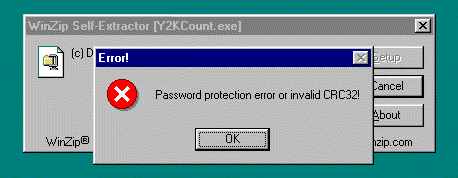
This is a disguise. At the same time the trojan installs itself to system. It copies 4 files into \Windows\System\ directory:
- PROCLIB.EXE
- PROCLIB.DLL
- PROCLIB16.DLL
- NTSVSRV.DLL
Then the SYSTEM.INI file is modified so that the trojan could be automatically started during next Windows bootup. The trojan adds 'ntsvsrv.dll' string after the list of drivers to start (after 'drivers=' tag). During next Windows startup the NTSVSRV.DLL gets control and renames WSOCK32.DLL to NLHVLD.DLL and copies PROCLIB16.DLL as WSOCK32.DLL. This will allow the trojan to monitor Internet activities on the infected system.
Being active the trojan checks Internet traffic for text strings 'login', 'password' and 'username'. This is done to get user's dial-up and network passwords. This action is typical for password stealing trojans.
F-Secure provides detection and removal of Y2KCount trojan with the latest updates that can be downloaded from our ftp site free of charge:
- ftp://ftp.europe.F-Secure.com/anti-virus/tools/fp-def.zip
You can also try to manually remove the trojan from your system. This should be done only from DOS. The following 4 trojan files should be deleted from \Windows\System\ folder:
- PROCLIB.EXE
- PROCLIB.DLL
- PROCLIB16.DLL
- NTSVSRV.DLL
The 'ntsvsrv.dll' string (trojan startup command) should be removed from SYSTEM.INI file. You can edit this file using EDIT comand at DOS prompt. The trojan execution string follows other drivers to be started after 'drivers=' tag (it should be the last in the list in case of recent infection). Finally the NLHVLD.DLL should be renamed to WSOCK32.DLL. This will restore Windows Sockets library renamed by the trojan. After that the system should be restarted for the changes to take effect.
Protect your devices from malware with F‑Secure Total
Protecting your devices from malicious software is essential for maintaining online security. F‑Secure Total makes this easy, helping you to secure your devices in a brilliantly simple way.
- Award‑winning antivirus and malware protection
- Online browsing, banking, and shopping protection
- 24/7 online identity and data breach monitoring
- Unlimited VPN service to safeguard your privacy
- Password manager with private data protection
Choose how many devices you want to protect to get started.

- Free customer support
- Cancel anytime
- The trial does not obligate you to buy the product
After 30 days your subscription will renew automatically for one year at €69.99.


More Support
Community
Ask questions in our Community.
User guides
Check the user guide for instructions.
Contact Support
Chat with our support for assistance.
Submit a Sample
Submit a file or URL for analysis.