

Summary
This type of worm is embedded in an email attachment, and spreads using the infected computer's emailing networks.
Removal
Based on the settings of your F-Secure security product, it will either move the file to the quarantine where it cannot spread or cause harm, or remove it.
A False Positive is when a file is incorrectly detected as harmful, usually because its code or behavior resembles known harmful programs. A False Positive will usually be fixed in a subsequent database update without any action needed on your part. If you wish, you may also:
- Check for the latest database updates
- First, check if your F-Secure security program is using the latest updates, then try scanning the file again.
- Submit a sample
- After checking, if you still believe the file is incorrectly detected, you can submit a sample of it for re-analysis.
- Note: If the file was moved to quarantine, you need to collect the file from quarantine before you can submit it.
- Exclude a file from further scanning
- If you are certain that the file is safe and want to continue using it, you can exclude it from further scanning by the F-Secure security product.
- Note: You need administrative rights to change the settings.
Technical Details
Warezov.W is a mass-mailing worm that sends itself as email attachments to addresses found on the infected computer.
Warezov.W also downloads another worm variant from a specified website on the Internet.
Installation
The worm shows this messagebox as a decoy during installation to a system:
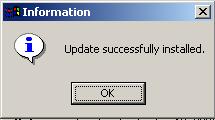
During installation, the worm adds the following files to the system:
- %WinDir%\tsrv.exe - The main copy of the worm that is active in memory.
- %SysDir%\ msji449c14b7.dll
- %SysDir% \cmut449c14b7.dll
- %SysDir%\hpzl449c14b7.exe
- %WinDir%\tsrv.dll - Detected as Warezov.W.
- %WinDir%\tsrv.wax - Data file where the worm stores found email addresses.
- %WinDir%\tsrv.z
- %WinDir%\tsrv.s
The worm also copies the file it was run from to Windows System folder.
Warezov.W modifies the Windows HOSTS file to prevent access to the following websites:
- avp.ru
- avp.ru/download/
- customer.symantec.com
- download.microsoft.com
- downloads1.kaspersky-labs.com
- downloads1.kaspersky-labs.com/products/
- downloads1.kaspersky-labs.com/updates/
- downloads2.kaspersky-labs.com
- downloads2.kaspersky-labs.com/products/
- downloads2.kaspersky-labs.com/updates/
- downloads3.kaspersky-labs.com
- downloads3.kaspersky-labs.com/products/
- downloads3.kaspersky-labs.com/updates/
- downloads4.kaspersky-labs.com
- downloads4.kaspersky-labs.com/products/
- downloads4.kaspersky-labs.com/updates/
- downloads5.kaspersky-labs.com
- downloads5.kaspersky-labs.com/products/
- downloads5.kaspersky-labs.com/updates/
- eset.com/
- eset.com/download/index.php
- eset.com/joomla/
- eset.com/products/index.php
- ftp://downloads1.kaspersky-labs.com
- ftp://downloads1.kaspersky-labs.com/products/
- ftp://downloads1.kaspersky-labs.com/updates/
- ftp://downloads2.kaspersky-labs.com
- ftp://downloads2.kaspersky-labs.com/products/
- ftp://downloads2.kaspersky-labs.com/updates/
- ftp://downloads3.kaspersky-labs.com
- ftp://downloads3.kaspersky-labs.com/products/
- ftp://downloads3.kaspersky-labs.com/updates/
- ftp://downloads4.kaspersky-labs.com
- ftp://downloads4.kaspersky-labs.com/products/
- ftp://downloads4.kaspersky-labs.com/updates/
- ftp://downloads5.kaspersky-labs.com
- ftp://downloads5.kaspersky-labs.com/products/
- ftp://downloads5.kaspersky-labs.com/updates/
- ftp://ftp.kasperskylab.ru/updates/
- ftp://updates.kaspersky-labs.com/updates/
- ftp://updates1.kaspersky-labs.com/updates/
- ftp://updates2.kaspersky-labs.com/updates/
- ftp://updates3.kaspersky-labs.com/updates/
- ftp://updates4.kaspersky-labs.com/updates/
- go.microsoft.com
- http://avp.ru
- http://customer.symantec.com
- http://downloads1.kaspersky-labs.com
- http://downloads1.kaspersky-labs.com/products/
- http://downloads1.kaspersky-labs.com/updates/
- http://downloads2.kaspersky-labs.com
- http://downloads2.kaspersky-labs.com/products/
- http://downloads2.kaspersky-labs.com/updates/
- http://downloads3.kaspersky-labs.com
- http://downloads3.kaspersky-labs.com/products/
- http://downloads3.kaspersky-labs.com/updates/
- http://downloads4.kaspersky-labs.com
- http://downloads4.kaspersky-labs.com/products/
- http://downloads4.kaspersky-labs.com/updates/
- http://downloads5.kaspersky-labs.com
- http://downloads5.kaspersky-labs.com/products/
- http://downloads5.kaspersky-labs.com/updates/
- http://kaspersky.com
- http://kaspersky.ru
- http://kaspersky.ru/updates/
- http://kaspersky-labs.com
- http://kaspersky-labs.com/updates/
- http://liveupdate.symantec.com
- http://liveupdate.symantecliveupdate.com
- http://securityresponse.symantec.com
- http://service1.symantec.com
- http://symantec.com
- http://symantec.com/updates
- http://u3.eset.com/
- http://u4.eset.com/
- http://updates.kaspersky-labs.com/updates/
- http://updates.symantec.com
- http://updates1.kaspersky-labs.com/updates/
- http://updates2.kaspersky-labs.com/updates/
- http://updates3.kaspersky-labs.com/updates/
- http://updates4.kaspersky-labs.com/updates/
- http://viruslist.com
- http://viruslist.ru
- http://www.avp.ru
- http://www.avp.ru/download/
- http://www.eset.com/
- http://www.eset.com/download/index.php
- http://www.eset.com/joomla/
- http://www.eset.com/products/index.php
- http://www.kaspersky.ru/updates/
- http://www.kaspersky-labs.com/updates/
- http://www.microsoft.com/downloads/Search.aspx?displayl
- kaspersky.com
- kaspersky.ru
- kaspersky-labs.com
- liveupdate.symantec.com
- liveupdate.symantecliveupdate.com
- msdn.microsoft.com
- office.microsoft.com
- securityresponse.symantec.com
- service1.symantec.com
- symantec.com
- symantec.com/updates
- u3.eset.com/
- u4.eset.com/
- updates.symantec.com
- viruslist.com
- viruslist.ru
- windowsupdate.microsoft.com
- www.avp.ru
- www.avp.ru/download/
- www.eset.com/
- www.eset.com/download/index.php
- www.eset.com/joomla/
- www.eset.com/products/index.php
- www.kaspersky.com
- www.kaspersky.ru
- www.kaspersky-labs.com
- www.symantec.com
- www.symantec.com/updates
- www.viruslist.com
- www.viruslist.ru
The worm also tries to stop services belonging to different firewalls and to terminate the following processes:
- ccapp.exe
- cwsmc.exe
- explorer.exe
- firefox.exe
- iexplore.exe
- mpftray.exe
- opera.exe
- outpost.exe
- services.exe
- svchost.exe
- vzapro.exe
- zlclient.exe
Payload
Warezov.W attempts to connect to the following site to download another malware file:
- http://yuhadefunjinsa.com/chr/grw/[...].exe
This file download is already detected as Email-Worm.Win32.Warezov.t. This mechanism is used to update the worm from Internet. The worm uses rootkit features to hide its process in memory.
Additionally, the worm contacts the yuhadefunjinsa.comwebsite to notify the worm's author. The notification is done with the POST request and it may include some additional data like the worm's version, type and so on.
Propagation
Warezov.W gathers target email addresses from the Windows Address Book (WAB). It may also harvests email addresses from the infected system by scanning through files with the following extension names:
- asp
- cfg
- cgi
- dbx
- eml
- htm
- htm
- html
- jsp
- mbx
- mdx
- mht
- mmf
- msg
- nch
- ods
- oft
- php
- pl
- sht
- shtm
- stm
- tbb
- txt
- uin
- wab
- wsh
- xls
- xml
The worm filters found email addresses to avoid sending itself to addresses that contain any of the following substrings:
- .edu
- .gov
- @avp
- admin
- anyone@
- apache
- berkeley
- bsd
- cafee
- certific
- contract@
- example
- fido
- ftp
- gnu
- gold-certs
- google
- help@
- ibm.com
- info@
- kasp
- kernel
- linux
- local
- master
- microsoft
- mozilla
- mydomai
- noone
- noreply
- panda
- rfc-ed
- ripe.
- root@
- secure
- sendmail
- service
- someone
- spam
- support
- unix
- update
- usenet
- winrar
- winzip
- www
- xx
- you
- your
The worm sends itself as an attachment to the gathered email addresses using the following email format:
TO: {Gathered email address from the system} FROM: The from field may use any of the following format:
- %FirstName% %SecondName% %FirstName%.%SecondName%@%domain name%
- %FirstName% %SecondName%_%random%@%domain name%
- {Gathered email address from the system}
Where %FirstName% may use any of the following:
- adam
- alice
- anna
- betty
- bob
- brenda
- brent
- brian
- carol
- claudia
- craig
- cyber
- dan
- dave
- david
- debby
- den
- Donna
- frank
- george
- gerhard
- helen
- helen
- james
- jane
- jayson
- jerry
- jim
- joe
- john
- karen
- linda
- lisa
- mancy
- maria
- ruth
- sandra
- sandra
- sharon
- Susan
%SecondName% may use any of the following:
- adams
- allen
- anderson
- baker
- carter
- clark
- garcia
- gonzalez
- green
- hall
- harris
- hernandez
- hill
- jackson
- jeremy
- joe
- kenneth
- king
- lee
- lewis
- lopez
- martin
- martinez
- miller
- molly
- moore
- nelson
- robinson
- robyn
- rodriguez
- scott
- shaan
- taylor
- thomas
- thompson
- walker
- white
- wilson
- wright
- young
%random% uses random 4-digit characters and %domain name% may use any of the following:
- care2.com
- email.myway.com
- fastmail.fm
- gmail.com
- goowy.com
- hotmail.com
- inbox.com
- mail.aim.com
- mail.com
- mail.lycos.com
- yahoo.com
Examples:
- james nelson (james.nelson@yahoo.com)
- sandra (martin_1950@mail.aim.com)
SUBJECT: The subject may use any of the following strings:
- Error
- Good Day
- Hello
- Mail Delivery System
- Mail server report
- Mail Transaction Failed
- Picture
- Server Report
- Test
MESSAGE BODY: It may use any of the following messages:
- Mail transaction failed. Partial message is available.
- The message cannot be represented in 7-bit ASCII encoding and has been sent as a binary attachment.
- The message contains Unicode characters and has been sent as a binary attachment.
- Mail server report. Our firewall determined the emails containing worm copies are being sent from your computer. Nowadays it happens from many computers, because this is a new virus type (Network Worms). Using the new bug in the Windows, these viruses infect the computer unnoticeably. After the penetrating into the computer the virus harvests all the email addresses and sends the copies of itself to these email addresses Please install updates for worm elimination and your computer restoring. Best regards, Customers support service
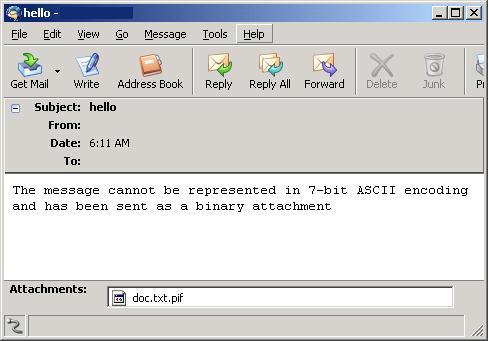
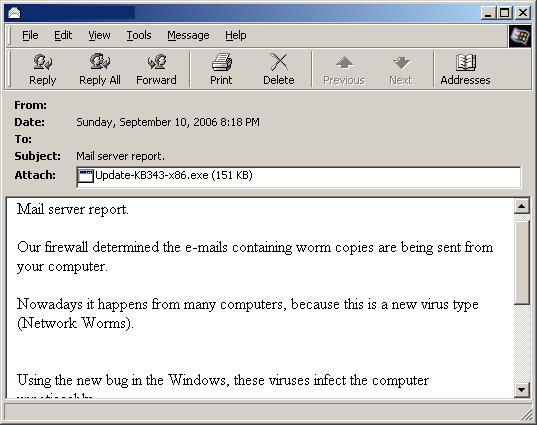
ATTACHMENT: The attachment is a copy of the worm. The filename is designed to disguise the executable nature of the attachment from the recipient. It is created using one of the following filename formats:
- %filename%.%ext1%.%ext2%
- Update-KB%random%-x86.exe
%filename% may use any of the following strings:
- body
- data
- doc
- document
- message
- readme
- text
%ext1% may use any of the following extension names:
- dat
- elm
- log
- txt
%ext2% may use any of the following extension names:
- bat
- cmd
- exe
- pif
%random% uses random numbers, for example:
- readme.txt.pif
- Update-KB1156-x86.exe
This worm also uses a text file icon in its attempt to fool recipients into thinking that this file is just a normal text or log file. This is especially true when the - Hide extensions for known file types - option in Windows is enabled.
Protect your devices from malware with F‑Secure Total
Protecting your devices from malicious software is essential for maintaining online security. F‑Secure Total makes this easy, helping you to secure your devices in a brilliantly simple way.
- Award‑winning antivirus and malware protection
- Online browsing, banking, and shopping protection
- 24/7 online identity and data breach monitoring
- Unlimited VPN service to safeguard your privacy
- Password manager with private data protection
Choose how many devices you want to protect to get started.

- Free customer support
- Cancel anytime
- The trial does not obligate you to buy the product
After 30 days your subscription will renew automatically for one year at €69.99.


More Support
Community
Ask questions in our Community.
User guides
Check the user guide for instructions.
Contact Support
Chat with our support for assistance.
Submit a Sample
Submit a file or URL for analysis.