

Summary
Trojan.W32/Agent.DPL totally paralyzes the victim's computer after execution by removing access to many basic functions of the Windows OS. Its motives appear to be completely malicious. It makes references to a Kenyan politician and may be a form of political mudslinging.
Removal
When the malware is active on the system, many basic functions are crippled, system tools are disabled, and there is little that can be done with the computer.However, the malware will terminate itself when a process named MsAutoPro.exe is launched.An application such as Notepad.exe can be renamed as MsAutoPro.exe. Running "notepad" with this new name will display a dialog box with the text "Illegal Application" and the malware will terminate itself.The Registry key changes will still need to be undone, but the malware will no longer close system tools and other applications.
A False Positive is when a file is incorrectly detected as harmful, usually because its code or behavior resembles known harmful programs. A False Positive will usually be fixed in a subsequent database update without any action needed on your part. If you wish, you may also:
- Check for the latest database updates
- First, check if your F-Secure security program is using the latest updates, then try scanning the file again.
- Submit a sample
- After checking, if you still believe the file is incorrectly detected, you can submit a sample of it for re-analysis.
- Note: If the file was moved to quarantine, you need to collect the file from quarantine before you can submit it.
- Exclude a file from further scanning
- If you are certain that the file is safe and want to continue using it, you can exclude it from further scanning by the F-Secure security product.
- Note: You need administrative rights to change the settings.
Technical Details
Upon execution Trojan:W32/Agent.DPL opens the "My Documents" folder on the Windows Desktop.Agent.DPL attempts to connect to the following website:
- www.kalonzomusyokaforpresident.com
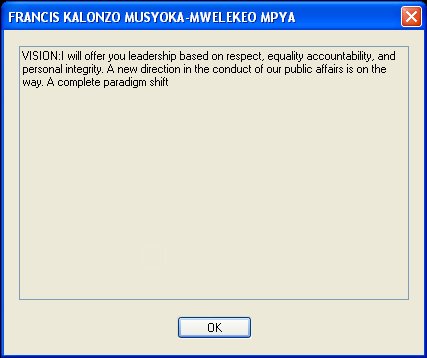
The website is the official presidential campaign page of Kenyan politician Stephen Kalonzo Musyoka.Before Windows starts and enters the Welcome screen the following message will appear:
- FRANCIS KALONZO MUSYOKA-MWELEKEO MPYAVISION:I will offer you leadership based on respect, equality accountability, and personal integrity. A new direction in the conduct of our public affairs is on the way. A complete paradigm shift
The malware creates the following file:
- C:\SoftwareProtector\musyoka610_out.pr
It creates the following Startup files for itself:
- %allusersprofile%\Start Menu\Programs\Startup\default.pif
- %Windir%\Auto.inf
It copies itself into the following folders as:
- %allusersprofile%\Documents\Music.exe
- %userprofile%\My Documents\My Documents .exe
- %Windir%\Fonts\lsass.exe
- %Windir%\SoftwareDistribution\DataStore\Logs\lsass.exe
- %Windir%\System32.exe
- %windir%\system32\config\systemprofile\My Documents\My Documents .exe
- %Windir%\System32\DirectX\Dinput\csrss.exe
- c:\Documents and Settings\Default User\My Documents\My Documents .exe
Spreading Vectors
The malware spreads itself by creating a file called "Autorun.inf" and a folder called "WindowXP" onto hard drive partitions, including removeable media (such as USB drives), and copies itself into the folder as "Explorer.exe". It hides the "Autorun.inf" file by changing its file attributes.
- [autorun.inf]open=shell\open\Command=Windowxp\Explorer.exeshell\open\Default=1shell\explore\Command=windowxp\Explorer.exe
It also copies itself to every folder opened and viewed by the user. The copy uses the same name as the folder itself.It modifies the following registry keys:
- HKEY_CURRENT_USER\Control Panel\DesktopCoolswitch = 00000000
- HKEY_CURRENT_USER\Software\Microsoft\Windows\CurrentVersion\Explorer\Advanced\Hidden = 00000000
- HKEY_CURRENT_USER\Software\Microsoft\Windows\CurrentVersion\Explorer\Advanced\ShowSuperHidden = 00000000
- HKEY_CURRENT_USER\Software\Microsoft\Windows\CurrentVersion\Explorer\Advanced\HideFileExt = 00000001
- HKEY_CURRENT_USER\Software\Microsoft\Windows\CurrentVersion\Policies\Explorer\NoFolderOptions = 00000001
- HKEY_CURRENT_USER\SOFTWARE\Microsoft\Windows\CurrentVersion\Policies\Explorer\NoControlPanel = 00000001
- HKEY_CURRENT_USER\SOFTWARE\Microsoft\Windows\CurrentVersion\Policies\Explorer\NoDrives = 00000001
- HKEY_CURRENT_USER\SOFTWARE\Microsoft\Windows\CurrentVersion\Policies\Explorer\NoFind = 00000001
- HKEY_CURRENT_USER\SOFTWARE\Microsoft\Windows\CurrentVersion\Policies\Explorer\NoRun = 00000001
- HKEY_CURRENT_USER\SOFTWARE\Microsoft\Windows\CurrentVersion\Policies\Explorer\NoShellSearchButton = 00000001
- HKEY_CURRENT_USER\SOFTWARE\Microsoft\Windows\CurrentVersion\Policies\Explorer\NoEntireNetwork = 00000001
- HKEY_CURRENT_USER\SOFTWARE\Microsoft\Windows\CurrentVersion\Policies\Explorer\NoSecurityTab = 00000001
- HKEY_CURRENT_USER\SOFTWARE\Microsoft\Windows\CurrentVersion\Policies\Explorer\NoSimpleStartMenu = 00000001
- HKEY_CURRENT_USER\SOFTWARE\Microsoft\Windows\CurrentVersion\Policies\Explorer\NoResolveSearch = 00000001
- HKEY_CURRENT_USER\SOFTWARE\Microsoft\Windows\CurrentVersion\Policies\Explorer\NoResolveTrack = 00000001
- HKEY_CURRENT_USER\SOFTWARE\Microsoft\Windows\CurrentVersion\Policies\Explorer\NoUserNameInStartMenu = 00000001
- HKEY_CURRENT_USER\SOFTWARE\Microsoft\Windows\CurrentVersion\Policies\Explorer\NoClose = 00000001
- HKEY_CURRENT_USER\Software\Microsoft\Windows\CurrentVersion\Policies\WinOldAppDisable = 00000001
- HKEY_LOCAL_MACHINE\SOFTWARE\Microsoft\Windows NT\CurrentVersion\AeDebugDebugger = "C:\WINDOWS\fonts\lsass.exe"
- HKEY_LOCAL_MACHINE\SOFTWARE\Microsoft\Windows NT\CurrentVersion\AeDebugAuto = 1
- HKEY_LOCAL_MACHINE\SOFTWARE\Microsoft\Windows NT\CurrentVersion\WinlogonUserinit = C:\WINDOWS\system32\userinit.exe,C:\WINDOWS\fonts\lsass.exe
- HKEY_LOCAL_MACHINE\SOFTWARE\Microsoft\Windows\CurrentVersion\Policies\Explorer\NoFolderOptions = 00000001
- HKEY_LOCAL_MACHINE\Software\Microsoft\Windows\CurrentVersion\policies\system\kb = AUTO.TXT
- HKEY_LOCAL_MACHINE\SOFTWARE\Microsoft\Windows\CurrentVersion\Policies\Explorer\NoControlPanel = 00000001
- HKEY_LOCAL_MACHINE\SOFTWARE\Microsoft\Windows\CurrentVersion\policies\systemshutdownwithoutlogon = 00000000
- HKEY_LOCAL_MACHINE\SOFTWARE\Microsoft\Windows\CurrentVersion\policies\systemLegalNoticeCaption = FRANCIS KALONZO MUSYOKA-MWELEKEO MPYA
- HKEY_LOCAL_MACHINE\SOFTWARE\Microsoft\Windows\CurrentVersion\policies\systemLegalNoticeText = VISION:I will offer you leadership based on respect, equalityaccountability, and personal integrity. A new direction in the conduct of our publicaffairs is on the way. A complete paradigm shift
- HKEY_LOCAL_MACHINE\SOFTWARE\Policies\Microsoft\Windows NT\SystemRestoreDisableConfig = 00000001
- HKEY_LOCAL_MACHINE\SOFTWARE\Policies\Microsoft\Windows NT\SystemRestoreDisableSR = 00000001
- HKEY_LOCAL_MACHINE\SOFTWARE\Policies\Microsoft\Windows\InstallerLimitSystemRestoreCheckpointing = 00000001
- HKEY_LOCAL_MACHINE\SOFTWARE\Policies\Microsoft\Windows\InstallerDisableMSI = 00000001
- HKEY_LOCAL_MACHINE\SYSTEM\CurrentControlSet\Control\SafeBoot\AlternateShell = C:\WINDOWS\SoftwareDistribution\DataStore\Logs\lsass.exe
The Registry modifications result in a crippled Start Menu:
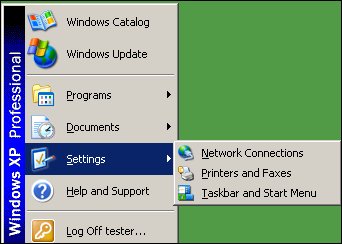
It disables/hides the following System tools:
- Control Panel
- Folder Options
- Shutdown from Start Menu
- Start Menu / Run
- System Clock
- Taskbar Properties
- Windows Search
It will remove the following files if they exist:
- %ProgramFilesDir%\Alwil Software\Avast4\ashAvast.exe
- %ProgramFilesDir%\Alwil Software\Avast4\ashBug.exe
- %ProgramFilesDir%\Alwil Software\Avast4\ashdisp.exe
- %ProgramFilesDir%\Alwil Software\Avast4\ashmaisv.exe
- %ProgramFilesDir%\Alwil Software\Avast4\ashserv.exe
- %ProgramFilesDir%\Alwil Software\Avast4\ashwebsv.exe
- %ProgramFilesDir%\Alwil Software\Avast4\sched.exe
- %ProgramFilesDir%\Alwil Software\Avast4\visthupd.exe
- %ProgramFilesDir%\ESET\nod32.exe
- %ProgramFilesDir%\ESET\nod32krn.exe
- %ProgramFilesDir%\ESET\nod32kui.exe
- %ProgramFilesDir%\Grisoft\Avg free\avgcc.exe
- %ProgramFilesDir%\Grisoft\Avg free\avgvv.exe
- %ProgramFilesDir%\Grisoft\Avg free\avgw.exe
- %ProgramFilesDir%\McAfee.com\Agent\mcagent.exe
- %ProgramFilesDir%\McAfee.com\VSO\Mcshield.exe
- %ProgramFilesDir%\McAfee.com\VSO\McVSEscn.exe
- %ProgramFilesDir%\McAfee.com\VSO\Mcvsftsn.exe
- %ProgramFilesDir%\Panda Software\Panda Antivirus 2007\Apvxdwin.exe
- %ProgramFilesDir%\Panda Software\Panda Antivirus 2007\apvxdwin.exe
- %ProgramFilesDir%\Panda Software\Panda Antivirus 2007\Avciman.exe
- %ProgramFilesDir%\Panda Software\Panda Antivirus 2007\Avengine.exe
- %ProgramFilesDir%\Panda Software\Panda Antivirus 2007\avengine.exe
- %ProgramFilesDir%\Panda Software\Panda Antivirus 2007\avlite.exe
- %ProgramFilesDir%\Panda Software\Panda Antivirus 2007\Avltmain.exe
- %ProgramFilesDir%\Panda Software\Panda Antivirus 2007\Avtask.exe
- %ProgramFilesDir%\Panda Software\Panda Antivirus 2007\lupgconf.exe
- %ProgramFilesDir%\Panda Software\Panda Antivirus 2007\panicsh.exe
- %ProgramFilesDir%\Panda Software\Panda Antivirus 2007\pavsrv51.exe
- %ProgramFilesDir%\Panda Software\Panda Antivirus 2007\psctrls.exe
- %ProgramFilesDir%\Panda Software\Panda Antivirus 2007\psimsvc.exe
- %ProgramFilesDir%\Panda Software\Panda Antivirus 2007\webproxy.exe
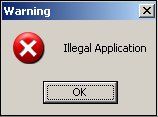
If the malware finds that the user is trying to launch a process called "MsAutoPro.exe" or that the process is already running, the malware terminates itself by displaying a message box with the text "Illegal Application". This process name can be used to disable the malware.
It terminates following processes and prevents them to run:
- Apvxdwin.exe
- Ashavast.exe
- Ashdisp.exe
- Ashmaisv.exe
- Ashserv.exe
- Ashwebsv.exe
- aswupdsv.exe
- avengine.exe
- avgcc.exe
- AVS 2007.exe
- kav6.0.2.621en.exe
- mcagent.exe
- Mcmnhdlr.exe
- mcshield.exe
- McVSEscn.exe
- McVsftsn.exe
- msiexec.exe
- nod32.exe
- nod32krn.exe
- nod32kui.exe
- pavsrv51.exe
- psctrls.exe
- psimsvc.exe
It terminates all the processes that have one of the following strings:
- ADMINI
- ANT
- AUTO
- AVAST
- AVS
- BUG
- CLEA
- COMPON
- CONFIG
- CONSOL
- DETEC
- ESSET
- KASP
- KAV
- MCAFEE
- MECHAN
- NOD32
- NORTON
- PAND
- PROC
- REG
- SCAN
- SECUR
- SUPPORT
- SYMAN
- TASK
- TRIA
- UNHO
- VIR
Agent.DPL also repeatedly opens the CD/DVD-Rom drive door.The malware was written with Visual Basic.
Protect your devices from malware with F‑Secure Total
Protecting your devices from malicious software is essential for maintaining online security. F‑Secure Total makes this easy, helping you to secure your devices in a brilliantly simple way.
- Award‑winning antivirus and malware protection
- Online browsing, banking, and shopping protection
- 24/7 online identity and data breach monitoring
- Unlimited VPN service to safeguard your privacy
- Password manager with private data protection
Choose how many devices you want to protect to get started.

- Free customer support
- Cancel anytime
- The trial does not obligate you to buy the product
After 30 days your subscription will renew automatically for one year at €69.99.


More Support
Community
Ask questions in our Community.
User guides
Check the user guide for instructions.
Contact Support
Chat with with or call an agent.
Submit a Sample
Submit a file or URL for analysis.