

Summary
Bugbear is a mass-mailing and network worm with keylogging and backdoor capabilities. It appeared in the wild on 30th of September 2002.
Removal
Based on the settings of your F-Secure security product, it will either move the file to the quarantine where it cannot spread or cause harm, or remove it.
Caution: Manual disinfection is a risky process; it is recommended only for advanced users.
To remove Bugbear worm from a system it's enough to delete all its files from a hard drive and to restart a computer. If the worm is in a network environment, the network should be temporarily taken down and all systems have to be disinfected separately. Otherwise the worm will try to re-infect already cleaned systems.
Note: Also after disinfection it is recommended to change all logins and passwords as they could have been compromised by the password stealer component of the worm.
It is also recommended to check infected systems and networks for possible hacker intrusion that could have been performed through the backdoor component of the worm.
A False Positive is when a file is incorrectly detected as harmful, usually because its code or behavior resembles known harmful programs. A False Positive will usually be fixed in a subsequent database update without any action needed on your part. If you wish, you may also:
- Check for the latest database updates
- First, check if your F-Secure security program is using the latest updates, then try scanning the file again.
- Submit a sample
- After checking, if you still believe the file is incorrectly detected, you can submit a sample of it for re-analysis.
- Note: If the file was moved to quarantine, you need to collect the file from quarantine before you can submit it.
- Exclude a file from further scanning
- If you are certain that the file is safe and want to continue using it, you can exclude it from further scanning by the F-Secure security product.
- Note: You need administrative rights to change the settings.
Technical Details
History
UPDATE (2002-12-03 14:00 GMT)
F-Secure is downgrading the Bugbear/Tanatos email worm from Level 1 to Level 2 as it is not spreading as fast as before.
UPDATE (2002-10-02 13:30 GMT)
F-Secure is upgrading the Bugbear/Tanatos email worm to Level 1 as it continues to spread rapidly. Currently it is the most widespread virus in the world together with Klez. For more information, see Global Bugbear worm Information Center: http://www.europe.f-secure.com/bugbear/
Infection
When run, the worm copies itself to Windows System directory with a random name (JFMV.EXE for example) and adds a startup key for this file to the Registry:
- [HKLM\Software\Microsoft\Windows\CurrentVersion\RunOnce]
It also drops a keylogging component as a DLL file with a randomly-generated name (ZLQPUPP.DLL for example) to Windows System folder. The worm also creates 2 more DLL files and stores some encrypted data there. The worm creates 2 randomly named DAT files in root Windows folder too.
Propagation (email)
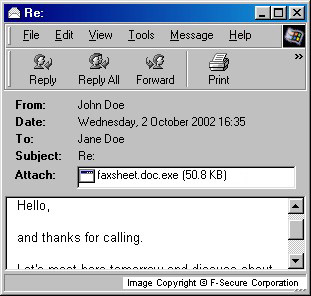
The worm's file is a PE EXE (portable executable), 50688 bytes long and it is compressed with UPX file compressor. Bugbear spreads in email messages as an attachment with randomly-generated names and with one or more extensions. Subjects and bodies of infected emails are also different. The mass-mailing routine is quite complex.
The worm has the ability to fake information in email headers, so sometimes the sender's email address gets replaced with another address that the worm finds on an infected system.
The worm's messages can contain IFrame exploit that allows it to run automatically on some computers when an infected email is viewed (for example, with Outlook and IE 5.0 or 5.01). This vulnerability is fixed and a patch for it is available on the Microsoft site:
- http://www.microsoft.com/windows/ie/downloads/critical/q323759ie/default.asp
Bugbear worm looks for email addresses in INBOX (Netscape incoming email database) and in files with the following extensions:
- .ODS
- .MMF
- .NCH
- .MBX
- .EML
- .TBB
- .DBX
Sometimes the worm picks up email messages from infected user's database and sends them out with its copy attached. Also the worm can place contents of a random text file from an infected hard drive to an infected message's body. It can send itself in a message with one of the following subjects:
- Greets!
- Get 8 FREE issues - no risk!
- Hi!
- Your News Alert
- $150 FREE Bonus!
- Re:
- Your Gift
- New bonus in your cash account
- Tools For Your Online Business
- Daily Email Reminder
- News
- free shipping!
- its easy
- Warning!
- SCAM alert!!!
- Sponsors needed
- new reading
- CALL FOR INFORMATION!
- 25 merchants and rising
- Cows
- My eBay ads
- empty account
- Market Update Report
- click on this!
- fantastic
- wow!
- bad news
- Lost & Found
- New Contests
- Today Only
- Get a FREE gift!
- Membership Confirmation
- Report
- Please Help...
- Stats
- I need help about script!!!
- Interesting...
- Introduction
- various
- Announcement
- history screen
- Correction of errors
- Just a reminder
- Payment notices
- hmm..
- update
- Hello!
The worm doesn't send itself to addresses that contain the following strings (to avoid bounces and other unwanted events):
- remove
- spam
- undisclosed
- recipients
- noreply
- lyris
- virus
- trojan
- mailer-daemon
- postmaster@
- root@
- nobody@
- localhost
- localdomain
- list
- talk
- ticket
- majordom
Bugbear can send itself as an attachment with with double extensions. The first extension can be one of the following:
- .reg
- .ini
- .bat
- .h
- .diz
- .txt
- .cpp
- .c
- .html
- .htm
- .jpeg
- .jpg
- .gif
It sets the content type of an infected attachment according to the above file types. Content type can be one of the following:
- image/gif
- image/jpeg
- application/octet-stream
- text/plain
- text/html
The second extension of an infected attachment can be one of the following:
- .scr
- .pif
- .exe
Also the worm can 'borrow' the name for its attachment from one of files on an infected hard drive and then to add an executable extension to it, for example it can send itself as AGREEMENT.DOC.PIF file. The name of the infected attachment can contain one of the following strings:
- readme
- Setup
- Card
- Docs
- news
- image
- images
- pics
- resume
- photo
- video
- music
- song
- data
Propagation (Local Area Network)
Bugbear has local network spreading capabilities. The worm enumerates network resources and tries to locate \Start Menu\Programs\Startup\ folder on remote systems. If such path is found, the worm copies itself there with a random name. When a remote system is restarted, the worm's file gets control and infects a system.
Terminating Processes
The worm continuously looks for and terminates processes with the below-given names:
- _AVP32.EXE
- _AVPCC.EXE
- _AVPM.EXE
- ACKWIN32.EXE
- ANTI-TROJAN.EXE
- APVXDWIN.EXE
- AUTODOWN.EXE
- AVCONSOL.EXE
- AVE32.EXE
- AVGCTRL.EXE
- AVKSERV.EXE
- AVNT.EXE
- AVP.EXE
- AVP32.EXE
- AVPCC.EXE
- AVPDOS32.EXE
- AVPM.EXE
- AVPTC32.EXE
- AVPUPD.EXE
- AVSCHED32.EXE
- AVWIN95.EXE
- AVWUPD32.EXE
- BLACKD.EXE
- BLACKICE.EXE
- CFIADMIN.EXE
- CFIAUDIT.EXE
- CFINET.EXE
- CFINET32.EXE
- CLAW95.EXE
- CLAW95CF.EXE
- CLEANER.EXE
- CLEANER3.EXE
- DVP95.EXE
- DVP95_0.EXE
- ECENGINE.EXE
- ESAFE.EXE
- ESPWATCH.EXE
- F-AGNT95.EXE
- F-PROT.EXE
- F-PROT95.EXE
- F-STOPW.EXE
- FINDVIRU.EXE
- FP-WIN.EXE
- FPROT.EXE
- FRW.EXE
- IAMAPP.EXE
- IAMSERV.EXE
- IBMASN.EXE
- IBMAVSP.EXE
- ICLOAD95.EXE
- ICLOADNT.EXE
- ICMON.EXE
- ICSUPP95.EXE
- ICSUPPNT.EXE
- IFACE.EXE
- IOMON98.EXE
- JEDI.EXE
- LOCKDOWN2000.EXE
- LOOKOUT.EXE
- LUALL.EXE
- MOOLIVE.EXE
- MPFTRAY.EXE
- N32SCANW.EXE
- NAVAPW32.EXE
- NAVLU32.EXE
- NAVNT.EXE
- NAVW32.EXE
- NAVWNT.EXE
- NISUM.EXE
- NMAIN.EXE
- NORMIST.EXE
- NUPGRADE.EXE
- NVC95.EXE
- OUTPOST.EXE
- PADMIN.EXE
- PAVCL.EXE
- PAVSCHED.EXE
- PAVW.EXE
- PCCWIN98.EXE
- PCFWALLICON.EXE
- PERSFW.EXE
- RAV7.EXE
- RAV7WIN.EXE
- RESCUE.EXE
- SAFEWEB.EXE
- SCAN32.EXE
- SCAN95.EXE
- SCANPM.EXE
- SCRSCAN.EXE
- SERV95.EXE
- SMC.EXE
- SPHINX.EXE
- SWEEP95.EXE
- TBSCAN.EXE
- TCA.EXE
- TDS2-98.EXE
- TDS2-NT.EXE
- VET95.EXE
- VETTRAY.EXE
- VSCAN40.EXE
- VSECOMR.EXE
- VSHWIN32.EXE
- VSSTAT.EXE
- WEBSCANX.EXE
- WFINDV32.EXE
- ZONEALARM.EXE
The worm uses separate routines for process killing on Windows 9x- and NT-based systems. In most cases the worm effectively disables security and anti-virus software that fail to detect it entering a system.
Backdoor
Bugbear worm also listens to port 36794 and can provide access to an infected system and the network it is connected to via an internal backdoor component. The backdoor component allows an attacker to access an infected system through a web-based interface. The worm generates HTML pages on-the-fly when an attacker browses directories on an infected remote computer.
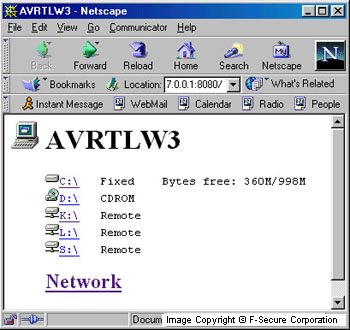
It contains several icons that it uses to identify the type of remote drives and files. The backdoor component also allows to browse shared network resources that an infected computer has access to. The worm also uses icons to identify network resources.
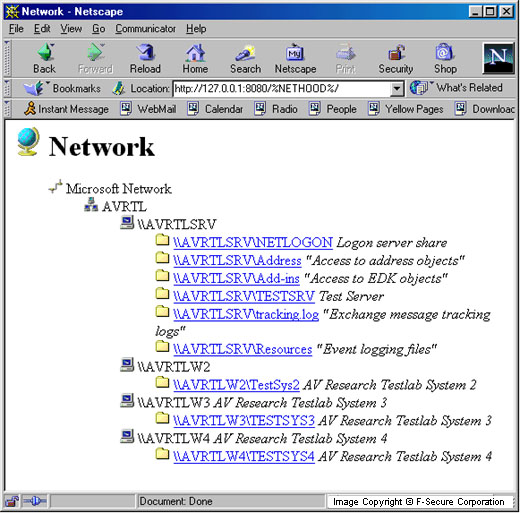
Bugbear allows an attacker to get information about the infected system: operating system, processor type, fixed and network drives.
Keylogging
The worm has password stealing capabilities. It installs a keylogging component to a system, records keystrokes and saves them into a file. Then it sends this file to a few email addresses that are stored in encrypted for in the worm's body. The smtp server names that the worm uses to send the files are also stored in encrypted form in the worm's body.
Side Effect
According to reports, network printers start to print a lot of garbage when the worm infects a network. This might be the side-effect of the worm's attempts to infect a network.
Protect your devices from malware with F‑Secure Total
Protecting your devices from malicious software is essential for maintaining online security. F‑Secure Total makes this easy, helping you to secure your devices in a brilliantly simple way.
- Award‑winning antivirus and malware protection
- Online browsing, banking, and shopping protection
- 24/7 online identity and data breach monitoring
- Unlimited VPN service to safeguard your privacy
- Password manager with private data protection
Choose how many devices you want to protect to get started.

- Free customer support
- Cancel anytime
- The trial does not obligate you to buy the product
After 30 days your subscription will renew automatically for one year at €69.99.


More Support
Community
Ask questions in our Community.
User guides
Check the user guide for instructions.
Contact Support
Chat with our support for assistance.
Submit a Sample
Submit a file or URL for analysis.