

Summary
Swen is a worm that replicates via email, local network (LAN), IRC and Kazaa. It uses a vulnerability in Internet Explorer to execute directly from email.
Removal
Based on the settings of your F-Secure security product, it will either move the file to the quarantine where it cannot spread or cause harm, or remove it.
A False Positive is when a file is incorrectly detected as harmful, usually because its code or behavior resembles known harmful programs. A False Positive will usually be fixed in a subsequent database update without any action needed on your part. If you wish, you may also:
- Check for the latest database updates
- First, check if your F-Secure security program is using the latest updates, then try scanning the file again.
- Submit a sample
- After checking, if you still believe the file is incorrectly detected, you can submit a sample of it for re-analysis.
- Note: If the file was moved to quarantine, you need to collect the file from quarantine before you can submit it.
- Exclude a file from further scanning
- If you are certain that the file is safe and want to continue using it, you can exclude it from further scanning by the F-Secure security product.
- Note: You need administrative rights to change the settings.
Technical Details
Swen worm appeared on 18th of September 2003. It is most likely written by the author of Gibe worm (Begbie) and this worm has similar features as the latest Gibe variants.
The worm's file is a Windows PE executable 106496 bytes long. It is not compressed by any file compressor.
Installation
When the worm's file is run, it checks whether it's already installed and if not, it copies its file to Windows directory with a random name (for example MLMHP.EXE) and creates a startup key for this file in the Registry:
- [HKLM\Software\Microsoft\Windows\CurrentVersion\Run] "[random characters]" = "[random characters].exe /autorun"
where is the name of the worm's file. This way the worm's file is always started with Windows. If the worm is already installed on a computer, it shows the following messagebox:
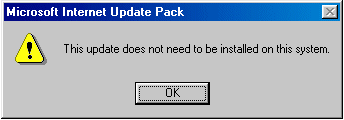
Otherwise the worm shows the following messagebox:
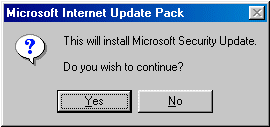
If a user clicks 'No' button, the worm installs itself to system hiddenly. If a user clicks 'Yes' button, the worm shows a fake installation dialog:
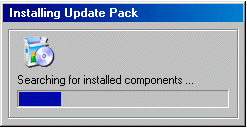
and after some time it reports successful installation:
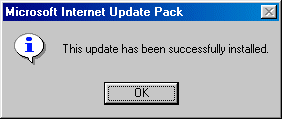
During installation the worm creates a batch file that has a name of an infected workstation. This batch file contains the following text:
@ECHO OFF IF NOT "%1"=="" [name].exe %1where [name] is the name of the worm's executable file. The worm extracts the list of SMTP and NNTP servers from its body into the SWEN1.DAT file that is placed into Windows directory.
Then the worm modifies default startup keys for BAT, SCR, EXE, REG and PIF files in the Registry:
- [HKCR\exefile\shell\open\command]
- [HKCR\regfile\shell\open\command]
- [HKCR\scrfile\shell\open\command]
- [HKCR\piffile\shell\open\command]
- [HKCR\batfile\shell\open\command]
- [HKCR\scrfile\shell\config\command]
As a result, the worm gets control every time a user tries to run executable and registry files. Additionally the worm disables Registry tools by creating the following key:
- [HKU\.DEFAULT\Software\Microsoft\Windows\CurrentVersion\Policies\System] "DisableRegistryTools" = dword:00000001
As a result a user will not be able to run Regedit utility and import REG files data. The worm will show the following messagebox in such case:
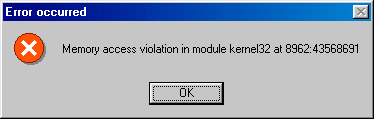
The numbers in this messagebox are randomly-generated.
The worm creates a set of subkeys in the following key:
- [HKLM\SOFTWARE\Microsoft\Windows\CurrentVersion\Explorer]
These subkeys contain information about SMTP server, user's email, key name of installed worm's file, name of infected computer user, name of a zip archive that the worm tries to create using WinZip, name of mIRC folder and some other data. During installation process the worm enables sharing for Kazaa client, copies itself several times into Kazaa shared folders and also replaces SCRIPT.INI file of mIRC client with the one that sends out the worm's file to every user joining a channel where an infected user is present. The worm also copies its file to startup folders of remote computers via network.
Propagation (local network)
The worm attempts to spread itself via local network (LAN). It looks for mapped network drives, accesses them and if it finds the following directories in the root folder:
- Win98
- Win95
- WinMe
- Windows
it copies its file with a random name to the following folders:
- \%WinDir%\Start menu\Programs\Startup
- \Documents and Settings\All Users\Start menu\Programs\Startup
- \Documents and Settings\Administrator\Start menu\Programs\Startup
- \Documents and Settings\Default User\Start menu\Programs\Startup
- \Winnt\Profiles\All Users\Start menu\Programs\Startup
- \Winnt\Profiles\Administrator\Start menu\Programs\Startup
- \Winnt\Profiles\Default User\Start menu\Programs\Startup
As a result remote computers will become infected with the worm after they are restarted.
Propagation (IRC)
The worm creates its own SCRIPT.INI file in mIRC installation folder. This script makes an IRC client send a file called 'WinZip installer.zip' to every user joining a channel where an infected user is present.
Propagation (Kazaa)
The worm modifies the Registry to enable sharing for Kazaa client, then it locates Kazaa shared folder and copies itself there with a generated name. The name is generated from the following strings:
- Kazaa Lite
- KaZaA media desktop
- KaZaA
- WinRar
- WinZip
- Winamp
- Mirc
- Download Accelerator
- GetRight FTP
- Windows Media Player
- key generator
- hack
- hacked
- warez
- upload
- installer
- Bugbear
- Yaha
- Gibe
- Sircam
- Sobig
- Klez
- remover
- removal tool
- cleaner
- fixtool
- AOL hacker
- Yahoo hacker
- Hotmail hacker
- 10.000 Serials
- Jenna Jameson
- HardPorn
- Sex
- XboX Emulator
- Emulator PS2
- XP update
- XXX Video
- Sick Joke
- XXX Pictures
- My naked sister
- Hallucinogenic Screensaver
- Cooking with Cannabis
- Magic Mushrooms Growing
- Virus Generator
These files can have EXE or ZIP extensions.
Propagation (E>-mails and newsgroups)
The worm periodically scans HTML and ASP files on a hard drive and stores found email addresses in the GERMS0.DBV file located in Windows folder. The worm also reads .EML, .DBX, .WAB, and .MBX files and fetches email addresses from there. The worm does not fetch addresses containing 'delete' and 'spam' strings.
The worm also can search for email addresses in various newsgroups. It connects to NNTP servers listed in the SWEN1.DAT file, gets a list of all newsgroups on that server and searches recent messages in these newsgroups for 'nfrom:' and 'nreply-to:' tags. When such tags are found, the worm gets email addressed after them and writes them to the GERMS0.DBV file. This way the worm can harvest a lot of email addresses to send itself to.
The worm can post its emails to newsgroups, the names of which it finds during searching process. The worm sends the same kind of messages as it sends via email.
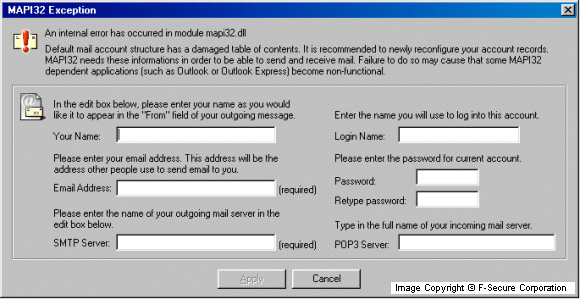
The worm reads SMTP server address and user name from the Registry. However, if it can't find this info, it shows a fake MAPI error dialog asking a user to input that data:
The worm sends itself a very legitimately-looking messages that are composed from different text strings hardcoded in the worm's body. It also checks the current date and uses the current month inside the text of the email message. On that way it will spread with different messages each month of the year. Here is an example of such message sent in September:
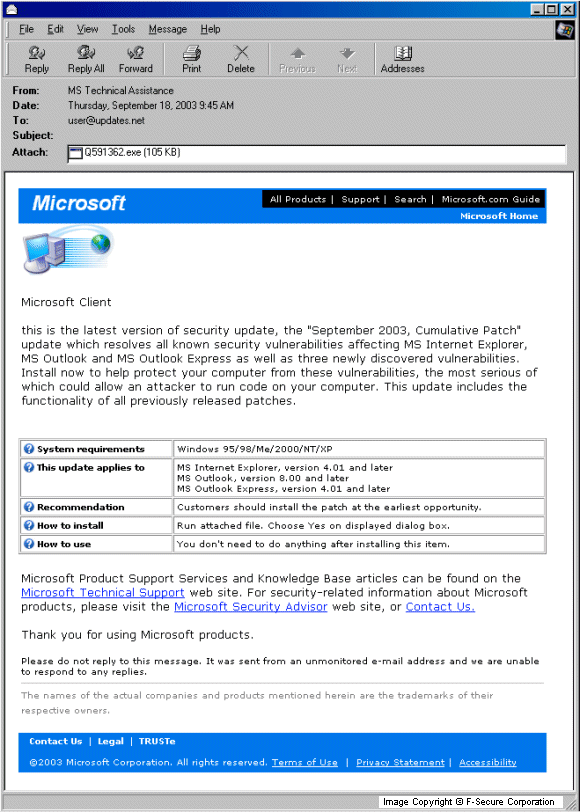
The attachment name, subject and part of the infected message is randomly composed from text strings hardcoded in the worm's body. The fake sender's address is selected from the following parts:
- MS
- Microsoft
- Corporation
- Program
- Internet
- Network
- Security
- Division
- Section
- Department
- Center
- Technical
- Public
- Customer
- Bulletin
- Services
- Assistance
- Support
The domain name for these emails is selected from the following parts:
- news
- bulletin
- confidence
- advisor
- updates
- technet
- support
- newsletters
The domain suffix for these emails is selected from the following parts:
- ms
- msn
- msdn
- microsoft
followed by one of the following:
- .com
- .net
The fake recipient's address is also composed from the above shown strings, however the fake recipient's name is selected from the following parts:
- Commercial
- MS
- Microsoft
- Corporation
- Customer
- User
- Partner
- Consumer
- Client
The subject is composed from the following parts:
- Current
- Newest
- Last
- New
- Latest
- Net
- Network
- Microsoft
- Internet
- Critical
- Security
- Patch
- Update
- Pack
- Upgrade
The worm is usually attached to infected messages as an EXE file. The attachment name is randomly generated from numbers and the following parts:
- upgrade
- update
- patch
- q
- install
- installer
- installation
For example the infected attachment name can be Q591362.EXE or UPDATE98.EXE. The IFrame exploit is not present in such messages. In some cases the worm's attachment can be in a ZIP archive. The worm can also compose fake forwarded or bounced emails from the following parts:
- RE:
- FWD:
- FW:
- Check
- Check out
- Prove
- Try
- Taste
- Try on
- Look at
- Take a look at
- See
- Watch
- Use
- Apply
- Install
- this
- that
- the
- these
- important
- internet
- critical
- security
- corrective
- correction
- patch
- update
- pack
- upgrade
- for
- MS
- Microsoft
- Windows
- Internet Explorer
- which
- that
- comes
- from
- the
- MS
- M$
- Microsoft
- Corporation
- Corp.
The bodies of bounced emails can have the following text strings:
- Hi.
- This is the qmail program
- Message from
- I'm sorry
- I'm sorry to have to inform you that
- I'm afraid
- I wasn't able to deliver your message
- the message returned below could not be delivered
- to the following addresses:
- to one or more destinations.
- Undeliverable
- Undelivered
- message
- mail
- Message follows:
Such emails usually contain IFrame exploit and the worm's file with PIF, BAT, COM, SCR or EXE extension and there is no Microsoft-like looking message body in them. The IFrame exploit allows the worm's attachment start automatically on older or unpatched versions of certain email browsers.
Payload
The worm terminates processes of security and anti-virus software that have the following strings in their names:
- _avp
- ackwin32
- anti-trojan
- aplica32
- apvxdwin
- autodown
- avconsol
- ave32
- avgcc32
- avgctrl
- avgw
- avkserv
- avnt
- avp
- avsched32
- avwin95
- avwupd32
- blackd
- blackice
- bootwarn
- ccapp
- ccshtdwn
- cfiadmin
- cfiaudit
- cfind
- cfinet
- claw95
- dv95
- ecengine
- efinet32
- esafe
- espwatch
- f-agnt95
- findviru
- fprot
- f-prot
- fprot95
- f-prot95
- fp-win
- frw
- f-stopw
- gibe
- iamapp
- iamserv
- ibmasn
- ibmavsp
- icload95
- icloadnt
- icmon
- icmoon
- icssuppnt
- icsupp
- iface
- iomon98
- jedi
- kpfw32
- lockdown2000
- lookout
- luall
- moolive
- mpftray
- msconfig
- nai_vs_stat
- navapw32
- navlu32
- navnt
- navsched
- navw
- nisum
- nmain
- normist
- nupdate
- nupgrade
- nvc95
- outpost
- padmin
- pavcl
- pavsched
- pavw
- pcciomon
- pccmain
- pccwin98
- pcfwallicon
- persfw
- pop3trap
- pview
- rav
- regedit
- rescue
- safeweb
- serv95
- sphinx
- sweep
- tca
- tds2
- vcleaner
- vcontrol
- vet32
- vet95
- vet98
- vettray
- vscan
- vsecomr
- vshwin32
- vsstat
- webtrap
- wfindv32
- zapro
- zonealarm
The worm also doesn't allow to start files that have the above strings in their names. When such file is being started, the worm shows the following messagebox and stops execution if such file:
The numbers in this messagebox are randomly-generated.
If the worm finds a debugger in a system, it shows a messagebox with the following text:
- Try to pull my legs?
Infection counter
The worm keeps its own counter on a certain webpage. Every infected computer tries to access that page and that increases the counter there. By the time of this description creation (18th of September 20:00 GMT) the counter value was over 510000, but we believe that this is not the actual number of infected computers.
Variants
Swen.B
This minor variant was found on 9th of October, 2003. It has been created by compressing the original virus with UPX. This has shrunk the virus from 106496 bytes to 52224 bytes, making it undetectable to some antivirus programs. In addition, many references to Microsoft in the original virus have been changed to references to Tiscali, an Italian ISP.
F-Secure Anti-Virus detected this modified version of the virus without any need for updates.
Swen.C
This minor variant was also found on 9th of October, 2003. Like the previous variant this one is also compressed with UPX file compressor. The packed file size is 52224.
Swen.C has a bit different set of text strings mentioning both Tiscali and Microsoft and also the name of Tiscali's CEO Renato Soru. A few Tiscali links that were present in the B variant were slightly modified.
Protect your devices from malware with F‑Secure Total
Protecting your devices from malicious software is essential for maintaining online security. F‑Secure Total makes this easy, helping you to secure your devices in a brilliantly simple way.
- Award‑winning antivirus and malware protection
- Online browsing, banking, and shopping protection
- 24/7 online identity and data breach monitoring
- Unlimited VPN service to safeguard your privacy
- Password manager with private data protection
Choose how many devices you want to protect to get started.

- Free customer support
- Cancel anytime
- The trial does not obligate you to buy the product
After 30 days your subscription will renew automatically for one year at €69.99.


More Support
Community
Ask questions in our Community.
User guides
Check the user guide for instructions.
Contact Support
Chat with our support for assistance.
Submit a Sample
Submit a file or URL for analysis.