

Summary
Worm:W32/Sircam is a mass mailing email worm with the ability to through Windows Network shares.
Removal
Based on the settings of your F-Secure security product, it will either move the file to the quarantine where it cannot spread or cause harm, or remove it.
A False Positive is when a file is incorrectly detected as harmful, usually because its code or behavior resembles known harmful programs. A False Positive will usually be fixed in a subsequent database update without any action needed on your part. If you wish, you may also:
- Check for the latest database updates
- First, check if your F-Secure security program is using the latest updates, then try scanning the file again.
- Submit a sample
- After checking, if you still believe the file is incorrectly detected, you can submit a sample of it for re-analysis.
- Note: If the file was moved to quarantine, you need to collect the file from quarantine before you can submit it.
- Exclude a file from further scanning
- If you are certain that the file is safe and want to continue using it, you can exclude it from further scanning by the F-Secure security product.
- Note: You need administrative rights to change the settings.
Technical Details
Sircam is particularly menacing because it includes a routine to add a document from the infected computer to the email messages it sends out to new victims. The document added is chosen from one of the documents in the user's 'My Documents' folder; this behavior may result in confidential material being released.
The worm's body is 137216 bytes long but when it comes as an email attachment, it appears larger in size due to the document attached to its body.
Distribution
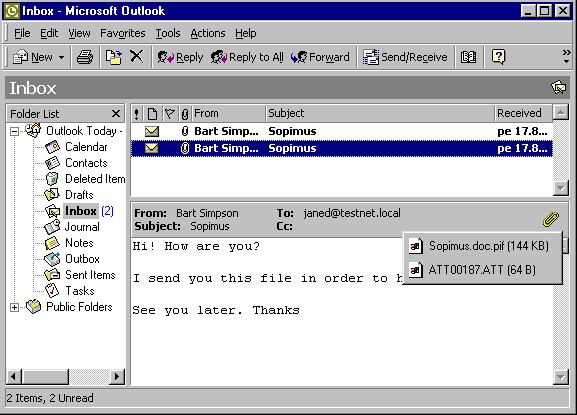
Sircam sends emails with variable user names and subject fields, and attaches user documents with double extensions (such as .doc.pif or .xls.lnk) to them. Messages sent by Sircam look like this:
Installation
When a Sircam-infected email attachment is opened it shows the document it picked up from the sender machine's. The file is displayed with the appropriate program according to its extension:
- '.DOC': WinWord.exe or WordPad.exe
- '.XLS': Excel.exe
- '.ZIP': winzip.exe
This effectively disguises the worm's activity. While the user is checking the document the system get infected (as described above).
When the worm runs on a clean system it copies itself to different locations with different names. The worm copies itself as 'SirC32.exe' to \Recycled\ folder. The default EXE file startup Registry key:
- [HKCR\exefile\shell\open\command]
is changed to '""[windows_drive]\recycled\SirC32.exe" "%1" %*"'. This is done to activate a worm's copy every time an EXE file is started. Since the recycled folder name is hard coded, the worm does not work on machines with NTFS filesystem. Most Windows NT and 2000 systems are installed on NTFS. The worm copies itself as 'SCam32.exe' in the System directory. The worm then creates a startup key for this file in the Registry to be started during all Windows sessions:
- [HKLM\Software\Microsoft\Windows\CurrentVersion\RunServices] "Driver32" = "\SCam32.exe"
The worm copies itself as 'rundll32.exe' file to Windows directory. The original 'rundll32.exe' file is renamed to 'run32.exe'. This copy exists only if a computer got infected through a network share (see below).
Sometimes (once out of 33 cases) the worm places its copy to Windows directory with the 'ScMx32.exe' name. In this case another copy of the worm is created in the current user's personal startup folder as 'Microsoft Internet Office.exe'. This copy will be started when a user who got infected logs into a system.
Payload
The worm has two payloads. On 16th of October, in one case out of 20, it deletes everything from the drive where Windows is installed.
on any other day, in one of 50 cases, it fills up the drive where Windows is installed. In this case it creates a file called ':\recycled\sircam.sys' and continuously fills it with one of below given text strings until the hard drive space is consumed.
- '[SirCam_2rP_Ein_NoC_Rma_CuiTzeO_MicH_MeX]'
or
- '[SirCam Version 1.0 Copyright 2001 2rP Made in / Hecho en - Cuitzeo, Michoacan Mexico]'
Fortunately neither of these payloads work due to bugs in the trigger routine. The random number generator in not initialized in the beginning, so the worm will not activate it's payloads on 16th of October or on any other day.
Propagation (email)
The emails sent by Sircam have the following characteristics.
- From: [user@address]
- To: [user@address]
- Subject: [document name without extension]
The body text uses the following first line
- Hi! How are you?
One of the following as a second line:
- 'I send you this file in order to have your advice'
- 'I hope you can help me with this file that I send'
- 'I hope you like the file that I sendo you'
- 'This is the file with the information that you ask for'
And concludes with the following last line:
- See you later. Thanks
If a system's language is set to Spanish, the worm sends messages in Spanish, with the first line of the body text as:
- Hola como estas ?
The second line being one of the following:
- 'Te mando este archivo para que me des tu punto de vista'
- 'Espero me puedas ayudar con el archivo que te mando'
- 'Espero te guste este archivo que te mando'
- 'Este es el archivo con la informaci n que me pediste'
And the last line:
- Nos vemos pronto, gracias.
To find other machines to infect, the worm searches the Windows Address Book ('*.wab files) to collect email addresses. It also tries to look for email addresses in \Temporary Internet Files\ folder ('sho*', 'get*', 'hot*', '*.html'). If a user has a working email account the worm reads the its setting. Otherwise the '[username]@prodigy.mx.net' is used as the default sender's address and 'prodigy.net.mx' is used for the SMTP server name.
The worm has its own SMTP engine and it sends out messages using this engine.
The worm collects a list of files with certain extensions ('.DOC', '.XLS', '.ZIP') into fake DLL files named 'sc*.dll'. The worm then sends itself out with one of the document files it found in the user's 'My Documents' folder.
The attached file has the name of a picked document file with a double extension like '.DOC.EXE', '.XLS.PIF'. The '.COM', '.BAT', '.PIF' and '.LNK' are used as second (executable) extensions. Since the worm can pick any of the user's personal document it might send out confidential information.
Propagation (Network)
This worm also uses Windows network shares to spread.
When doing this, it first enumerates all the network shares available to the infected computer. If there there is a writeable \recycled\ folder on a share, a copy of the worm is put to \\[share]\recycled\' folder as 'SirCam32.exe' file.
The \\[share]\autexec.bat file is appended with an extra line: '@win \recycled\SirC32.exe', so next time when an infected computer is rebooted the worm will be started.
The worm also copies itself as 'rundll32.exe' file to Windows directory of a remote system. The original 'rundll32.exe' file is copied to 'run32.exe' before that.
Protect your devices from malware with F‑Secure Total
Protecting your devices from malicious software is essential for maintaining online security. F‑Secure Total makes this easy, helping you to secure your devices in a brilliantly simple way.
- Award‑winning antivirus and malware protection
- Online browsing, banking, and shopping protection
- 24/7 online identity and data breach monitoring
- Unlimited VPN service to safeguard your privacy
- Password manager with private data protection
Choose how many devices you want to protect to get started.

- Free customer support
- Cancel anytime
- The trial does not obligate you to buy the product
After 30 days your subscription will renew automatically for one year at €69.99.


More Support
Community
Ask questions in our Community.
User guides
Check the user guide for instructions.
Contact Support
Chat with our support for assistance.
Submit a Sample
Submit a file or URL for analysis.