

Summary
This is network worm with backdoor capabilities, which spreads itself under Win32 systems. The worm was reported in-the-wild in July-August, 2000. The worm itself is Win32 executable file and about 120K long, written in MS Visual C++.
Removal
Based on the settings of your F-Secure security product, it will either move the file to the quarantine where it cannot spread or cause harm, or remove it.
A False Positive is when a file is incorrectly detected as harmful, usually because its code or behavior resembles known harmful programs. A False Positive will usually be fixed in a subsequent database update without any action needed on your part. If you wish, you may also:
- Check for the latest database updates
- First, check if your F-Secure security program is using the latest updates, then try scanning the file again.
- Submit a sample
- After checking, if you still believe the file is incorrectly detected, you can submit a sample of it for re-analysis.
- Note: If the file was moved to quarantine, you need to collect the file from quarantine before you can submit it.
- Exclude a file from further scanning
- If you are certain that the file is safe and want to continue using it, you can exclude it from further scanning by the F-Secure security product.
- Note: You need administrative rights to change the settings.
Technical Details
When an infected file is executed, the worm registers itself in Windows registry in auto-start section:
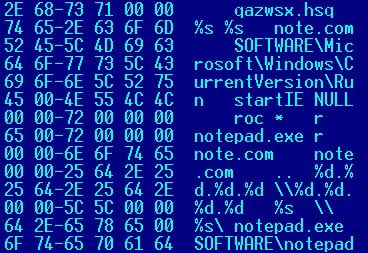
HKLM\SOFTWARE\Microsoft\Windows\CurrentVersion\Run startIE = "filename qazwsx.hsq" where "filename" is the name of worm's file (usually this is "Notepad.exe", see below). As a result, the worm will be activated each time Windows starts up.
The worm then stays in the system memory as an application (visible in the task list) and runs two processes: its spreading process and backdoor process.
The spreading process spreads the worm copy through the local network to drives that are shared for reading/writing. The worm enumerates network resources and looks for "WIN" string in their names. If such a string is found from the name (i.e. Windows directory on a remote computer), the worm looks for NOTEPAD.EXE in there, renames it with a new name NOTE.COM and writes its copy with the name NOTEPAD.EXE.
As a result the original NOTEPAD.EXE can be found with NOTE.COM name on the affected computer (it is used by the worm to run original Notepad when the worm completes its routines), and the worm code is present in NOTEPAD.EXE file. The worm will be activated when a user runs Notepad on the affected machine.
The backdoor routine is quite simple. It supports just a few commands: Run (to run specified file), Upload (to create a file on affected machine) and Quit (terminate the worm routines). There are just three commands, but that is enough to install any other (more powerful) trojan/virus to the computer.
The worm also sends a notification to its "host" (worm's author?). This email message is sent to some address in China. The message contains the IP address(es) of infected machine.
Here's how the worm looks 'from the inside':
Qaz worm can be successfully disinfected with a fresh version of FSAV and the latest updates for it.
[link removed] [link removed]
Before disinfection with FSAV, please download and run the special REG file that will remove worm's registry entry from a system Registry:
[link removed]
Then restart a system and perform disinfection from either DOS or Windows. Finally, rename NOTE.COM file back to NOTEPAD.EXE to have Notepad available again.
You can also use a free version of F-Prot for DOS to remove Qaz worm from an infected system. It is a requirement to perform disinfection from pure DOS and to run the above listed REG file before exiting Windows.
[link removed] [link removed]
For successful disinfection all files detected as Qaz should be deleted from an infected system and NOTE.COM file should be renamed to NOTEPAD.EXE.
Note: to locate an infected computer within a network is possible by checking whether it sends/receives data on TCP port 7597.
[Kaspersky Labs, F-Secure Corp.; October 2000 - January 2001]
Protect your devices from malware with F‑Secure Total
Protecting your devices from malicious software is essential for maintaining online security. F‑Secure Total makes this easy, helping you to secure your devices in a brilliantly simple way.
- Award‑winning antivirus and malware protection
- Online browsing, banking, and shopping protection
- 24/7 online identity and data breach monitoring
- Unlimited VPN service to safeguard your privacy
- Password manager with private data protection
Choose how many devices you want to protect to get started.

- Free customer support
- Cancel anytime
- The trial does not obligate you to buy the product
After 30 days your subscription will renew automatically for one year at €69.99.


More Support
Community
Ask questions in our Community.
User guides
Check the user guide for instructions.
Contact Support
Chat with our support for assistance.
Submit a Sample
Submit a file or URL for analysis.