

Summary
A new variant of Netsky worm - Netsky.D was found on March 1st, 2004 and is spreading fast in the wild. This worm variant lacks many text strings that were present in NetSky.C variant and it does not copy itself to shared folders. Netsky.D spreads itself in emails as an executable attachment only.
Removal
Based on the settings of your F-Secure security product, it will either move the file to the quarantine where it cannot spread or cause harm, or remove it.
A False Positive is when a file is incorrectly detected as harmful, usually because its code or behavior resembles known harmful programs. A False Positive will usually be fixed in a subsequent database update without any action needed on your part. If you wish, you may also:
- Check for the latest database updates
- First, check if your F-Secure security program is using the latest updates, then try scanning the file again.
- Submit a sample
- After checking, if you still believe the file is incorrectly detected, you can submit a sample of it for re-analysis.
- Note: If the file was moved to quarantine, you need to collect the file from quarantine before you can submit it.
- Exclude a file from further scanning
- If you are certain that the file is safe and want to continue using it, you can exclude it from further scanning by the F-Secure security product.
- Note: You need administrative rights to change the settings.
Technical Details
Descriptions of previous NetSky variants can be found here:
The differences between Netsky.D variant and the previous variants of the worm are as follows:
- The worm's file is packed with Petite file compressor and is 17424 bytes long. The unpacked file's size is about 28 kilobytes.
- The worm doesn't show an error messagebox when run for the first time.
- On March 2nd, 2004 the worm constantly beeps with PC speaker from 6:00 to 8:59. Below is the link to the WAV file with the sound that the worm makes: netsky_d.wav
Here's a screenshot of the worm's file contents with a message from its creators:
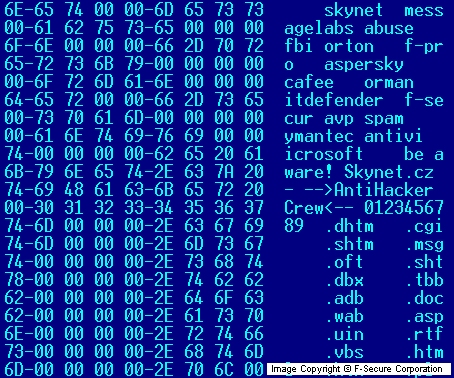
Like the previous variant, the NetSky.D variant installs itself as WINLOGON.EXE file to Windows folder and creates a startup key for this file in the Registry:
[HKLM\SOFTWARE\Microsoft\Windows\CurrentVersion\Run] "ICQ Net" = "%windir%\winlogon.exe -stealth" where %windir% represents Windows directory.
The NetSky.D variant of the worm deletes the following Registry keys:
[HKCR\CLSID\{E6FB5E20-DE35-11CF-9C87-00AA005127ED}\InProcServer32] [HKCU\Software\Microsoft\Windows\CurrentVersion\Explorer\PINF] [HKLM\System\CurrentControlSet\Services\WksPatch] [HKLM\SOFTWARE\Microsoft\Windows\CurrentVersion\Run] KasperskyAv Explorer Taskmon system. msgsvr32 DELETE ME service Sentry Windows Services Host [HKCU\SOFTWARE\Microsoft\Windows\CurrentVersion\Run] KasperskyAv Explorer d3dupdate.exe au.exe OLE Windows Services Host [HKCU\SOFTWARE\Microsoft\Windows\CurrentVersion\RunServices] system. The worm has the same list of file extensions that it uses to look for email addresses. Files with these extensions are searched on all drives from C: to Z: except CD-ROM drives. Here's the list of file extensions that the worm uses:
.eml .txt .php .pl .htm .html .vbs .rtf .uin .asp .wab .doc .adb .tbb .dbx .sht .oft .msg .shtm .cgi .dhtm Like its previous variants, this worm variant avoids sending emails to addresses that contain the following strings:
icrosoft antivi ymantec spam avp f-secur itdefender orman cafee aspersky f-pro orton fbi abuse messagelabs skynet The subjects of infected messages sent by the worm can be one of the following:
Re: Document Re: Re: Document Re: Re: Thanks! Re: Thanks! Re: Your document Re: Here is the document Re: Your picture Re: Re: Message Re: Hi Re: Hello Re: Re: Re: Your document Re: Here Re: Your music Re: Your software Re: Approved Re: Details Re: Excel file Re: Word file Re: My details Re: Your details Re: Your bill Re: Your text Re: Your archive Re: Your letter Re: Your product Re: Your website The infected message body text can be the following:
Your document is attached. Here is the file. See the attached file for details. Please have a look at the attached file. Please read the attached file. Your file is attached. The infected attachment names are randomly selected from the following list:
your_document.pif your_document.pif document.pif message_part2.pif your_document.pif document_full.pif your_picture.pif message_details.pif your_file.pif your_picture.pif document_4351.pif yours.pif mp3music.pif application.pif all_document.pif my_details.pif document_excel.pif document_word.pif my_details.pif your_details.pif your_bill.pif your_text.pif your_archive.pif your_letter.pif your_product.pif your_website.pif The worm doesn't use any exploits to make its file run automatically on recipients' systems. A recipient has to run the executable attachment to get infected.
Protect your devices from malware with F‑Secure Total
Protecting your devices from malicious software is essential for maintaining online security. F‑Secure Total makes this easy, helping you to secure your devices in a brilliantly simple way.
- Award‑winning antivirus and malware protection
- Online browsing, banking, and shopping protection
- 24/7 online identity and data breach monitoring
- Unlimited VPN service to safeguard your privacy
- Password manager with private data protection
Choose how many devices you want to protect to get started.

- Free customer support
- Cancel anytime
- The trial does not obligate you to buy the product
After 30 days your subscription will renew automatically for one year at €69.99.


More Support
Community
Ask questions in our Community.
User guides
Check the user guide for instructions.
Contact Support
Chat with our support for assistance.
Submit a Sample
Submit a file or URL for analysis.