Worm:W32/Navidad
Summary
Navidad is an Internet worm. It spreads itself as NAVIDAD.EXE attachment to email messages sent from an infected computer.
Removal
Based on the settings of your F-Secure security product, it will either move the file to the quarantine where it cannot spread or cause harm, or remove it.
A False Positive is when a file is incorrectly detected as harmful, usually because its code or behavior resembles known harmful programs. A False Positive will usually be fixed in a subsequent database update without any action needed on your part. If you wish, you may also:
- Check for the latest database updates
First, check if your F-Secure security program is using the latest updates, then try scanning the file again.
- Submit a sample
After checking, if you still believe the file is incorrectly detected, you can submit a sample of it for re-analysis.
Note: If the file was moved to quarantine, you need to collect the file from quarantine before you can submit it.
- Exclude a file from further scanning
If you are certain that the file is safe and want to continue using it, you can exclude it from further scanning by the F-Secure security product.
Note: You need administrative rights to change the settings.
Technical Details
The icon of the worm's executable file looks like:

The original worm sample that we received has a bug that makes an infected system inoperable after infection - no EXE files could be started.
Installation
When run, the NAVIDAD.EXE file installs itself as WINSVRC.VXD into \Windows\System directory and modifies several Registry keys. It changes the default EXE file startup key
- [HKEY_CLASSES_ROOT\exefile\shell\open\command]
to make sure it starts with every EXE file. The worm also makes sure it is always run on each Windows startup by creating another startup key in:
- [HKEY_LOCAL_MACHINE\SOFTWARE\Microsoft\Windows\CurrentVersion\Run].
The worm also creates 'Navidad' key in the following section:
- [HKEY_CURRENT_USER\Software]
But there's a bug in the worm's code - the Registry keys are created for WINSVRC.EXE file while the worm installs itself as WINSVRC.VXD file. As a result no EXE files can be started in a system after infection. Also the worm doesn't get activated on next Windows startup.
Activity
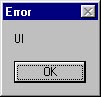
During installation the worm displays a fake error message:
After a user presses 'OK', an 'eye' icon appears in Windows taskbar:

This is the major sign that indicates Navidad worm infection in a system. When a user clicks on that icon the following dialog box with 'Nunca presionar este boton' text is displayed:

and when the only button in the above dialog box is clicked, another messagebox with 'Lamentablemente cayo en la tentacion y perdio si computadora' text appears:

When the worm is activated it connects to MAPI-compatible email browser using MAPI32.DLL library, enumerates all unread emails, gets email addresses from them and sends itself out to these addresses.
Variant:Navidad.b
This variant of Navidad worm is a patched version of the original Navidad. But unlike the original Navidad worm, it spreads itself as EMANUEL.EXE and installs itself as WINTASK.EXE to Windows System directory. It also modifies EXE file startup key (now correctly) to be run when any EXE program is launched by a user.
When run, Navidad.b displays a messagebox:

Then it installs itself to memory and shows an ICQ-like (green flower with yellow middle) icon in System tray:
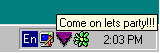
When a cursor is placed on that icon, a message is displayed - "Come on lets party!!!". When a user clicks the icon, Navidad.b displays its original dialog with a button:

If a user clicks [X] to close the dialog, the worm displays the following messagebox and exits:

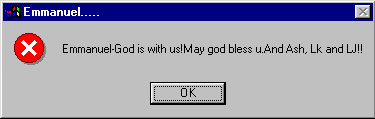
Otherwise, if a user clicks 'Nunca presionar este boton' button, the worm displays the following messagebox:
More Support

Community
Ask questions in our Community.

User guides
Check the user guide for instructions.

Contact Support
Chat with with or call an agent.

Submit a Sample
Submit a file or URL for analysis.