

Summary
The MayArchive.B trojan is a so-called "ransomware". It copies the contents of files with certain extensions to its own archive named ArchivedFiles.als, deletes the original files and then asks for a ransom to restore them.
Removal
Please note that disinfection of this trojan has to be done AFTER it restores your files. Otherwise you will not be able to restore your files that the trojan put into its EncryptedFiles.als archive. So if you have been infected with this trojan, and it has created the Demo.als and EncryptedFiles.als files on your hard drive, then please follow the below given instructions:
- Open Windows Explorer and locate EncryptedFiles.als
- Doubleclick on the EncryptedFiles.als file
- Click OK in the messagebox that has the 'Read INSTRUCTIONS to get your files back' text
- In the new window click the Extract button
- In the password prompt window input this password exactly as shown: AssociateFileExtension
- Press Enter
- Wait until the trojan extracts all of the files and then close the application window
The trojan should restore files to your\My Documents\ folder. Please verify that your files have been restored. You can then proceed to disinfection. Disinfection of this trojan requires deletion of the trojan's file from you hard drive. You can do it manually or you can follow:
F-Secure Anti-Virus should delete or rename the trojan's file after it finds the infection.
Please note that due to bugs in the trojan's code some of your files may become corrupted.
A False Positive is when a file is incorrectly detected as harmful, usually because its code or behavior resembles known harmful programs. A False Positive will usually be fixed in a subsequent database update without any action needed on your part. If you wish, you may also:
- Check for the latest database updates
- First, check if your F-Secure security program is using the latest updates, then try scanning the file again.
- Submit a sample
- After checking, if you still believe the file is incorrectly detected, you can submit a sample of it for re-analysis.
- Note: If the file was moved to quarantine, you need to collect the file from quarantine before you can submit it.
- Exclude a file from further scanning
- If you are certain that the file is safe and want to continue using it, you can exclude it from further scanning by the F-Secure security product.
- Note: You need administrative rights to change the settings.
Technical Details
The trojan's file is a Visual Basic application that is not packed in any way. After the trojan's file is run, it scans the local hard drive(s) for files with the following extensions:
- arh
- asm
- arj
- bas
- db
- db1
- db2
- dbf
- dbt
- dbx
- doc
- dpr
- dsw
- frm
- frt
- frx
- gtd
- gz
- gzip
- jpg
- key
- kwm
- lst
- man
- mdb
- mmf
- mo
- old
- p12
- pas
- pak
- pgp
- pl
- pwl
- pwm
- rar
- rtf
- safe
- tar
- txt
- xls
- xml
- zip
If a file with one of those extensions is found, the trojan copies its contents to its own archive named EncryptedFiles.als and then deletes the original file. The files stored in that archive are not encrypted, so they can be restored manually. However this will require professional help. In order to use the trojan to restore your files please read the Disinfection section (see above) of this description.
The trojan contains instructions to a user on how to get the password and to restore user's files. These instructions are copied into the file named Instructions how to get your files back.txt that is located in user's \My Documents\ folder. Here's how these instructions look like:
- INSTRUCTIONS HOW TO GET YOUR FILES BACKREAD CAREFULLY
This is automated report generated by auto archiving software.
All your documents, text files and databases was archived with the long password.
You can not guess the password for your archived files - password length is more than 30 symbols that makes all password recovery programs fail to bruteforce it (guess password by trying all possible combinations).
Do not try to search for a program that encrypted your information - it simply does not exist in your hard disk anymore. System backup will not help you to restore files. Reporting to police about a case will not help you, they do not know the password. Reporting somewhere about our email account will not help you to restore files. Moreover, you and other people will lose contact with us, and consequently, all the encrypted information.
WE DO NOT ASK YOU FOR ANY MONEY! We only want to do business with you. You can even EARN extra money with us. If you really care about the documents and information in encrypted files, you should send an email to restoring@safemail.net or restoringfiles@yahoo.com This is your only way to get your files back and save your time.
We do not want to do you any harm, we do not ask you for money, we only want to do business with you.
- ##########################################################################Remember you are just one step away from your files##########################################################################
The trojan creates an extension association in the Registry for the .ALS files. The association entry points to the trojan's executable file. So when a user clicks on the ALS file, the trojan starts and shows this text first:
Read INSTRUCTIONS to get your files back The trojan then shows the contents of the ALS archive. After the user clicks the Extract button, it shows a password prompt. See the image below:
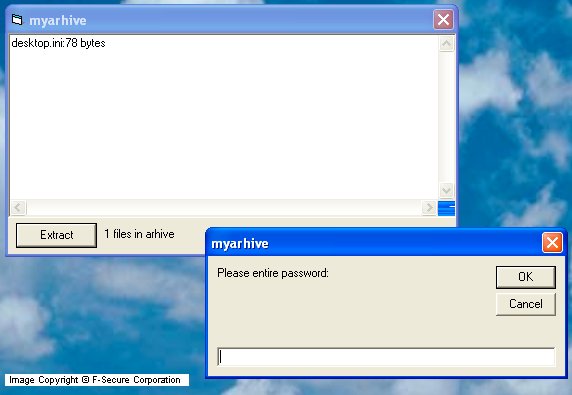
The password for the files, stored by the trojan in the EncryptedFiles.als archive is AssociateFileExtension.
The trojan also creates a file named Demo.als to prove that it can restore the user's files. The trojan is quite buggy however, so some files may become corrupted after the trojan restores them.
Protect your devices from malware with F‑Secure Total
Protecting your devices from malicious software is essential for maintaining online security. F‑Secure Total makes this easy, helping you to secure your devices in a brilliantly simple way.
- Award‑winning antivirus and malware protection
- Online browsing, banking, and shopping protection
- 24/7 online identity and data breach monitoring
- Unlimited VPN service to safeguard your privacy
- Password manager with private data protection
Choose how many devices you want to protect to get started.

- Free customer support
- Cancel anytime
- The trial does not obligate you to buy the product
After 30 days your subscription will renew automatically for one year at €69.99.


More Support
Community
Ask questions in our Community.
User guides
Check the user guide for instructions.
Contact Support
Chat with with or call an agent.
Submit a Sample
Submit a file or URL for analysis.