

Summary
VBS/Freelink is an email worm written with the VBScript language. Programs written with VBScript operate only under Windows 98 and Windows 2000 (unless Windows Scripting Host has been installed separately).
Removal
INFORMATION ON DETECTING FREELINK WITH F-SECURE ANTI-VIRUS
F-Secure Anti-Virus v5.x and F-Secure Workstation Suite detect and disinfect Freelink with default settings.
However, F-Secure for Windows 98 v4.x does not scan the VBS extension by default.
To fix this, add the VBS to extension list by following these instructions:
1. Download the latest update file from [link removed]
2. Execute it
3. Start the on-demand-scanner by double-clicking the F-Secure icon in your system tray
4. Close the on-demand-scanner
5. Reboot (or just restart Gatekeeper)
Alternatively, you can modify the extension list from F-Secure Anti-Virus preferences manually to add VBS extension.
To manually remove copies of LINKS.VBS from your system, open up the Find command ("Start/Find/Files or Folders" system menu), type "LINKS*.VBS" as the file name and select "Local hard drives" from the "Look in" menu. Wait for the search to finish, then select all found copies of LINKS.VBS and press Delete button to remove them.
A False Positive is when a file is incorrectly detected as harmful, usually because its code or behavior resembles known harmful programs. A False Positive will usually be fixed in a subsequent database update without any action needed on your part. If you wish, you may also:
- Check for the latest database updates
- First, check if your F-Secure security program is using the latest updates, then try scanning the file again.
- Submit a sample
- After checking, if you still believe the file is incorrectly detected, you can submit a sample of it for re-analysis.
- Note: If the file was moved to quarantine, you need to collect the file from quarantine before you can submit it.
- Exclude a file from further scanning
- If you are certain that the file is safe and want to continue using it, you can exclude it from further scanning by the F-Secure security product.
- Note: You need administrative rights to change the settings.
Technical Details
VBS/Freelink does not work at all under default Windows 95 and Windows NT 4.0 installations. However, it does work under 95 and NT 4 provided that other supporting software (such as Microsoft Internet Explorer v5.x) has been installed.
Freelink was found in the wild in Europe in July 1999. This worm uses similar encryption method to the VBS/Luser viruses (they are known also as Zulu).
When the worm is executed, it drops an encrypted script file to "C:\Windows\System\Rundll.vbs". After that VBS/Freelink changes the registry in a such way that "Rundll.vbs" will be executed each time when the system is restarted.
Next, the worm shows a dialog box with the following text:
This will add a shortcut to free XXX links on your desktop. Do you want to continue? 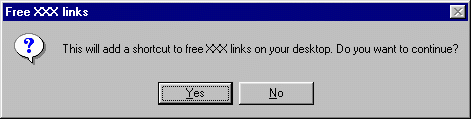
If user presses the "Yes" button, the worm creates an Internet shortcut named "FREE XXX LINKS" to the desktop. The shortcut points to https://www.sublimedirectory.com web site.
The worm also searches for mapped network shares. If the worm can find any, it copies itself to the root of the each network share.
The worm uses Outlook application to mass-mail itself to each recipient in each address book. The mass-mail part is similar to W97M/Melissa, but this one doesn't infect Word documents and it sends itself each time when it is executed.
The subject of the message is:
Check this and the body of the message is:
Have fun with these links. Bye. 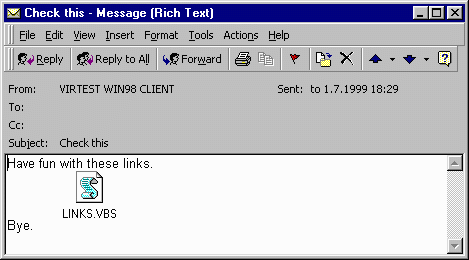
The worm attachs itself as "Links.vbs" to the message. When the receiver double-clicks on the attachment, the worm executes and it will mass-mail itself again.
VBS/Freelink removes the sent mail from user's "Sent Mail" folder. In that way it tries to hide the mass mail from the user.
As address books typically contain group addresses, the end result of executing the Freelink worm inside an organization is that the first infected user sends the message to everybody in the organization. After this, other users open the message and send the message AGAIN to everyone else. This quickly overloads email servers.
After the machine has been restarted, the worm drops "Links.vbs" to the Windows directory.
The worm will also search for "C:\MIRC" directory for "MIRC32.EXE" IRC chat client. If the executable is found, the worm creates "SCRIPT.INI" file, replacing the existing one. It also searches for another IRC client from directory "c:\PIRCH98" and if it is found, the worm replaces the "EVENTS.INI" from the same directory.
After that both IRC clients, mIRC and Pirch98, will automatically spread the worm when the user enters IRC chat channels.
Protect your devices from malware with F‑Secure Total
Protecting your devices from malicious software is essential for maintaining online security. F‑Secure Total makes this easy, helping you to secure your devices in a brilliantly simple way.
- Award‑winning antivirus and malware protection
- Online browsing, banking, and shopping protection
- 24/7 online identity and data breach monitoring
- Unlimited VPN service to safeguard your privacy
- Password manager with private data protection
Choose how many devices you want to protect to get started.

- Free customer support
- Cancel anytime
- The trial does not obligate you to buy the product
After 30 days your subscription will renew automatically for one year at €69.99.


More Support
Community
Ask questions in our Community.
User guides
Check the user guide for instructions.
Contact Support
Chat with our support for assistance.
Submit a Sample
Submit a file or URL for analysis.