

Summary
Worm:W32/Fizzer spreads in infected email messages and in the Kazaa peer-to-peer (P2P) file-sharing network.
Removal
Based on the settings of your F-Secure security product, it will either move the file to the quarantine where it cannot spread or cause harm, or remove it.
A False Positive is when a file is incorrectly detected as harmful, usually because its code or behavior resembles known harmful programs. A False Positive will usually be fixed in a subsequent database update without any action needed on your part. If you wish, you may also:
- Check for the latest database updates
- First, check if your F-Secure security program is using the latest updates, then try scanning the file again.
- Submit a sample
- After checking, if you still believe the file is incorrectly detected, you can submit a sample of it for re-analysis.
- Note: If the file was moved to quarantine, you need to collect the file from quarantine before you can submit it.
- Exclude a file from further scanning
- If you are certain that the file is safe and want to continue using it, you can exclude it from further scanning by the F-Secure security product.
- Note: You need administrative rights to change the settings.
Technical Details
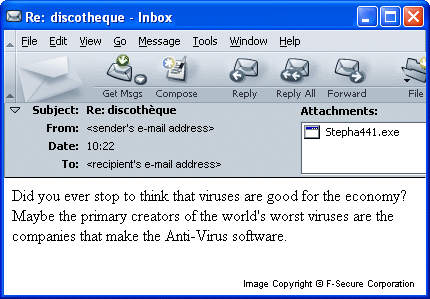
Below is a screenshot of a Fizzer email message:
The Fizzer worm contains a built-in IRC backdoor, a Denial of Service (DoS) attack tool, a data-stealing Trojan (uses external keylogger DLL), an HTTP server and other components. The worm has the functionality to kill the tasks of certain anti-virus programs. Additionally, the worm has automatic updating capabilities.
Note
Fizzer is a complex email worm that appeared on May 8, 2003.
F-Secure is upgrading the Fizzer worm to Level 1 as this complex email/P2P worm continues to spread rapidly. It is currently one of the most widespread viruses in the world.
Installation
The worm spreads its dropper as an email attachment. When a user activates a dropper, it creates a file called ISERVC.EXE in a temporary folder and activates it. The ISERVC.EXE file is the main component of the worm. It copies itself to the Windows directory with the following names:
- ISERVC.EXE
- INITBAK.DAT
It then drops 2 more files in the Windows directory:
- ISERVC.DLL
- PROGOP.EXE
The ISERVC.DLL file is a key-logging component and the PROGOP.EXE file is a pure dropper code. Before sending itself out, the worm re-assembles its file using this dropper.
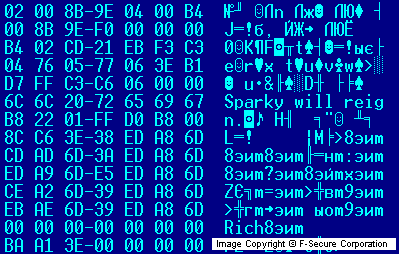
The ISERVC.EXE file contains the 'Sparky will reign.' string in its header, as shown in the screen shot:
It should be noted that the worm uses its resource section to store its own text strings and additional files that it drops. This method is very rarely used by malicious programs.
The main file of the worm has 5 resources in its body. All of the resources except the first one are encrypted and compressed. Only the first resource is compressed. The structure of the resources are the following:
- email address list
- progop.exe file
- iservc.dll file
- behavior script
- text strings
The behavior script contains major settings for the worm, such as its installation name and folder. This script also controls the worm's behavior in certain conditions. For example, when the date changes, the worm logs out from IRC, waits for some time and then logs back in again.
Payload
The worm has the ability to kill the tasks of certain anti-virus programs. It kills all processes with the following strings in their names:
- NAV
- SCAN
- AVP
- TASKM
- VIRUS
- F-PROT
- VSHW
- ANTIV
- VSS
- NMAIN
The worm can perform a DoS (Denial of Service) attack if it receives a specific command from a remote hacker.
The worm has the ability to update itself from a web site. It connects to a web site, downloads an update and saves it as UPD.BIN file in the Windows main folder. However, the web site with the updates for the worm is no longer available.
The worm can also uninstall itself if a file with the following name is found in the Windows main directory:
- Uninstall.pky
When the worm finds a file with this name, it kills all its tasks and removes its registry keys thus disinfecting a system.
Keylogging Trojan
The worm records users' keystrokes and writes them into an ISERVC.KLG file located in the Windows folder. This file can be picked by a hacker, so he can get access to users' login names and passwords as well as to their confidential data.
AOL Backdoor
The worm connects to the AOL server on port 5190 with a random user name, creating a bot. A hacker can then establish a connection to the bot and remotely control the worm.
IRC Backdoor
The worm tries to connect to different IRC servers and create bots in a certain channels there. The author of the worm can use these bots to get limited access to infected systems.
The worm has a long list of IRC servers in its resources. Here are some of the IRC server names that the worm uses:
- irc.afternet.org
- irc.dal.net
- irc.eu.dal.net
- irc.ablenet.org
- irc.abovenet.org
- irc.accessirc.net
- irc.aceirc.net
- irc.all-defiant.org
- irc.allochat.net
- irc.alphanine.net
- irc.altnet.org
- irc.amcool.net
- irc.amiganet.org
- irc.angeleyez.net
- irc.aniverse.com
- irc.another.net
- irc.arabchat.org
- irc.arabmirc.net
- irc.astrolink.org
- irc.asylum-net.org
- irc.auirc.net
- irc.aurosoniq.net
- irc.auscape.org
- irc.aussiechat.org
- irc.awesomechat.net
- irc.awesomechristians.com
- irc.axenet.org
- irc.aXpi.net
- irc.ayna.org
- irc.azzurra.org
- irc.bahamutirc.net
- irc.bappy.eu.org
- irc.bdsm-net.com
- irc.beyondirc.net
Additional Backdoor Capabilities
The worm has additional backdoor capabilities. It listens to ports 2018-2021 for commands from a remote host (the hacker's computer). The ports are used for the following purposes:
- 2018 - command port (sending/receiving commands)
- 2019 - file port (sending/receiving files)
- 2020 - console port (remote console)
- 2021 - video port (capturing video and sending it out)
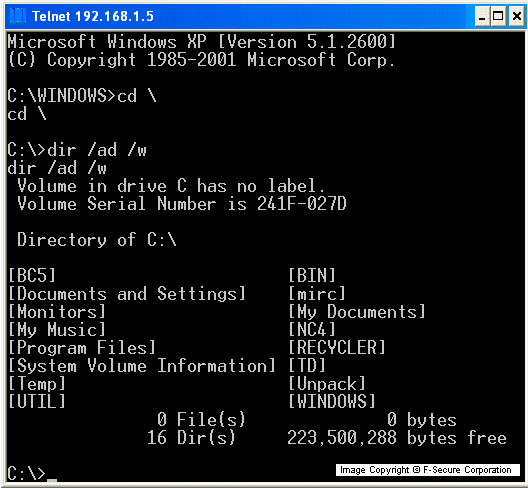
The worm's author can access these ports with a backdoor program's specially-modified client; the remote console port can be connected to a Telnet application. Here's how the remote console looks like:
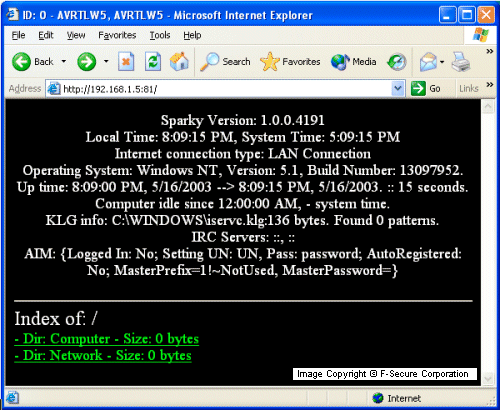
The worm can also start an HTTP server on port 81 to provide additional access to an infected computer. Here's a screen shot of the worm's HTTP server interface:
Propagation (email)
The Fizzer worm primarily spread via infected email attachments. To create the email messages that serve as carriers for the attachments, the worm randomly selects message subjects and bodies from its internal lists, which are quite big.
The infected attachments are also named by randomly selecting a name from its internal lists. Attachment extensions can be either in .EXE, .PIF, .SCR or .COM. The worm can also use the names of innocent files from an infected system's hard disk for its attachment name.
The worm also spoofs, or fakes, the sender's email address; to do so, it composes fake addresses by combining selections from its internal lists. The fake sender's email address may contain a name (for example, Rebecca), a random number and one of these domains:
- msn.com
- hotmail.com
- yahoo.com
- aol.com
- earthlink.net
- gte.net
- juno.com
- netzero.com
The Fizzer worm collects email addresses from the Windows and Outlook Address Books on the infected computers. It also collects email addresses from files in the machine's personal folders, cookie folders, recently opened files folders and Internet cache directories.
The worm sends itself in email messages to all the addresses it finds. Here is an example of what an infected email message might look like:
- Subject: I thought this was interesting...
- Body: If you don't like it, just delete it.
- Attachment: Jesus123.exe
The worm is able able to use German strings to compose the email messages.
Propagation (File-Sharing)
The Fizzer worm locates the Kazaa shared folder on an infected computer and copies itself there with random names.
Any person who connects to an infected computer and executes files downloaded from its shared folder becomes infected with the worm.
Registry
The worm creates a startup key for its main component in the registry. As a result, the main file of the worm is activated for each Windows session.
Additionally, the worm modifies the text file startup string:
- [HKEY_CLASSES_ROOT\txtfile\shell\open\command] @ = "%windir%\ProgOp.exe 0 7 '%windir%\NOTEPAD.EXE %1' '%windir%\initbak.dat' '%windir%\iservc.exe'
Where %windir% is the Windows main directory.
Protect your devices from malware with F‑Secure Total
Protecting your devices from malicious software is essential for maintaining online security. F‑Secure Total makes this easy, helping you to secure your devices in a brilliantly simple way.
- Award‑winning antivirus and malware protection
- Online browsing, banking, and shopping protection
- 24/7 online identity and data breach monitoring
- Unlimited VPN service to safeguard your privacy
- Password manager with private data protection
Choose how many devices you want to protect to get started.

- Free customer support
- Cancel anytime
- The trial does not obligate you to buy the product
After 30 days your subscription will renew automatically for one year at €69.99.


More Support
Community
Ask questions in our Community.
User guides
Check the user guide for instructions.
Contact Support
Chat with our support for assistance.
Submit a Sample
Submit a file or URL for analysis.