

Summary
The Firkin worm family appeared in the beginning of April, 2000. 3 variants this worm exist already. All these variants are spreading via local networks. The worm is also known as '911 virus', because it has a specific payload routine that calls 911 if a modem is present in an infected system.
Removal
Based on the settings of your F-Secure security product, it will either move the file to the quarantine where it cannot spread or cause harm, or remove it.
A False Positive is when a file is incorrectly detected as harmful, usually because its code or behavior resembles known harmful programs. A False Positive will usually be fixed in a subsequent database update without any action needed on your part. If you wish, you may also:
- Check for the latest database updates
- First, check if your F-Secure security program is using the latest updates, then try scanning the file again.
- Submit a sample
- After checking, if you still believe the file is incorrectly detected, you can submit a sample of it for re-analysis.
- Note: If the file was moved to quarantine, you need to collect the file from quarantine before you can submit it.
- Exclude a file from further scanning
- If you are certain that the file is safe and want to continue using it, you can exclude it from further scanning by the F-Secure security product.
- Note: You need administrative rights to change the settings.
Technical Details
The worm is written in DOS Batch language (worm's components are mostly BAT files) and it uses DOS box commands and a few external utilities to perform the infection. Firkin is a multi-component worm - the worm itself is not just a single file, but a set of DOS batch files, PIF files (Program Information Files used to start DOS programs under Windows) and some additional components.
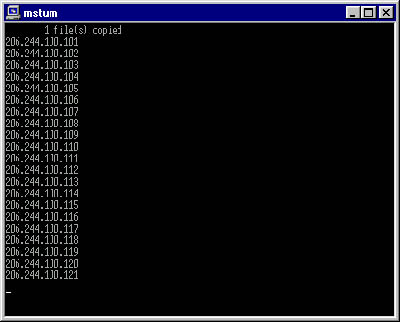
After being run, the worm installs its startup component (a PIF file) to the Windows startup folder ('Start Menu\Programs\Startup'). When Windows boots up, this PIF file activates the main worm component - the special routine in the worm's main BAT component. This routine initializes the random counter the the IP address counter, hides its window (DOS box window) with a help of an additional utility and then proceeds to the infection loop. During this loop the worm generates a large number of IP addresses and pings (tries to resolve) all of them. This is a time consuming task, but it is processed in background and as a result it is not visible for the user.
Here's the screenshot of the worm's process window when maximized:
When an IP address is resolved, the worm identifies all shared resources on a PC associated with that address. If there are drives shared with full access rights (reading and writing), the worm looks for the Windows directory on that drive and installs itself there. Then the worm then creates a new folder in the 'Program Files' directory, copies its files there and adds a PIF file to the Windows startup folder to be activated on the remote computer on its next startup.
The worm is able to spread itself only if Windows is installed in the directory named C:\WINDOWS\, so if this directory name is different or if Windows is installed on an another drive, the worm fails to spread itself. The worm will not work under Windows NT as it has a different startup directorypath.
The worm has a dangerous payload routine. Depending on its random counter the worm either formats hard drives or dials '911' using a modem if one is installed on COM1 - COM4 ports. One of worm's versions sends dial commands to all these ports regardless of modem presence in the infected system.
Several variants of this worm are known and all of them operate the same way as described above, only with some minor differences:
The worm's directory:
'Firkin.a,b': C:\PROGRA~1\FORESKIN\ (C:\Program Files\FORESKIN\)
'Firkin.c': C:\PROGRA~1\CHODE\ (C:\Program Files\CHODE\)
The worm's components and additional utilities:
'Firkin.a'
A,B,C,D,E,F,G,H,I,J,ADD,FINAL,HIDE,SLAM - all are BAT files
ASHIELD.EXE, ASHIELD.PIF - utility that hides worm window
MSTUM.BAT, MSTUM.PIF - main worm's BAT and PIF files
'Firkin.b'
A,B,C,D,E,F,G,H,I,J,ADD,ZULU,HIDE,SLAM - all are BAT files
ASHIELD.EXE, ASHIELD.PIF - utility that hides worm window
MSTUM.BAT, MSTUM.PIF - main worm's BAT and PIF files
'Firkin.c'
ADD, RANDOM - additional BAT files
ASHIELD.EXE, ASHIELD.PIF - utility that hides worm window
CHODE.BAT, NETSTAT.PIF - main worm's BAT and PIF files
Protect your devices from malware with F‑Secure Total
Protecting your devices from malicious software is essential for maintaining online security. F‑Secure Total makes this easy, helping you to secure your devices in a brilliantly simple way.
- Award‑winning antivirus and malware protection
- Online browsing, banking, and shopping protection
- 24/7 online identity and data breach monitoring
- Unlimited VPN service to safeguard your privacy
- Password manager with private data protection
Choose how many devices you want to protect to get started.

- Free customer support
- Cancel anytime
- The trial does not obligate you to buy the product
After 30 days your subscription will renew automatically for one year at €69.99.


More Support
Community
Ask questions in our Community.
User guides
Check the user guide for instructions.
Contact Support
Chat with our support for assistance.
Submit a Sample
Submit a file or URL for analysis.