

Summary
Bluetooth-Worm:SymbOS/Cabir identifies a large family of Bluetooth-worms that runs on Symbian mobile phones that support the Series 60 platform.
Removal
Alternatively, you can disinfect the system manually by installing a file manager application and manually deleting these files:
- c:\system\apps\caribe\caribe.app
- c:\system\apps\caribe\caribe.rsc
- c:\system\apps\caribe\flo.mdl
- c:\system\recogs\flo.mdl
- c:\system\symbiansecuredata\caribesecuritymanager\caribe.app
- c:\system\symbiansecuredata\caribesecuritymanager\caribe.rsc
A False Positive is when a file is incorrectly detected as harmful, usually because its code or behavior resembles known harmful programs. A False Positive will usually be fixed in a subsequent database update without any action needed on your part. If you wish, you may also:
- Check for the latest database updates
- First, check if your F-Secure security program is using the latest updates, then try scanning the file again.
- Submit a sample
- After checking, if you still believe the file is incorrectly detected, you can submit a sample of it for re-analysis.
- Note: If the file was moved to quarantine, you need to collect the file from quarantine before you can submit it.
- Exclude a file from further scanning
- If you are certain that the file is safe and want to continue using it, you can exclude it from further scanning by the F-Secure security product.
- Note: You need administrative rights to change the settings.
Technical Details
Please note that the Cabir worm can only reach mobile phones that support Bluetooth, and are in discoverable mode.
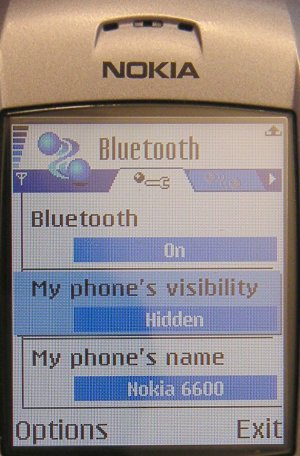
Setting your phone into non-discoverable (hidden) Bluetooth mode will protect your phone from the Cabir worm. Once the phone is infected however it will try to infect other systems even if user tries to disable Bluetooth from system settings.
The details below describe the Cabir.A variant.
Propagation
Cabir replicates over Bluetooth with a file named caribe.sis that contains the worm's main executable caribe.app, system recognizer flo.mdl and resource file caribe.rsc.
The caribe.sis file will not arrive automatically to the target device, so the user needs to answer yes to the transfer question while the infected device is still in range. The question will be repeated to the user if they select no.
The user must click the SIS file in order to install it. The SIS file contains autostart settings that will automatically execute caribe.app after the SIS file is installed. The worm then activates and starts looking for new devices to infect via Bluetooth.
The Cabir worm starts sending infected caribe.sis files to the first device it finds. The replication routine in Cabir contains a bug that causes it to lock onto the first device found; it won't continue look for other devices.
Cabir is capable of sending infected files to only one other device per activation. It will try to infect one other device when it is activated the first time, and then one more each time when the phone is rebooted.
In our tests we also found that the newly infected phone will first look for the phone that sent it the infected file. This means Cabir is capable of spreading widely only in cases where the phone that sent the infected file is out of range before the user activates Cabir on the new phone. This means that while Cabir is capable of spreading in the wild, it would spread quite slowly and would not cause a large epidemic.
One curious fact is that in Series 60 phones the bluetooth functionality is independent from the GSM side, and if the phone is rebooted Cabir will try to spread even if the user doesn't enter his PIN code.
Installation
When the user clicks on the caribe.sis file in phone's messaging Inbox the phone will display a warning dialog:
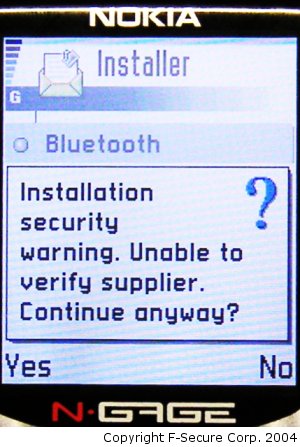
If the user selects "Yes" the phone will ask the normal installation question:
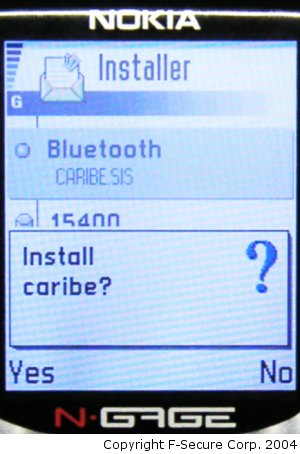
If the user selects "Yes" the Cabir worm will activate and show a dialog that contains the name that malware author wants to give to the worm and the author's initials and the group initial of 29A (it seems that in some phone models, for example Nokia 6600, this dialog is not shown).
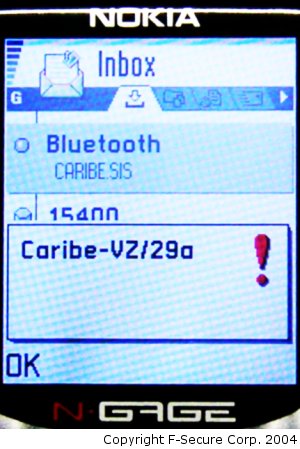
When the caribe.sis file is installed the installer will copy the worm's executables into following locations:
- c:\system\apps\caribe\caribe.app
- c:\system\apps\caribe\caribe.rsc
- c:\system\apps\caribe\flo.mdl
When the caribe.app is executed it copies the following files:
- caribe.app to c:\system\symbiansecuredata\caribesecuritymanager\
- caribe.rsc to c:\system\symbiansecuredata\caribesecuritymanager\
- flo.mdl to c:\system\recogs
This is most likely done in case the user installs the application to the memory card.
Then the worm will recreate the caribe.sis file from worm component files and data blocks that are in caribe.app.
After recreating the caribe.sis file, the worm starts to look for all visible Bluetooth devices and send the SIS file to them.
Protect your devices from malware with F‑Secure Total
Protecting your devices from malicious software is essential for maintaining online security. F‑Secure Total makes this easy, helping you to secure your devices in a brilliantly simple way.
- Award‑winning antivirus and malware protection
- Online browsing, banking, and shopping protection
- 24/7 online identity and data breach monitoring
- Unlimited VPN service to safeguard your privacy
- Password manager with private data protection
Choose how many devices you want to protect to get started.

- Free customer support
- Cancel anytime
- The trial does not obligate you to buy the product
After 30 days your subscription will renew automatically for one year at €69.99.


More Support
Community
Ask questions in our Community.
User guides
Check the user guide for instructions.
Contact Support
Chat with our support for assistance.
Submit a Sample
Submit a file or URL for analysis.