Summary
For more information of Word macro viruses, see the description of Concept.
WM/Imposter.A is a common Word macro virus, which is similar to DMV and Concept viruses.
Removal
Based on the settings of your F-Secure security product, it will either move the file to the quarantine where it cannot spread or cause harm, or remove it.
A False Positive is when a file is incorrectly detected as harmful, usually because its code or behavior resembles known harmful programs. A False Positive will usually be fixed in a subsequent database update without any action needed on your part. If you wish, you may also:
- Check for the latest database updates
First, check if your F-Secure security program is using the latest updates, then try scanning the file again.
- Submit a sample
After checking, if you still believe the file is incorrectly detected, you can submit a sample of it for re-analysis.
Note: If the file was moved to quarantine, you need to collect the file from quarantine before you can submit it.
- Exclude a file from further scanning
If you are certain that the file is safe and want to continue using it, you can exclude it from further scanning by the F-Secure security product.
Note: You need administrative rights to change the settings.
Technical Details
When it first infects a system, it displays a dialog box with text 'DMV'.
Imposter.A contains a comment which reads:
just to prove another point
Imposter.A only replicates.
Variant:Imposter.E(Wormy-1, PC-Format)
Origin:Greece
Unlike Imposter.A, this variant is not very similar to DMV or Concept viruses.
When the virus infects the system for a first time and the user exits Word, it displays the following message in the status bar:
WORMY-1 by NAENBGOURSG
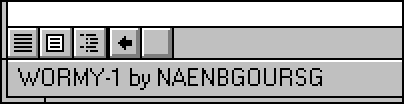
After that Imposter.E infects every document when they are saved. It also re-infects files that have been infected already.
Virus also contains this text within its code:
by NAENBGOURSG SO.HT.AI.KS 231076-GREECE Thanks to NEURO VRD 19-4-1997 VRP A.U.A
Otherwise the virus just spreads.
More Support

Community
Ask questions in our Community.

User guides
Check the user guide for instructions.

Contact Support
Chat with with or call an agent.

Submit a Sample
Submit a file or URL for analysis.