IM-Worm:W32/Pykse.A
Summary
A type of worm that spreads on vulnerable Instant Messaging (IM) networks.
Removal
Based on the settings of your F-Secure security product, it will either move the file to the quarantine where it cannot spread or cause harm, or remove it.
A False Positive is when a file is incorrectly detected as harmful, usually because its code or behavior resembles known harmful programs. A False Positive will usually be fixed in a subsequent database update without any action needed on your part. If you wish, you may also:
- Check for the latest database updates
First, check if your F-Secure security program is using the latest updates, then try scanning the file again.
- Submit a sample
After checking, if you still believe the file is incorrectly detected, you can submit a sample of it for re-analysis.
Note: If the file was moved to quarantine, you need to collect the file from quarantine before you can submit it.
- Exclude a file from further scanning
If you are certain that the file is safe and want to continue using it, you can exclude it from further scanning by the F-Secure security product.
Note: You need administrative rights to change the settings.
Technical Details
IM-Worm:W32/Pykse.A is an instant messaging worm that uses the APIR for the Instant Messaging application Skype to send messages with malicious URL links.When IM-Worm:W32/Pykse.A is executed, it will show a picture of a lightly dressed woman as below:

Note: the image has been blurred.
Installation
When executed, the worm drops the following files:
- %sysdir%\Invisible002.dll - contains most of malicious code
- %sysdir%\system32\Skype.exe
It adds the following auto start registry entry to enable its automatic execution upon boot up:
- HKCU\Software\Microsoft\Windows\CurrentVersion\Run SkypeStartup = "%sysdir%\Skype.exe"
- HKLM\SOFTWARE\Microsoft\Windows\CurrentVersion\Run SkypeStartup = "%sysdir%\Skype.exe"
It also adds the .DLL component as a BHO (Browser Helper Object) so that once the Internet browser is loaded, the malware is also loaded simultaneously.IM-Worm:W32/Pykse.A creates the following key, to save some of its installation details:
- HKCU\Software\SkypeWorm\cfg
It creates the following mutexes to signify each malicious routine. No duplicate mutex could be created to ensure that only these three mutexes are present in the memory at one particular time:
- Skype Worm spreader mutex - Spreading routine
- Skype Worm server mutex1 - Other routines
- aaa111226 - Iexplore.exe injection
Propagation
IM-Worm:W32/Pykse.A spreads via Skype by sending a message with a malware link to all online friends in Skype' contact list using Skype API.The message is randomly chosen from the following list:
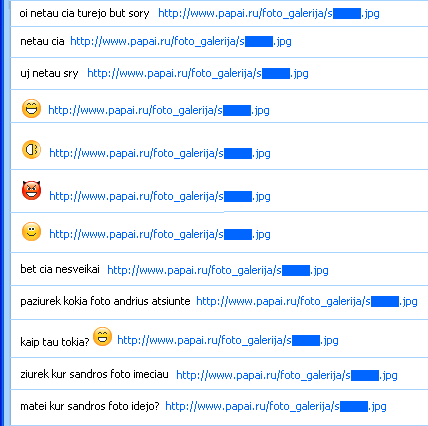
It sets the Skype user's status to DND (Do not Disturb) so that the user cannot be actively notified of incoming calls or messages.It visits the following non-malicious links:
- https://aras.lookingat.us/index.htm
- https://asilas.my-php.net/index.html
- https://bobodada.3-hosting.net/index.html
- https://bobos45.bebto.com/index.html
- https://gogo442.hatesit.com/index.html
- https://jackdaniels.110mb.com/index.html
- https://timboss.1majorhost.com/index.html
- https://zozole.php0h.com/index.html
Moreover the following site is also visited, which probably acts as a counter for the number of infected machines:
- https://aras.allfreehost.net/c[REMOVED]nt.php
More Support

Community
Ask questions in our Community.

User guides
Check the user guide for instructions.

Contact Support
Chat with with or call an agent.

Submit a Sample
Submit a file or URL for analysis.