Adware:OSX/Yoontoo
Summary
Adware:OSX/Yontoo silently installs third-party browser extensions which will display unsolicited pop-up adverstiments.
Removal
Based on the settings of your F-Secure security product, it will either automatically delete or quarantine the file, or ask you for a desired action.
Caution: Manual disinfection is a risky process; it is recommended only for advanced users. Otherwise, please seek professional technical assistance. F-Secure customers may also contact our Support.
- Run the following commands in Terminal to removed the programs installed from the Yoontoo.B archive:
- - cd /private/var/tmp
- - rm -f 3dpartyinstaller.zip
- - rm -f gophotoit.crx
- - rm -f torrenthandler.crx
- - rm -rf YontooMacSilentInstaller\ <day-month-year >/
- - cd ~/Library/Application Support/Google/Chrome/External Extensions
- - rm -f hphibigbodkkohoglgfkddblldpfohjl.json
- - rm -f pfmopbbadnfoelckkcmjjeaaegjpjjbk.json
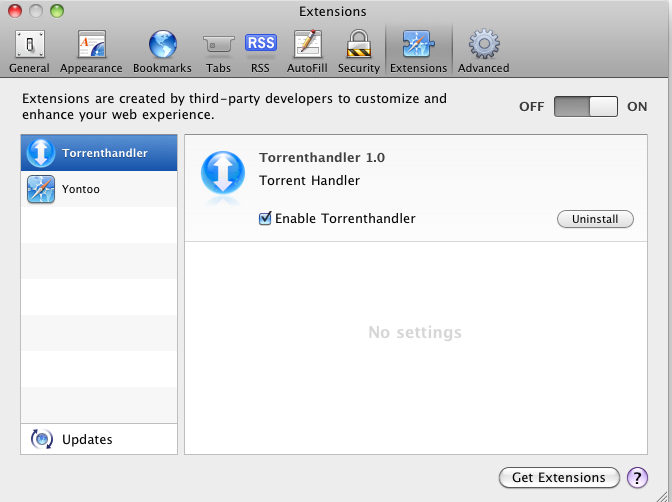
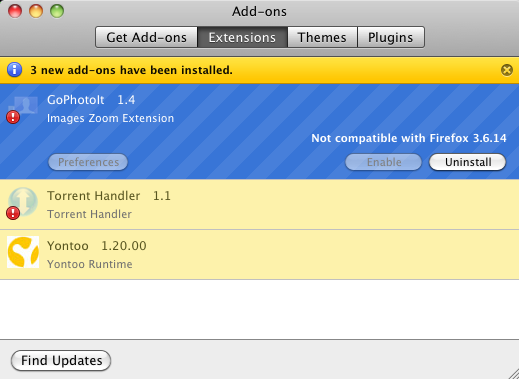
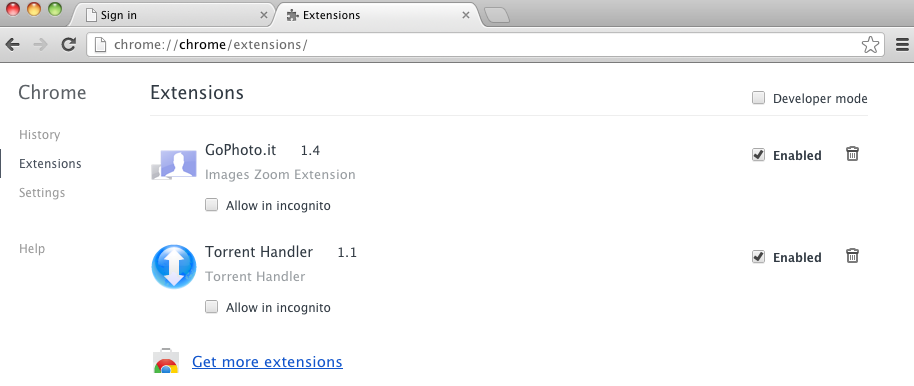
- Then remove the "GoPhotoIt", "Torrent Handler" and "Yontoo" extensions from your browsers, as seen in the examples below.
- Safari:
- Firefox:
- Chrome:
- Safari:
A False Positive is when a file is incorrectly detected as harmful, usually because its code or behavior resembles known harmful programs. A False Positive will usually be fixed in a subsequent database update without any action needed on your part. If you wish, you may also:
- Check for the latest database updates
First, check if your F-Secure security program is using the latest updates, then try scanning the file again.
- Submit a sample
After checking, if you still believe the file is incorrectly detected, you can submit a sample of it for re-analysis.
Note: If the file was moved to quarantine, you need to collect the file from quarantine before you can submit it.
- Exclude a file from further scanning
If you are certain that the file is safe and want to continue using it, you can exclude it from further scanning by the F-Secure security product.
Note: You need administrative rights to change the settings.
Technical Details
Adware:OSX/Yontoo.A is known to be bundled and distributed with the following browser extensions:
- Banner Gagets
- FreeTwitTube
- ezLooker
- Buzzdock and Wajam
- Pagerage
- GoPhotoIt
- TorrentHandler
On installation, Yontoo.A will download the Yontoo installer (detected as Adware:OSX/Yontoo.B) from a remote site. The installer's archive, which uses the file name 3dpartyinstaller.zip, is then saved and its contents are extracted to the following location:
- /private/var/tmp/YontooMacSilentInstaller <day-month-year>
The following browser extensions are installed together with the Yontoo adware:
- GoPhotoIT
- TorrentHandler
More Support

Community
Ask questions in our Community.

User guides
Check the user guide for instructions.

Contact Support
Chat with with or call an agent.

Submit a Sample
Submit a file or URL for analysis.