Trojan:W32/AutoIt.X
Summary
Trojan:W32/AutoIt.X silently downloads, installs and executes files on the infected system.
Removal
Based on the settings of your F-Secure security product, it will either move the file to the quarantine where it cannot spread or cause harm, or remove it.
A False Positive is when a file is incorrectly detected as harmful, usually because its code or behavior resembles known harmful programs. A False Positive will usually be fixed in a subsequent database update without any action needed on your part. If you wish, you may also:
-
Check for the latest database updates
First check if your F-Secure security program is using the latest updates, then try scanning the file again.
-
Submit a sample
After checking, if you still believe the file is incorrectly detected, you can submit a sample of it for re-analysis.
Note: If the file was moved to quarantine, you need to collect the file from quarantine before you can submit it.
-
Exclude a file from further scanning
If you are certain that the file is safe and want to continue using it, you can exclude it from further scanning by the F-Secure security product.
Note: You need administrative rights to change the settings.
Technical Details
The malware may also hijack the web browser by making unauthorized changes to the search and start pages. AutoIt.X is a script file converted to an executable file using AutoIt.
Distribution
AutoIt.X may be distributed by malicious Java Script Trojans (detected as variants of Exploit:JS/ADODB.Stream) embedded on websites. The Script contain exploit code targeting a vulnerability in the Internet Explorer web browser allowing remote code execution in the ADODB Stream object in ActiveX control. On execution, the Script forces the targeted computer to execute AutoIt.X.
The Script may also be delivered to an unsuspecting user at through malicious links spammed in Instant Messaging (IM) chat messages from the Yahoo! Messenger application. Below is a sample message:
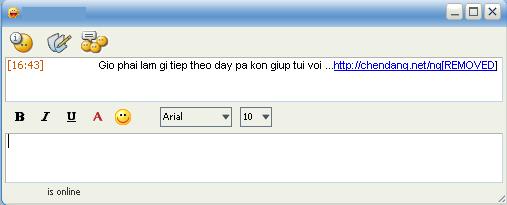
Any of the following message strings may be used:
- Ai muon diet virut thi` vao day, ba` kon du`ng co' click vao nhung site khac nhe ... http://chendang.net/ng[REMOVED]
- Bay gio` bu`n wa' chang biet lam gi` , gui? ta.ng ba kon trang nay vao choi... http://chendang.net/ng[REMOVED]
- Cha` cha` !!! Ai ma` bi con virus thi` vao day ma`diet no diiiiii ... http://chendang.net/ng[REMOVED]
- Con gai nha ai ma` xinh the ko biet nua~ , dep ghe vao day di ... http://chendang.net/ng[REMOVED]
- Dem nay ko co em , dem dai bong nhien day hon huhu :((... http://chendang.net/ng[REMOVED]
- Gio phai lam gi tiep theo day pa kon giup tui voi ... http://chendang.net/ng[REMOVED]
- Me kiep ghet nhat la thang nao` ma` choi con virut do' , ai bi vao day xoa no nhe'... http://chendang.net/ng[REMOVED]
- Nha'm chen dang an ti`nh nay ma lo`ng nguoi nao co hay !!! Van biet yeu thuong la` tro` dua` ma` minh van me say ;))... http://chendang.net/ng[REMOVED]
- Tha nguoi dung noi se yeu minh toi mai thoi thi gio day toi se vui hon. Gio nguoi lac loi buoc chan ve noi xa xoi, cay dang chi rieng minh toi... http://chendang.net/ng[REMOVED]
- Toi di lang thang lan trong bong toi buot gia, ve dau khi da mat em roi? Ve dau khi bao nhieu mo mong gio da vo tan... Ve dau toi biet di ve dau? http://chendang.net/ng[REMOVED]
AutoIt.X is able to hijack the IM chat application to send out its malicious chat message. The program constantly searches for the string title "Yahoo! Messenger" in the Windows Title Bar to determine if the application is open. When the string found, AutoIt.X will secretly and randomly input any of the above messages, every 180 seconds.
Clicking on the link in the message directs the user to malicious page containing the malicious Script. The site may be one of the following:
- https://www.chendang.net/nguyen/[...].exe
- https://www.sukien.org/love/[...].exe
Execution
On execution, AutoIt.X attempts to download a copy of itself from the following site:
- https://www.chendang.net/nguyen/[...].exe
The downloaded file is saved with the following filename:
- %WinDir%\taskmng.exe
AutoIt.X changes the settings for the web browser's Home Page, Yahoo Buzz and Yahoo Launchcast links to the following site:
- https://chendang.net/ng[REMOVED]
It also changes the Windows Title of Internet Explorer to the following:
- Lam dc gi khi gio la con so 0 ...
Registry
To enable its automatic execution on startup, it creates the following registry launch point:
- [HKEY_LOCAL_MACHINE\Software\Microsoft\Windows\CurrentVersion\Run] Task Manager ="%WinDir%\taskmng.exe"
It locks the home page in Internet Explorer by modifying the following registry entry:
- [HKEY_CURRENT_USER\Software\Policies\Microsoft\InternetExplorer\ControlPanel] Homepage="1"
The value of Homepage varies between users. Homepage="0" will unlock the homepage settings.
It also disables Task Manager and Registry Editor by creating the following registry entries:
- [HKEY_CURRENT_USER\Software\Microsoft\Windows\CurrentVersion\Policies\System] DisableTaskMgr="1"
- [HKEY_CURRENT_USER\Software\Microsoft\Windows\CurrentVersion\Policies\System] DisableRegistryTools="1"