

Summary
The Netsky.Q variant was discovered on March 29th, 2004.This worm spreads in email using different exploits and social engineering. NetSky.Q performs a DDoS against several websites and makes the infected computers beep randomly.
Removal
Based on the settings of your F-Secure security product, it will either move the file to the quarantine where it cannot spread or cause harm, or remove it.
A False Positive is when a file is incorrectly detected as harmful, usually because its code or behavior resembles known harmful programs. A False Positive will usually be fixed in a subsequent database update without any action needed on your part. If you wish, you may also:
- Check for the latest database updates
- First, check if your F-Secure security program is using the latest updates, then try scanning the file again.
- Submit a sample
- After checking, if you still believe the file is incorrectly detected, you can submit a sample of it for re-analysis.
- Note: If the file was moved to quarantine, you need to collect the file from quarantine before you can submit it.
- Exclude a file from further scanning
- If you are certain that the file is safe and want to continue using it, you can exclude it from further scanning by the F-Secure security product.
- Note: You need administrative rights to change the settings.
Technical Details
System Infection
Upon execution the worm copies its dropper to the Windows Directory as 'SysMonXP.exe', which is added to the registry:
[HKLM\SOFTWARE\Microsoft\Windows\CurrentVersion\Run] = "SysMonXP" = "%WinDir%\SysMonXP.exe" where %WinDir% represents Windows directory name.
The main DLL is placed to the same place with the filename 'firewallogger.txt' alongside with other temporary files used by the worm:
'zipo0.txt' 'zipo1.txt' 'zipo2.txt' 'zipo3.txt' 'base64.tmp' 'zippedbase64.tmp' The worm removes several registry values that belong to other worms.
Email Propagation
When collecting addresses NetSky.Q recursively searches through all hard drives and checks the content of files with the following extensions:
.adb .asp .cfg .cgi .dbx .dhtm .doc .eml .htm .html .jsp .mbx .mdx .mht .mmf .msg .nch .ods .oft .php .pl .ppt .rtf .sht .shtm .stm .tbb .txt .uin .vbs .wab .wsh .xls .xml This variant of NetSky sends emails that look like error messages from mail servers.
Here's an example of what messages sent by Netsky.Q can look like:
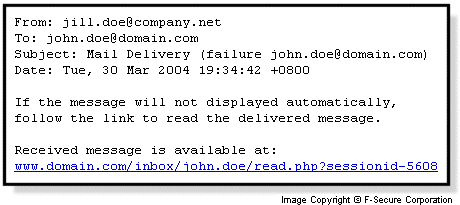
The emails are composed from the following parts:
Subjects:
Delivery Error Delivery Failure Delivery Mail Delivery failure Mail Delivery System Mail System Delivery Delivered Message Error Status Failure Failed Unknown Exception Delivery Failed Deliver Mail Server Error Delivery Bot Bodies:
Delivery Error Delivery Failure Delivery Mail Delivery failure Mail Delivery System Mail System Delivery Delivered Message Error Status Failure Failed Unknown Exception Delivery Failed Deliver Mail Server Error Delivery Bot The attachment name is created from one of the following names:
message msg mail data The file extension is either '.pif' or '.zip'. In case of ZIP files the filename inside the ZIP can be one of
data.eml.scr mail.eml.scr msg.eml.scr message.eml.scr The purpose of large number of spaces between the extensions is to the hide the executable extension from the users' eyes, leaving them with the harmless looking '.eml' to open.
The email can contain different endings that attempt to start the attachment or make the user to do so.
- A link with the format: www.<recipient domain>/inmail/<recipient username>/mread.php?sessionid-<random>
- An exploit for MS01-020 (IFRAME) to execute the attachment automatically. More information on the vulnerability and patches are available from https://www.microsoft.com/technet/security/bulletin/MS01-020.mspx
- Plain attachment with '.pif' or '.zip' extension
Payloads
Between 7th and 12th of April, 2004 NetSky.Q infected computers will perform a Distributed Denial-of-Service attack against the following sites:
Delivery Error Delivery Failure Delivery Mail Delivery failure Mail Delivery System Mail System Delivery Delivered Message Error Status Failure Failed Unknown Exception Delivery Failed Deliver Mail Server Error Delivery Bot On 30th of March, 2004 NetSky.Q will make the infected computer to beep randomly between 5AM and 11AM.
Protect your devices from malware with F‑Secure Total
Protecting your devices from malicious software is essential for maintaining online security. F‑Secure Total makes this easy, helping you to secure your devices in a brilliantly simple way.
- Award‑winning antivirus and malware protection
- Online browsing, banking, and shopping protection
- 24/7 online identity and data breach monitoring
- Unlimited VPN service to safeguard your privacy
- Password manager with private data protection
Choose how many devices you want to protect to get started.

- Free customer support
- Cancel anytime
- The trial does not obligate you to buy the product
After 30 days your subscription will renew automatically for one year at €69.99.


More Support
Community
Ask questions in our Community.
User guides
Check the user guide for instructions.
Contact Support
Chat with our support for assistance.
Submit a Sample
Submit a file or URL for analysis.